APDEX ETL Developer's Guide 
APDEX Source Code Control 
APDEX ETL core source code is hosted at https://sqbu-github.cisco.com/stap/airflow-tasks-apdex/
APDEX self-service feature definitions is hosted at https://sqbu-github.cisco.com/stap/airflow-tasks-apdex-service/
Both of the repositories are using the following process as our source code control workflow: 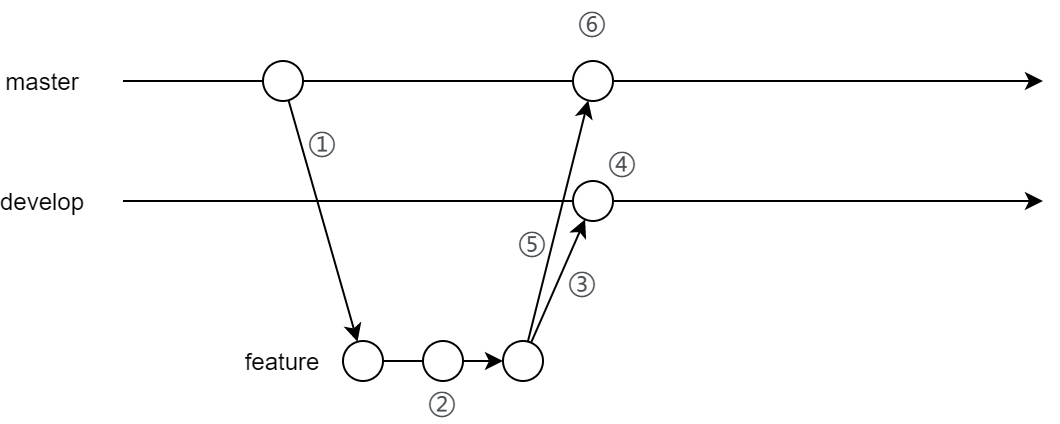 apdex_git_flow.drawio
- Create feature branch from master branch.
- Make feature development in feature branch
- Merge feature branch into develop branch, deploy to APDEX staging environment automatically by Jenkins pipeline
- Enable and test feature in staging environment for 7 days (or shorter period for bug fixes, depending on bug critical level)
- After proper test in staging environment, create PR from feature branch to master branch. Ask APDEX committee members to review. Merge if no problem.
- After merge, feature will be deployed to production environment automatically by Jenkins pipeline
Deployment / Release Pipeline 
Jenkins Pipeline is used to achieve automagical code deployment. http://10.241.93.117:31111/
It will monitor change in develop and main branch, build staging and prod docker image correspondingly, and deploy to corresponding environment.
When deploying to our staging environment Jenkins will also run the test cases and if there is a failure that will be reported in the 'MSQ Jenkins Notifications' team space.
Feature Testing and Test Cases 
New features need to be tested in 3 stages.
- In local development, the "patch_airflow" trick can be used to accelerate the test and development as described in this link
- Test cases for all features need to be generated by
utils/generate_test_cases.py. Feature developer need to verify the outputs in CLP Kibana by manually run the query. - New feature or change need to be baked in stage environment and check the following list, let it stay long enough and according to emergency.
- DAG runs without error or delay.
- Data appears in Beta APDEX dashboard
- Data has expected interval and value