Accessing the Kubed Nodes 
At times you may need to access our docker containers running in the WebexKubed environment to investigate a problem.
Command and Control UI : https://ui.int.mccprod.prod.infra.webex.com/help
- Go to the Command and Control page. Make sure you have the right cluster selected
w/JFK selected : https://ui.int.mccprod.prod.infra.webex.com/clusters/wjfkgen-p-1
w/DFW selected: https://ui.int.mccprod.prod.infra.webex.com/clusters/wdfwgen-p-5
- Click the generate shell icon in the upper left.

- Generate the kubectl commands to copy to your shell.
On the dialog box you'll need to select our RBAC role: soap-insights-devops After you click the Generate button the dialox box will expand and give you a few lines to copy to your local terminal.
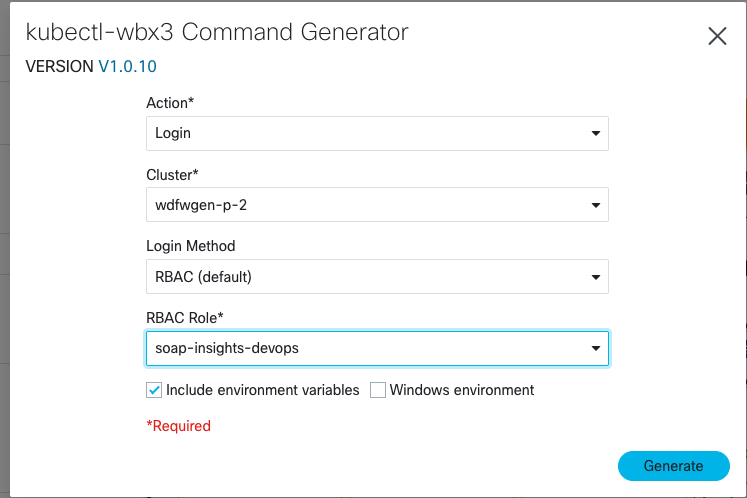
- Access Keeper
One variable you'll have to get into Vault for. Fortunately the Command Generator gives you a link for that.
Clicking over to that you'll sign into Vault
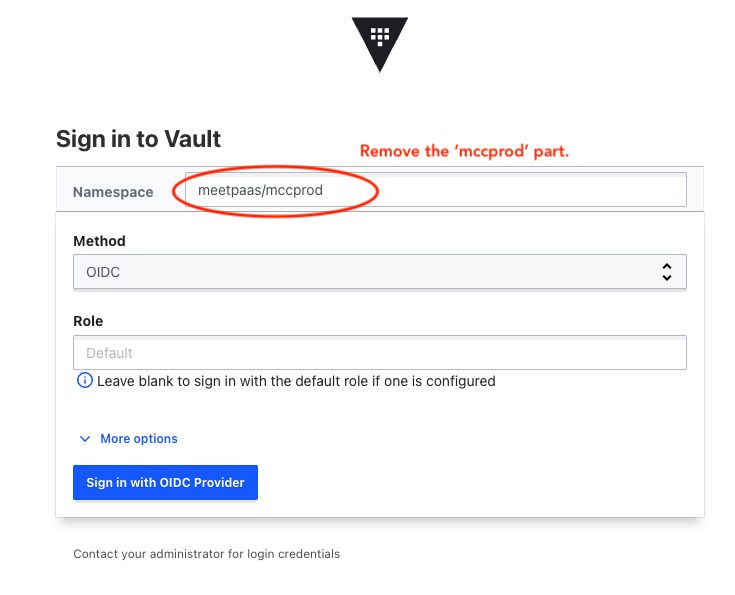
- Export the vault token
Once signed into Vault you can copy the token.
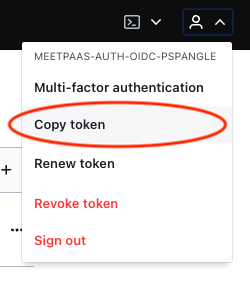
In your local shell you can export that
% export VAULT_TOKEN=my_token_value
.. and then you can copy/paste the other lines you got from the command generator. If everything goes well after the last command you'll see a success message...
Success! kubeconfig has been set!
At this point you can move on and run kubectl commands.
- Get the list of pods. or for the Logstash nodes... (note the hyphen here...)
% kubectl get pods -n apdexor for the STAP application% kubectl get pods -n stap-logstashand you'll get a list of containers that looks like this...% kubectl get pods -n stap
NAME                                       READY   STATUS    RESTARTS   AGE
apdex-airflow-scheduler-SOME-HASH-CODE   2/2     Running   2          43h
apdex-airflow-webserver-SOME-HASH-CODE   2/2     Running   0          43h
apdex-airflow-webserver-SOME-HASH-CODE   2/2     Running   0          43h
apdex-airflow-worker-SOME-HASH-CODE      2/2     Running   0          43h
apdex-airflow-worker-SOME-HASH-CODE      2/2     Running   0          43h
...
% % kubectl exec -it PICK-A-CONTAINER-HERE bash -n apdex
ubuntu@apdex-airflow-worker-SOME-HASH-CODE:/$ hostname
apdex-airflow-worker-SOME-HASH-CODE
You could then go look at our Airflow DAG logs under /app/logs/.. for instance.
Troubleshooting 
Q1. When I try to get shell access to a container I get an error
Error from server (Forbidden): pods "SOME-CONTAINER-ID-HERE" is forbidden: User "SOME-HASH/YOU" cannot get resource "pods" in API group "" in the namespace "default"
A1. Yeah, you really need to add the -n apdex in your kubectl command.