Tutorial
Tutorial 
Send Event to EMS 
RESTful API (V1) 
URLS
Internal
- Production: https://api-csgems.webex.com/api/internal/handler_v1
- BTS: https://api-csgems-staging.webex.com/api/internal/handler_v1
External(From internet)
- Production: https://api-csgems-external.webex.com/api/external/handler_v1
- BTS: https://api-csgems-staging-external.webex.com/api/external/handler_v1
Notes: Sending request to EMS from external will have body size limitation, up to 1M bytes per request.
Supported Method
HTTP POST only.
Payload Format
{
    "eventName"         : "EventName",
    "ts"                : 123456789,
    "level"             : 5,
    "message"           : "xyz module operationally down!",
    "eventSource"       : {
        "hostname"      : "zsj1tlm001.webex.com.com",
        "hostAddress"   : "192.168.1.10" },
    "dataParam"         : {
        "deploymentName": "SJC02",
        "moreDetails"   : "Additional json payload",
        "groupID"       : 3 }
}
| Name | Value | Type | Mandatory | Comments |
|---|---|---|---|---|
| eventName | The name of the event eg: "DiskMajorEvent" or "NTPCheck" | String | Yes | The event name is the primary key for events with in a host. So events occurring on the same host but on different components should ensure that the component name is part of the event name. For example If a process is down, the name of the process should be part of the event name... |
| ts | The time when the event actually occurred. UTC time in Unix EPOCH format. | Long | Yes | |
| level | Severity of the event, 0=OK 1=Info 2=Warn 3=Minor 4=Major 5=Critical | Integer | Yes | Different level will show different color in UI. Send over a Level=0 event will not close the event just make the event color green in UI but not change the event status. |
| message | A fair description of the event. | String | Yes | Limit = 64 kilobytes. |
| eventSource.hostname | The FQDN of the box where the event is detected/originated. Ex: "zsj1tlm001.webex.com" | String | Yes | eventName and hostname in tandem determines the uniqueness of an event in the entire system. |
| eventSource.hostAddress | The IP Address of the box where the event is detected. Eg: "192.168.10.100" | String | Yes | |
| dataParam.deploymentName | The name of the data center. eg: "jfk02" | String | Yes | |
| dataParam.moreDetails | A JSON dump of all event attributes that would be helpful for troubleshooting the event. | JSON | Yes | Limit = 2K characters |
| dataParam.groupID | A integer that is used to group related events and do some kind of correlation. | Integer | No |
Security
A username/password is required to access the API. Basic authentication mechanism is used. (i.e Base64 encoding of username:password has be sent as a HTTP Header.
Authorization Header Example:
Authorization: Basic QWxhZGRpbjpvcGVuIHNlc2FtZQ==
An additional security token needs to be sent as part of every request. This is a static long token generated by the EMS administrators while provisioning the api. There is no expiry policy for this token. This has to be sent as a HTTP Header.
Token Example:
Webex-SOC-Token: 26e0fa5e-ae4c-4a17-a3ce-11229c5405b9
Please contact csg-hz-ems@cisco.com to get the username/password/token or go to Admin console->API->Create New to create new API account.
Bulk Event Payload Format
{
"events":[
    {
        "eventName"         : "CapacityThreshold",
        "ts"                : 123456789,
        "level"             : 5,
        "message"           : "xyz component memory usage capacity exceeded 85%",
        "eventSource"       : {
            "hostname"      : "zsj1tlm001.webex.com",
            "hostAddress"   : "192.168.1.10" },
        "dataParam"         : {
            "deploymentName": "sjc02",
            "moreDetails"   : "JSON payload to provide additional data",
            "groupID"       : 3 }
    },        {
        "eventName"         : "SomethingElse",
        "ts"                : 123456789,
        "level"             : 5,
        "message"           : "abc failed due to xyz reason",
        "eventSource"       : {
            "hostname"      : "abc.webex.com",
            "hostAddress"   : "192.168.1.20" },
        "dataParam"         : {
            "deploymentName": "sjc02",
            "moreDetails"   : "JOSN Payload to provide additional data",
            "groupID"       : 3 }
    }
]
}
Response
Success Message:
{
  "status": "success",
  "message": "payload accepted for processing"
}
Payload Validation Error:
{
   "status"  : "error",
   "message" : "validation error"
}
Operational Error:
{
   "status"  : "error",
   "message" : "operational exception"
}
Authentication Errors:
{
"status": "error",
"message": "generic auth error, code: e0",
}
Inactive user:
{
 "status": "error",
 "message": "auth error, code:e5"
}
Wrong Credentials/Wrong Token:
{
     "status": "error",
     "message": "auth error, code:e4"
}
SNMP (v2) 
Step1: Provide MIB file to EMS team.
Step2: Send Traps to both bmsj1traps.webex.com & bmtx1traps.webex.com for production environment, both bmbttraps.webex.com & bmbt4traps.webex.com for staging environment.
For try out, you can install net-snmp package and run command:
 /usr/bin/snmptrap -v 2c -c public bmbttraps.webex.com "" .1.3.6.1.2.1.31.2.1.9 .1.3.6.1.2.1.31.1.2.1.3 i 0
truncating integer value > 32 bits
SNMP (v3) 
Step1: Provide MIB file to EMS team. Here MIB file is same to SNMPv2, no need to provide duplicately.
Step2: Send Traps to snmptraps-r.webex.com for production environment and to btsnmptraps-r.webex.com for staging environment with security parameters. Please contact EMS team for security settings.
- Security Parameter List: - security level - username - authentication protocol - authentication protocol pass phrase - privacy protocol - privacy protocol pass phrase
More security parameters refers to tool snmptrap.
For try out, you can install net-snmp package and run command with security parameters:
 /usr/bin/snmptrap -v 3 -l [security level] -u [username] -a [authentication protocol] \
 -A [authentication protocol pass phrase] -x [privacy protocol] -X [privacy protocol pass phrase] \
 snmptraps-r.webex.com '' .1.3.6.1.6.3.1.1.5.4 .1.3.6.1.2.1.2.2.1.7 i 0 .1.3.6.1.2.1.2.2.1.1 i 2
 /usr/bin/snmptrap -v 3 -l authPriv -u testUsername -a SHA -A testAuthPass -x AES -X testPrivPass \
 snmptraps-r.webex.com '' .1.3.6.1.6.3.1.1.5.4 .1.3.6.1.2.1.2.2.1.7 i 0 .1.3.6.1.2.1.2.2.1.1 i 2
Grafana Alert Integration 
Internal
- Production: https://api-csgems.webex.com/api/grafana/alert
- BTS: https://api-csgems-staging.webex.com/api/grafana/alert
External/From internet
- Production: https://api-csgems-external.webex.com/api/grafana/alert
- BTS: https://api-csgems-staging-external.webex.com/api/grafana/alert
Configure The Grafana Contact Point like:
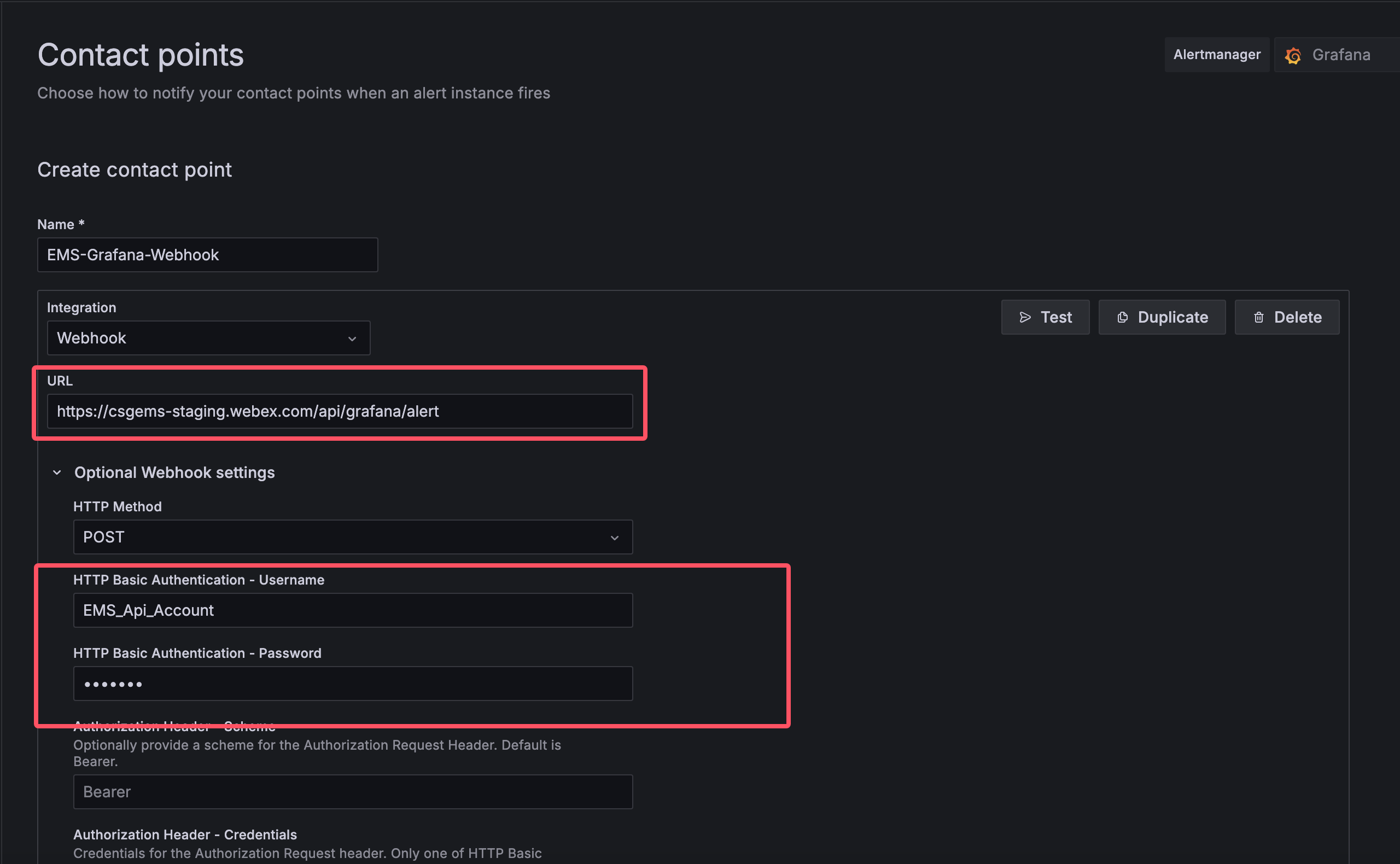
Note: A label named ems_host standing for the alert target is recommended to put into alert label, the label would be convert to hostname in EMS.
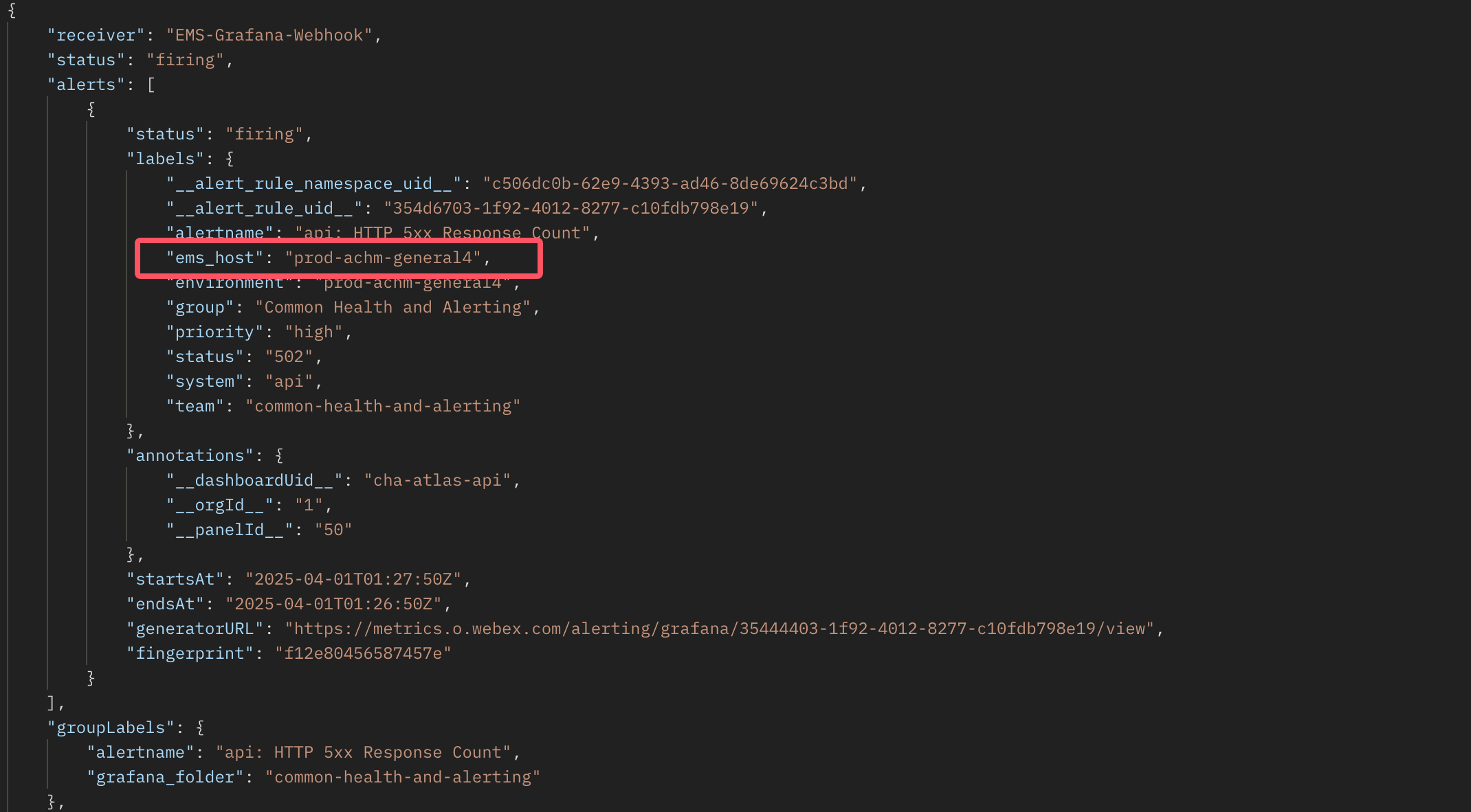
Grafana Alert Sample 
Row Data:
{
    "receiver": "EMS-Grafana-Webhook",
    "status": "firing",
    "alerts": [
        {
            "status": "firing",
            "labels": {
                "alertname": "api: HTTP 5xx Response Count",
                "ems_host": "prod-achm-general1",
                "cluster": "prod-achm-general1",
                "severity": "error"
            },
            "annotations": {},
            "startsAt": "2025-04-10T01:27:55.001Z",
            "endsAt": "2025-04-10T01:26:50Z",
            "generatorURL": "https://metrics.o.webex.com/alerting/grafana/35444403-1f92-4012-8277-c10f/view",
            "fingerprint": "f12e80456587457"
        }
    ],
    "groupLabels": {
        "alertname": "api: HTTP 5xx Response Count"
    },
    "commonLabels": {
        "alertname": "api: HTTP 5xx Response Count",
        "ems_host": "prod-achm-general1",
        "cluster": "prod-achm-general1",
        "severity": "error"
    },
    "commonAnnotations": {
    },
    "externalURL": "",
    "version": "4",
    "groupKey": "",
    "truncatedAlerts": 0
}
alerts[n].labels.alertname               => EMS event
alerts[n].labels.ems_host                => EMS hostname
alerts[n].labels.severity ("error")      => EMS severity ("Critical")
alerts[n].generatorURL                   => EMS message (source: ${alerts[n].generatorURL})
alerts[n].labels.annotations.message     => EMS message (message: ${alerts[n].labels.annotations.message})
alerts[n].labels                         => EMS message (labels: ${alerts[n].labels})
when firing: alerts[n].startsAt          => EMS alert time
when not firing: alerts[n].endsAt        => EMS alert time
Hostname in EMS is a key attribute, if no label named "ems_host", we would try to get a value as hostname from these labels(by order): "hostname","host", "instance", "ip","cluster", and if failed too, we would set the hostname with "fingerprint"
Thousandeyes Alert integration 
- Production: https://api-csgems-external.webex.com/api/thousand_eye/event
- BTS: https://api-csgems-staging-external.webex.com/api/thousand_eye/event
Thousandeyes Alert Sample 
Row Data:
{
    "eventId": "9d96e59e-9d26-30990cbb6fa",
    "alert": {
        "severity": "Major",
        "dateStartZoned": "2025-04-10 01:30:00 GMT",
        "apiLinks": [
            {
                "rel": "related",
                "href": "https://api.thousandeyes.com/v4/tests/123456"
            },
            {
                "rel": "data",
                "href": "https://api.thousandeyes.com/v4/web/page-load/123456"
            }
        ],
        "testLabels": [],
        "active": 1,
        "ruleExpression": "Page Load has error or Page Load timed out or Page Load is incomplete",
        "type": "Page Load",
        "ruleAid": 186,
        "agents": [
            {
                "dateStart": "2025-04-10 01:30:00",
                "active": 1,
                "metricsAtStart": "Page Load has error: true\nPage Load is incomplete: true",
                "metricsAtEnd": "",
                "permalink": "https://app.thousandeyes.com/alerts/list/?__a\u003d186\u0026alertId\u003d850cd483-d671-4dce-9d26-3099b64fa\u0026agentId\u003d1295199",
                "agentId": 123456,
                "agentName": "JFK02-DS01-Cluster"
            }
        ],
        "testTargetsDescription": [
            "https://csgems.webex.com"
        ],
        "violationCount": 1,
        "dateStart": "2025-04-10 01:30:00",
        "dateEnd": "2025-04-10 01:30:00",
        "ruleName": "EMS page load notification rule",
        "testId": 123456,
        "alertId": "850cd483-d671-4dce-9d26-30990cbb64fa",
        "ruleId": 123456,
        "permalink": "https://app.thousandeyes.com/alerts/list/?__a\u003d186\u0026alertId\u003d850cd83-d671-4dce-9d26-30990cbb64fa",
        "testName": "EMS-Internal-\u003eMCT [EA]"
    },
    "eventType": "ALERT_NOTIFICATION_TRIGGER"
}
Email 
- Step1: Configure your script/program/software to send emails to emsbts.gen@cisco.com(bts) / PMCalarms.gen@cisco.com(prod)
- Step2: Create a rule in EMS Admin Console to accept the incoming email. An example screenshot is given below.
Mandatory fields:
From: the from address of the email. if you chose "Email address" you need define "xxx@xxx.com", if chose "Domain address", you need define "@xxx.com" then EMS will accept all mail come from the domain.
Service String: A string value to represent the service name. It should be single word, no spaces. Example: "Network", "OCPIntegration", "Firewall" etc.
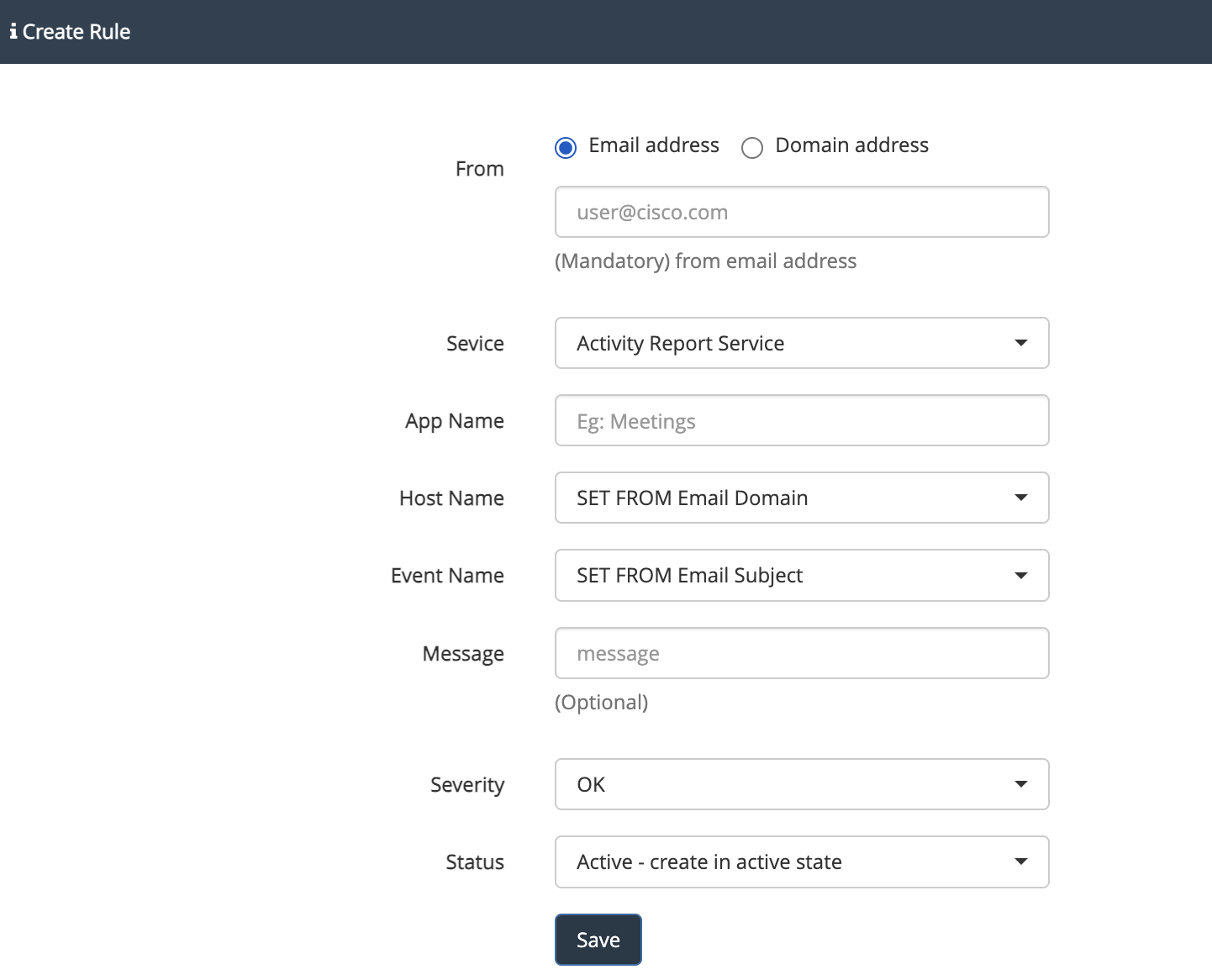
NOTE: The if you chose from "Email address" then the field has to match exactly like in the email. Otherwise it wouldn't accept the email.
Escalation Rule 
An Escalation Rule in EMS is a mechanism that defines how alerts should be escalated when certain conditions are met. These rules automate the notification process to ensure that critical events are properly addressed by the right people or teams.
Create from staging EMS new escalation rule page and you can get some detail info at the right side of the page.
Additional info: