System Overview
This document provides a comprehensive overview of the Alert entity within the Event Management System (EMS). It details the lifecycle of an alert from creation to resolution and defines the core concepts and processes involved in managing alerts effectively.
Core Concepts 
To understand the alert lifecycle, it's important to first define these fundamental concepts:
- Alert Deduplication: The process of consolidating multiple, redundant notifications originating from a single source and identical underlying event. This is done to reduce noise and prevent alert storms. The output of this process is a single, individual alert.
- Alert Correlation: The process of grouping distinct, seemingly separate alerts that may come from different source services or components but share the same root cause. This helps to identify a single, actionable incident. The output of this process is a Group Alert (also known as a rollup).
- Group Alert: A higher-level alert that aggregates multiple individual alerts that are correlated to the same root cause. This provides a consolidated view of related issues, making it easier for operators to manage and respond to incidents.
- Incident: This is a re-defined concept of Keep Incident, which will be a copy of CTG SNOW P1/P2 tickets. It serves as "shadow" representation of high-priority tickets within EMS2 for better context and tracking, and alert correlation for better incident triage.
Key: In EMS2, the "Incident" is a mirror of CTG SNOW high priority tickets (P1/P2). This will be a view-only representation within EMS2, and any actions on the incident must be performed in CTG SNOW. The practice in EMS2 is to correlate Indiviual Alerts and Group Alerts into that "Incident" for better context and tracking.
Alert Sources 
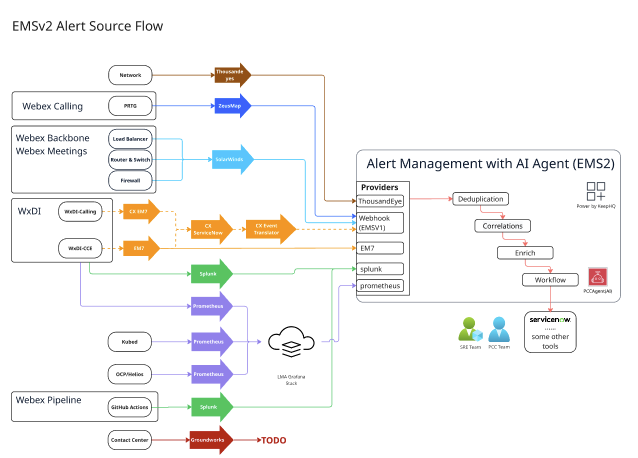
Alert Lifecycle: A Step-by-Step Guide 
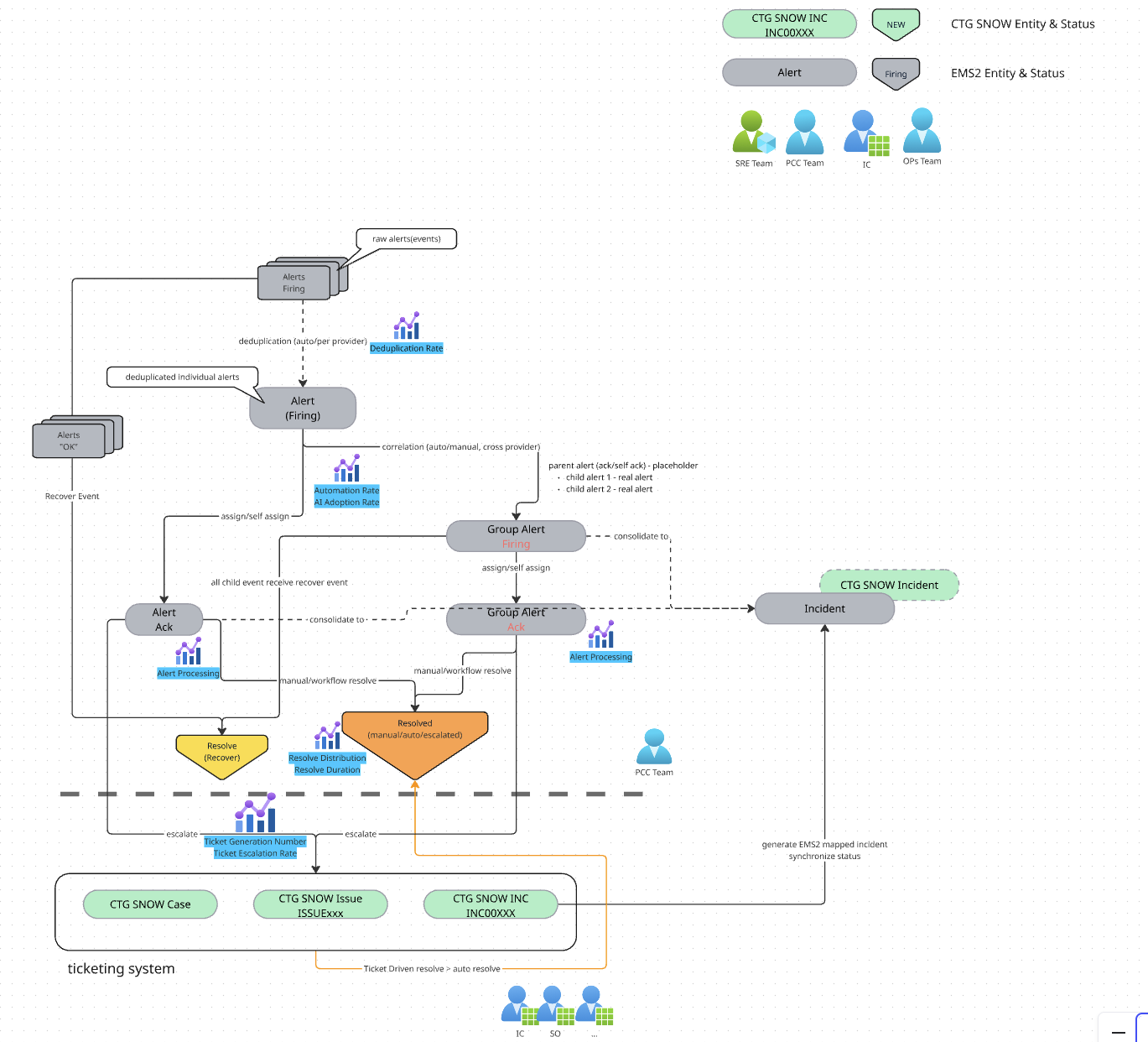
An alert progresses through several states from its initial trigger to its final resolution. The typical lifecycle is as follows:
State 1: Firing 
This is the initial state of an alert.
- Raw events are ingested by the system.
- Deduplication is applied to filter out redundant notifications.
- The output is an individual, deduplicated alert in the Firing state.
- Correlation may then group multiple individual alerts into a single Group Alert, which also starts in the Firing state.
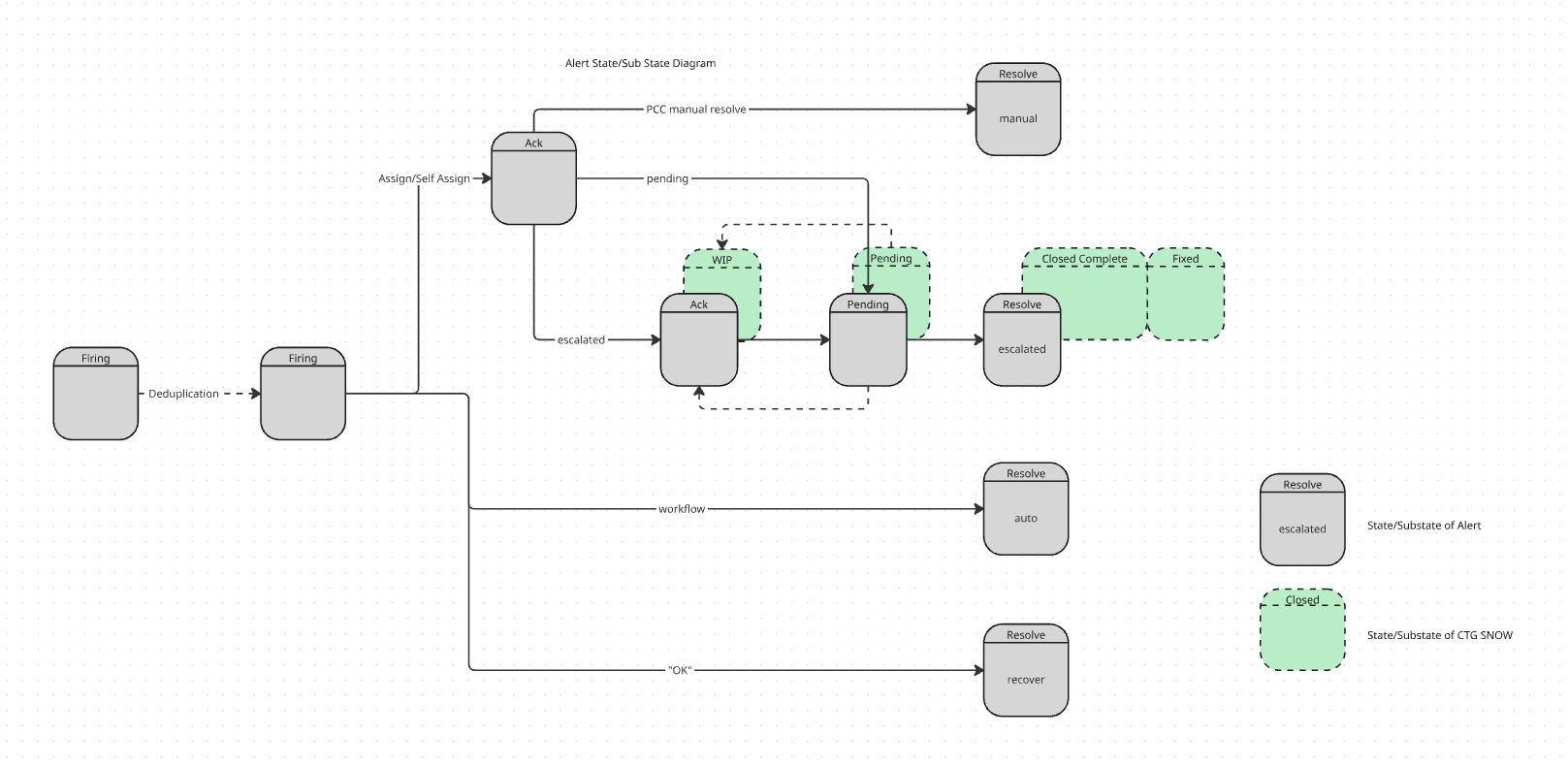
State 2: Acknowledged (Ack) 
An alert is moved to the Acknowledged state when a user or team (e.g., the PCC team) takes ownership. This is typically done through an "Assign" or "Self-Assign" action. This indicates that the alert is being actively investigated.
State 3: Pending 
An alert may enter a Pending state while awaiting further action or information, particularly after being escalated. This state is often linked to the status of ticket in CTG SNOW.
State 4: Escalated 
If an alert cannot be resolved directly, it can be escalated.
- This action generates a corresponding ticket (e.g., Issue, Incident or Case maybe) in the ticketing system (CTG SNOW).
- The status of the alert and the external ticket are kept in sync. For example, an alert may show a sub-state of
WIP(Work in Progress) orPendingthat reflects the status of the SNOW ticket.
State 5: Resolved 
This is the final state in the alert's lifecycle. An alert can be resolved through one of three primary methods:
- Auto: The alert is resolved automatically by a pre-defined workflow without manual intervention.
- Manual: A member of the PCC team manually resolves the alert after investigation.
- Escalated: The alert is resolved when the associated ticket in CTG SNOW is closed. The alert's status is updated to reflect the closure of the external ticket.
- Recover: The alert is automatically resolved when the originating source system sends a "Recover" or "OK/Health" notification, indicating the issue is no longer present.
Key Performance Indicators (KPIs) 
The efficiency and effectiveness of the alert management process are measured using several key metrics:
- Deduplication Rate: Measures the percentage of raw events that are consolidated, indicating how effectively noise is being reduced.
- Automation Rate (AI Adoption Rate): Measures the percentage of alerts that are automatically correlated into Group Alerts, reflecting the efficiency of root cause analysis.
- Total Resolve Duration: The total time elapsed from when an alert first enters the
Firingstate to when it is moved to theResolvedstate. - Resolve Rate (Manual vs. Auto): The ratio of alerts resolved manually compared to those resolved via automated workflows.
- Ticket Escalation Rate: The number or percentage of alerts that require escalation and result in the creation of a ticket.
- Total Incidents Created: The total number of high-priority incidents (P1/P2) created in CTG SNOW as a result of improved outage detection through all monitoring sources.
Alert onboard flow 
| Job Name | Role | Job Description |
|---|---|---|
| Onboard Alerts | SRE | Identifie which alerts need be onboard EMS and forward the alerts to EMS |
| Review Alerts | SRE & PCC | Work out alerts runbook and clear how to deal with alerts |
| Organize Alerts | SRE & PCC | Set up mapping/extraction/deduplication/extraction rule in EMS |
| Takeover Alerts | PCC | Assign alerts and escalate alerts as tickets |
| Resolved Alerts | PCC | Try to resolve alerts and follow up until it been resolved |