DB Cleaner 
Overview 
db cleaner is a command-line tool for batch-cleaning historical data in PostgreSQL by time windows. It supports: - Optional automatic foreign-key discovery and cascade deletes. - Batched deletes to reduce lock contention and table bloat. - Optional CSV archiving of rows before deletion. - Dry-run mode to validate what would be removed.
You can find this tool here
Running 
Run Locally 
- Install dependencies.
pip install psycopg2-binary SQLAlchemy PyYAML - Run the CLI module.
python -m db_cleaner.cli
Run under Docker 
- Build the image.
docker build -t db-cleaner:latest . - Mount an external configuration and archive directory.
docker run --rm \
-e DB_CLEANER_CONFIG=/app/config/config.yaml \
-v "$(pwd)/config/config.yaml:/app/config/config.yaml:ro" \
-v "$(pwd)/archive:/app/archive" \
db-cleaner:latest
Integration with EMS using Workflow 
This tool will be packed into EMS backend image located in /app/db_cleaner/, so we could using bash provider to run periodically.
e.g. 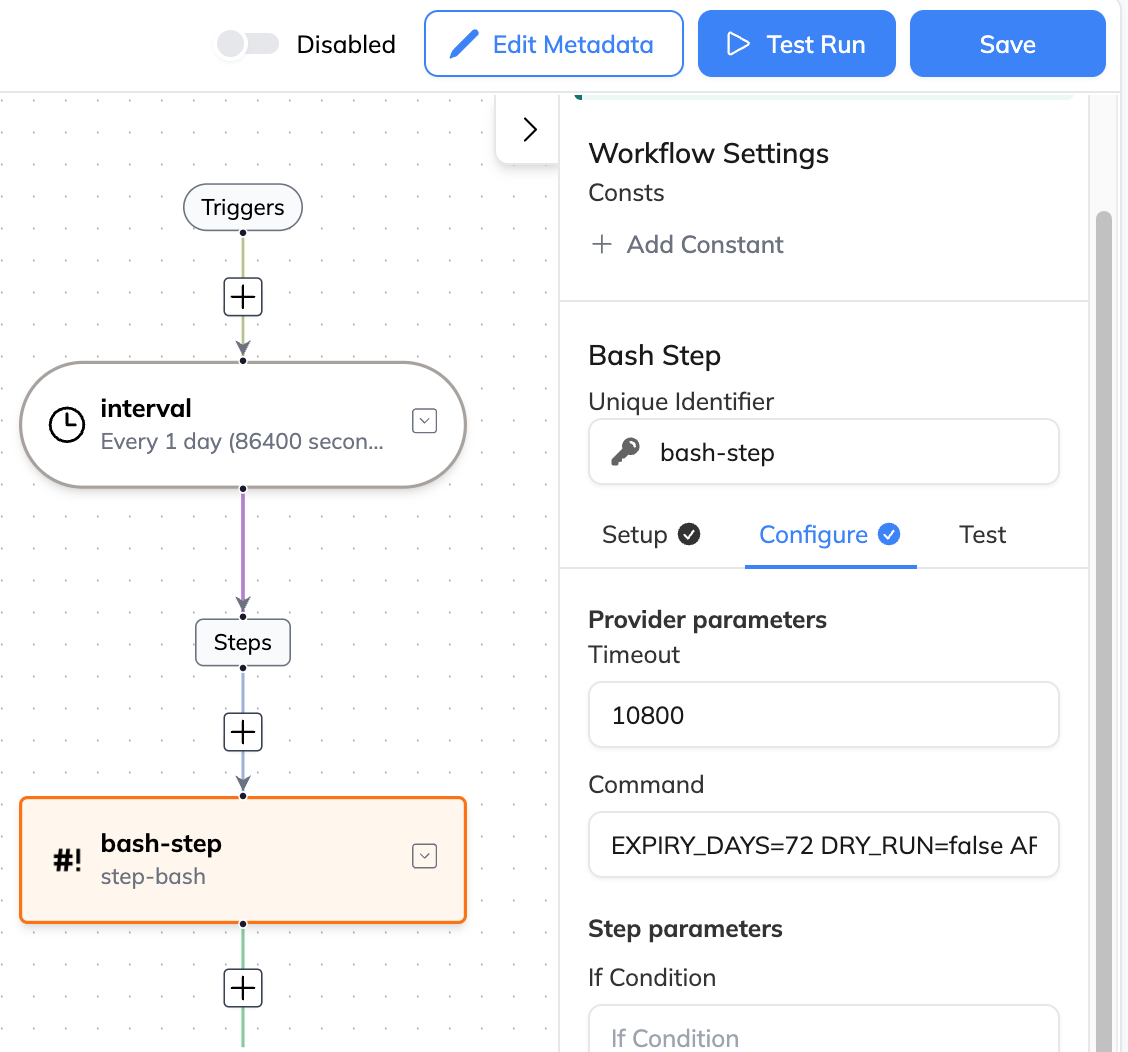
Command could be:
EXPIRY_DAYS=30 DRY_RUN=false ARCHIVE=false cd /app/db_cleaner/ && python -m db_cleaner.cli
Configuration 
db cleaner reads the configuration path from the environment variable DB_CLEANER_CONFIG. Defaults is ./config/config.yaml. Example:
db_uri: "postgresql://{user}:{pwd}@{db_ip}:5432/{db_table}"
log_file: "./cleaner_prod.log"
log_console: false
log_rotate:
  type: "size"
  max_bytes: 10485760
  backup_count: 10

dry_run: false
skip_tables: ["tenant"]
skip_columns: []

tables:
  - name: "alert"
    enable: true
    auto_discover_related: true
    key_columns: ["id"]
    date_column: "timestamp"
    expire_days: 45   # recommend set a time of 7 or 10 days each time (e.g. 90->80->70->....)
    batch_size: 10000 # recommend start from 500
    time_out: 180
    archive: true
    archive_path: "./archive"
    disable_cutoff: true
    conditions:
      - column: "timestamp"
        op: ">="
        value: "2025-09-29 00:00:00"
      - column: "timestamp"
        op: "<"
        value: "2025-09-30 00:00:00"
      - raw_sql: "event->>'name' LIKE %s"
        params: ["test123%"]
    related:
      - name: "alertenrichment"
        parent_table: "alert"
        mapping:
          parent_columns: ["id"]
          child_columns: ["alert_fingerprint"]
      - name: "airuleexecution"
        parent_table: "alert"
        mapping:
          parent_columns: ["id"]
          child_columns: ["event_id"]
      - name: "workflowtoalertexecution"
        parent_table: "alert"
        mapping:
          parent_columns: ["id"]
          child_columns: ["event_id"]
      - name: "workflowexecution"
        parent_table: "workflowtoalertexecution"
        mapping:
          parent_columns: ["workflow_execution_id"]
          child_columns: ["id"]
      - name: "workflowexecutionlog"
        parent_table: "workflowexecution"
        mapping:
          parent_columns: ["id"]
          child_columns: ["workflow_execution_id"]
      - name: "lastalert"
        parent_table: "alert"
        mapping:
          parent_columns: ["id"]
          child_columns: ["alert_id"]
      - name: "lastalerttoincident"
        parent_table: "lastalert"
        mapping:
          parent_columns: ["tenant_id", "fingerprint"]
          child_columns: ["tenant_id", "fingerprint"]
      - name: "airuleexecution"
        parent_table: "lastalert"
        mapping:
          parent_columns: ["fingerprint"]
          child_columns: ["alert_fingerprint"]
      - name: "workflowtoalertexecution"
        parent_table: "lastalert"
        mapping:
          parent_columns: ["fingerprint"]
          child_columns: ["alert_fingerprint"]
      - name: "alertenrichment"
        parent_table: "lastalert"
        mapping:
          parent_columns: ["fingerprint"]
          child_columns: ["alert_fingerprint"]
      - name: "alertaudit"
        parent_table: "lastalert"
        mapping:
          parent_columns: ["fingerprint"]
          child_columns: ["fingerprint"]
  - name: "enrichmentevent"
    enable: true
    auto_discover_related: false
    key_columns: ["id"]
    date_column: "timestamp"
    expire_days: 45
    batch_size: 20000
    time_out: 180
    archive: true
    archive_path: "./archive"
Key fields. 
- db_uri: Database connection URI including user, password, host, port, and database name.
- dry_run: If true, prints counts of would-be deletions without executing them.
- log_file: File path to write log messages; relative paths are resolved against the working directory.
- skip_tables: Tables to skip; supports schema.table or short table names.
- skip_columns: Columns to skip when filtering relations.
- tables.name: Table name; default schema is public if omitted.
- tables.enable: Whether to run cleaning for this table.
- tables.auto_discover_related: If true, scans system catalogs to find foreign-key relations for cascade deletes.
- tables.key_columns: Required in the current generic cascade implementation; use the table’s primary key columns.
- tables.date_column: Timestamp column used to determine historical rows.
- tables.expire_days: How many days old rows must be to qualify for deletion.
- tables.batch_size: Number of parent keys processed per batch.
- tables.time_out: Statement timeout in seconds for each batch.
- tables.archive: If true, archives the batch’s rows to CSV before deletion.
- tables.archive_path: Directory for CSV archives.
- tables.disable_cutoff: disable expire_days, mainly use for time range in conditions.
- tables.conditions(optional): table query condition, see details in Conditions.
- tables.related(optional): manually assign related tables.
Versions and Dependencies 
App already tested under: - Python: 3.11. - Dependencies: psycopg2-binary, SQLAlchemy, PyYAML.
Conditions Usage 
Conditions is used to add additional filtering conditions to the parent table during batch cleaning. Supports ordinary column conditions, native SQL expressions, and complex JSON queries.
Basic Syntax 
tables:
  - name: "alert"
    conditions:
      - column: "column_name"
        op: "operator"
        value: "value"
      - raw_sql: "raw SQL expression"
        params: ["parameter_list"]
Supported Operators 
1. Comparison Operators 
conditions:
  # Equals
  - column: "tenant_id"
    op: "="
    value: "tenant-123"

  # Not equals
  - column: "status"
    op: "!="
    value: "deleted"

  # Greater than/Less than
  - column: "timestamp"
    op: ">="
    value: "2024-01-01T00:00:00Z"

  # Less than or equal
  - column: "retry_count"
    op: "<="
    value: 5
2. LIKE Pattern Matching 
conditions:
  # Prefix matching
  - column: "provider_id"
    op: "LIKE"
    value: "prometheus%"

  # Suffix matching
  - column: "fingerprint"
    op: "LIKE"
    value: "%_error"

  # Contains matching
  - column: "alert_hash"
    op: "LIKE"
    value: "%abc123%"

  # NOT LIKE
  - column: "provider_type"
    op: "NOT LIKE"
    value: "test_%"
3. IN / NOT IN List Matching 
conditions:
  # IN - matches any value in the list
  - column: "provider_type"
    op: "IN"
    value: ["prometheus", "grafana", "datadog"]

  # NOT IN - excludes values in the list
  - column: "status"
    op: "NOT IN"
    value: ["active", "pending"]
4. NULL Checks 
conditions:
  # IS NULL
  - column: "provider_id"
    op: "IS NULL"
    # value not required

  # IS NOT NULL
  - column: "alert_hash"
    op: "IS NOT NULL"
JSON Field Queries (using raw_sql) 
1. Basic JSON Field Extraction 
conditions:
  # Exact match for JSON string field
  - raw_sql: "event->>'status' = %s"
    params: ["resolved"]

  # Pattern matching for JSON field
  - raw_sql: "event->>'name' LIKE %s"
    params: ["%wxdipo%"]

  # Numeric comparison
  - raw_sql: "(event->>'priority')::int > %s"
    params: [3]
2. Nested JSON Fields 
conditions:
  # Access nested field event.payload.emshost
  - raw_sql: "event->'payload'->>'emshost' = %s"
    params: ["den01wx060ccm01"]

  # Pattern matching on nested field
  - raw_sql: "event->'payload'->>'emshost' LIKE %s"
    params: ["den01%"]

  # Multi-level nesting event.details.metadata.region
  - raw_sql: "event->'details'->'metadata'->>'region' = %s"
    params: ["us-west"]
3. JSON Array Queries 
conditions:
  # Array containment check (requires jsonb conversion)
  - raw_sql: "event->'fingerprint_fields'::jsonb @> %s::jsonb"
    params: ['"name"']

  # Array length check
  - raw_sql: "json_array_length(event->'fingerprint_fields') > %s"
    params: [2]

  # Array element existence check
  - raw_sql: "EXISTS (SELECT 1 FROM json_array_elements_text(event->'fingerprint_fields') AS f WHERE f = %s)"
    params: ["emshost"]
4. JSON Time Fields 
conditions:
  # Time field comparison in JSON
  - raw_sql: "(event->>'resolvedTime')::timestamp >= %s"
    params: ["2024-01-01T00:00:00Z"]

  # Time range query
  - raw_sql: "(event->>'resolvedTime')::timestamp BETWEEN %s AND %s"
    params: ["2024-01-01T00:00:00Z", "2024-12-31T23:59:59Z"]
Important Notes 
1. Parameter Safety 
- Always use
%splaceholders, never concatenate strings directly - Parameters in the
paramsarray are automatically escaped to prevent SQL injection
2. JSON Type Conversion 
# ❌ Incorrect: Direct comparison may have type mismatch
- raw_sql: "event->>'priority' > 3"

# ✅ Correct: Explicit type conversion
- raw_sql: "(event->>'priority')::int > %s"
  params: [3]