EMS - Harness Deployment 
The EMS consists of three deployable components — ems (backend), ems-ui (frontend), and ems-redis (cache cluster) — running across two Kubernetes clusters (wjfkgen-p-1 as primary, wdfwgen-p-5 as secondary) in both prod and alpha environments. Deployment is driven by Harness pipelines, with service images built via Jenkins and configuration managed in a dedicated configuration repo.
Chart 
| Type | Chart |
|---|---|
| Service Chart | kubed-wxt-service |
| Redis Chart | ott-redis-cluster |
Configuration 
- We configure application settings in
/config/ems-ui/em-ui.yamland/config/ems/ems.yaml, and deployment-related settings in/deploy/ems-ui.yaml,/deploy/ems.yaml, and/deploy/ems-redis.yaml. All these configuration files are stored in the Configuration repository.
- Some secret paths are specified in the YAML files under
/secrets/apps/ems.
- Chart definitions are configured in
/deploy/em-ui.yamland/deploy/ems.yaml.
Repo: https://sqbu-github.cisco.com/WebExSquared/configuration
| Category | Path |
|---|---|
| Deploy config | /deploy/ems.yaml |
/deploy/ems-ui.yaml | |
/deploy/ems-redis.yaml | |
| Service config | /config/ems-ui/ems-ui.yaml |
/config/ems/ems.yaml | |
| Secret config | /secrets/apps/ems |
Vault 
Login
| Field | Value |
|---|---|
| URL | https://keeper.cisco.com |
| Namespace | webexdeploy/configuration |
| Method | OIDC |
| Role | wbx-ems-admin |
Secret Path: /secret/apps/wbx-ems
Image Build 
Jenkins URL: https://sqbu-jenkins.wbx2.com/service05/job/team/job/wbx-ems/job/pipeline/
| Service | Image Repo |
|---|---|
| Frontend (ems-ui) | webex-maas/emsui/service |
| Backend (ems) | webex-maas/ems/service |
Pipelines 
Harness Pipelines URL: https://app.harness.io/ng/account/o0yschY0RrGZJ2JFGEpvdw/all/orgs/Webex/projects/Webex/pipelines
Frontend Service (ems-ui) 
| Environment | Pipeline Name |
|---|---|
| Alpha | Deploy ems-ui WBX3-wbmaas-alpha-wjfk-maas1 |
| Alpha | Deploy ems-ui WBX3-wbmaas-alpha-wdfw-maas1 |
| Prod | Deploy ems-ui WBX3-wbmaas-prod-wjfk-maas1 |
| Prod | Deploy ems-ui WBX3-wbmaas-prod-wdfw-maas1 |
Backend Service (ems) 
| Environment | Pipeline Name |
|---|---|
| Alpha | Deploy ems WBX3-wbmaas-alpha-wjfk-maas1 |
| Alpha | Deploy ems WBX3-wbmaas-alpha-wdfw-maas1 |
| Prod | Deploy ems WBX3-wbmaas-prod-wjfk-maas1 |
| Prod | Deploy ems WBX3-wbmaas-prod-wdfw-maas1 |
Redis Cluster 
| Environment | Pipeline Name |
|---|---|
| Alpha | Deploy ems-redis WBX3-wbmaas-alpha-wjfk-maas1 |
| Alpha | Deploy ems-redis WBX3-wbmaas-alpha-wdfw-maas1 |
| Prod | Deploy ems-redis WBX3-wbmaas-prod-wjfk-maas1 |
| Prod | Deploy ems-redis WBX3-wbmaas-prod-wdfw-maas1 |
Deploy Workflow 
Taking the EMS backend service as an example.
Step 1: Click the pipeline you want to deploy (Please choose either ems-ui or ems, and also be sure to specify which environment you want to deploy to). 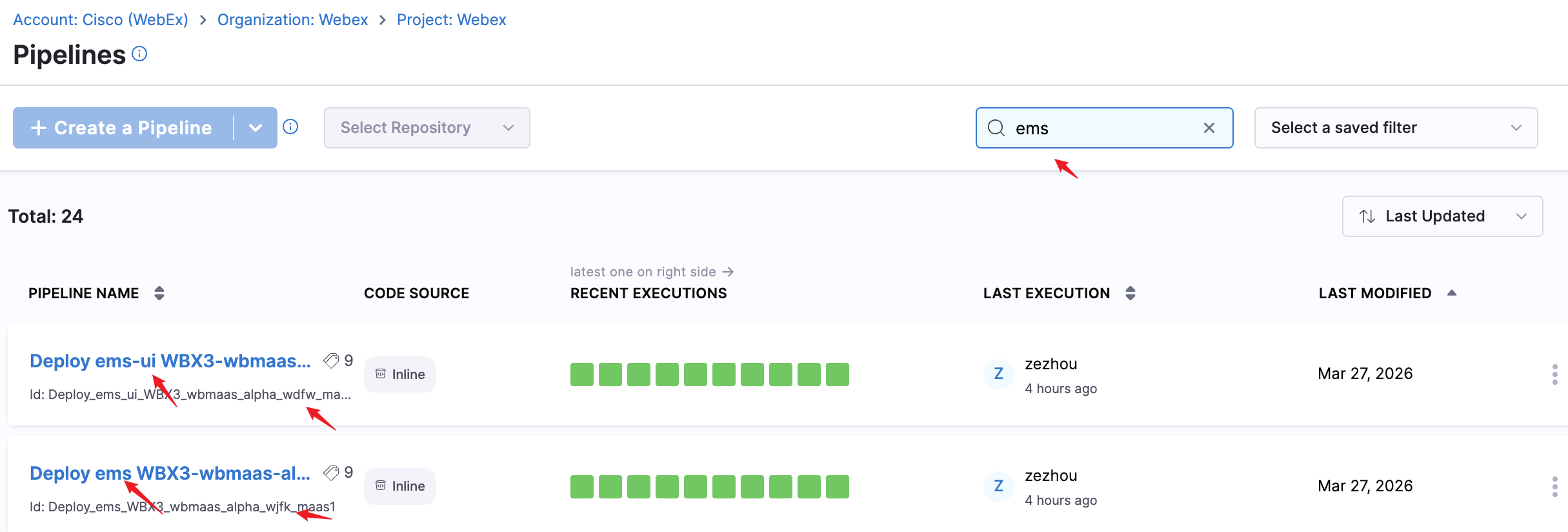
Step 2: Click the RUN button. 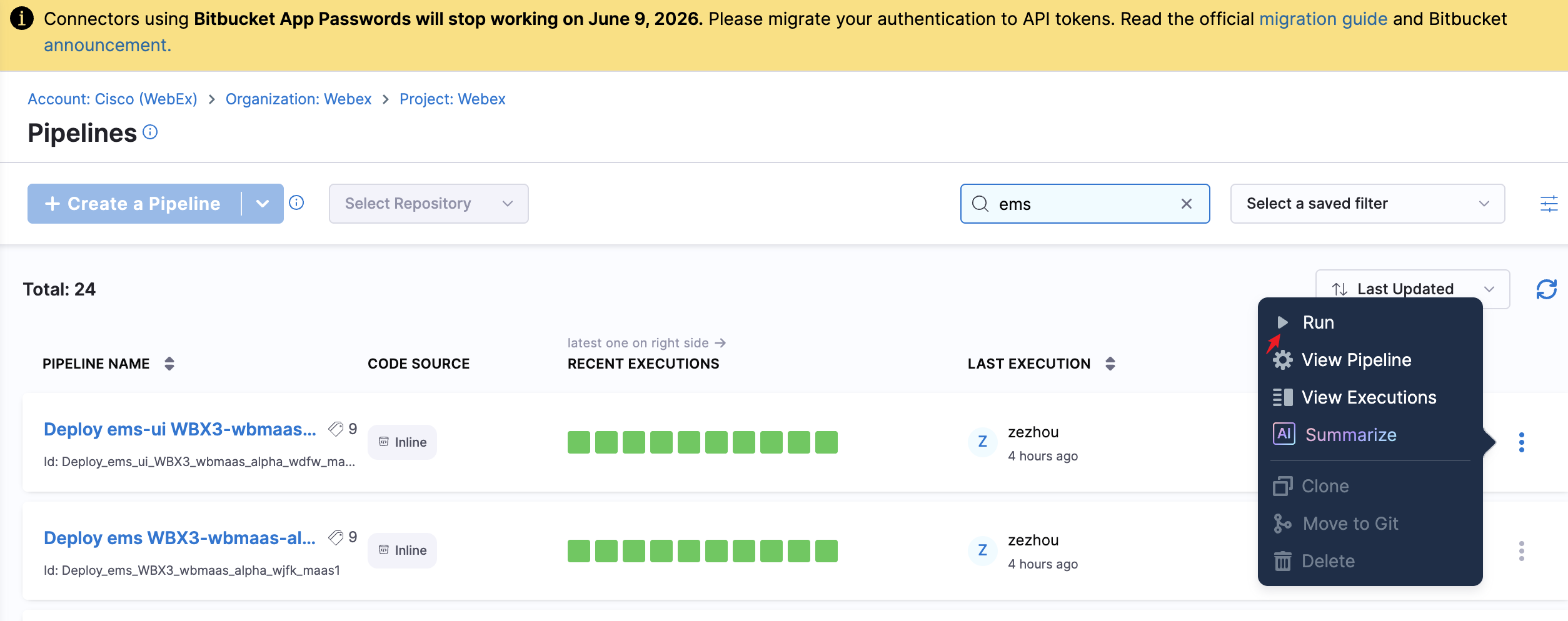
Step 3: Configure pipeline variables and click Run Pipeline.
| Variable | Value |
|---|---|
SKIP_VALIDATION | true |
CONFIG_HASH | Copy the latest hash from cache-configuration job or the Jenkins Pipeline Notifications room |
Tag | The image version you want to deploy |
Tip: Every time you push a change to the Configuration repo, a new hash will be sent to the Jenkins Pipeline Notifications room.
Cluster Login 
Primary — wjfkgen-p-1 
The Vault token must be copied from Vault with
namespace=meetpaas/mccprod.
export VAULT_TOKEN=<your_own_token>
export CLUSTER_NAME=wjfkgen-p-1
export CLUSTER_DOMAIN=prod.infra.webex.com
export CNC_DOMAIN=prod.infra.webex.com
export CNC=mccprod
export VAULT_ADDR=https://keeper.cisco.com
export VAULT_NAMESPACE=meetpaas/mccprod
export INFRA_SERVICE_URL=https://infra.int.mccprod.prod.infra.webex.com
kubectl wbx3 login wjfkgen-p-1 --role wbmaas-mct-prod-admin
Namespaces:
| Environment | Namespaces |
|---|---|
| Prod | prod-wjfk-maas1-ems, prod-wjfk-maas1-ems-ui, prod-wjfk-maas1-ems-redis |
| Alpha | alpha-wjfk-maas1-ems, alpha-wjfk-maas1-ems-ui, alpha-wjfk-maas1-ems-redis |
Secondary — wdfwgen-p-5 
export VAULT_TOKEN=<your_own_token>
export CLUSTER_NAME=wdfwgen-p-5
export CLUSTER_DOMAIN=prod.infra.webex.com
export CNC_DOMAIN=prod.infra.webex.com
export CNC=mccprod
export VAULT_ADDR=https://keeper.cisco.com
export VAULT_NAMESPACE=meetpaas/mccprod
export INFRA_SERVICE_URL=https://infra.int.mccprod.prod.infra.webex.com
kubectl wbx3 login wdfwgen-p-5 --role wbmaas-mct-prod-admin
Namespaces:
| Environment | Namespaces |
|---|---|
| Prod | prod-wdfw-maas1-ems, prod-wdfw-maas1-ems-ui, prod-wdfw-maas1-ems-redis |
| Alpha | alpha-wdfw-maas1-ems, alpha-wdfw-maas1-ems-ui, alpha-wdfw-maas1-ems-redis |
Important Notes 
-
Traffic management differs between clusters: -
wjfkgen-p-1: traffic managed via Ingress -wdfwgen-p-5: traffic managed via Istio -
Backend service runs on Python 3.12. Use the specified base image from containers.cisco.com/repository/webexott/base/python.
-
Frontend service runs on Node.js 22.16.0. Custom builds are required since standard images were not available: - Build repo: xiaowfu/wbx3-nodejs - Jenkins job: nodejs-build - Image pushed to: containers.cisco.com/repository/webexott/base/nodejs
-
Node labels and
nodeSelectordiffer between clusters:wjfkgen-p-1:
wb3:
  service:
    nodeSelector:
      type: ems-p0
    tolerations[0]:
      key: dedicated
      operator: Equal
      value: ems
      effect: NoSchedule
wdfwgen-p-5:
wb3:
  service:
    nodeSelector:
      dedicated: ems
      type: worker
    tolerations[0]:
      key: dedicated
      operator: Equal
      value: ems
      effect: NoSchedule