K8s Event
Introduction to Kubernetes Events 
Kubernetes events provide detailed information about what is happening inside your cluster. They are an essential part of monitoring and troubleshooting, offering insights into the state changes and errors occurring within your cluster resources, like Pods, Nodes, and Deployments. Events can be generated by the Kubernetes control plane components, such as the scheduler, kubelet, or other controllers, and are recorded in the kube-system namespace.
Events are temporary records and are generally stored in the etcd database for a limited amount of time (typically one hour). They are useful for debugging issues, understanding changes in the cluster, and tracking the lifecycle of various resources.
The followings are key concepts for understanding k8s event:
Event Types 
Kubernetes events can be classified into two main types: Normal and Warning. These types provide context about the nature of the events, helping administrators quickly determine the significance and potential impact of an event on the cluster's health and stability.
1. Normal Events 
Normal events indicate routine and expected activity within the Kubernetes cluster. They confirm that certain actions or state changes have occurred as part of the regular operations. Examples of normal events include:
- Scheduled: A Pod has been successfully scheduled onto a Node.
- Started: A container has started within a Pod.
- Pulled: A container image has been pulled successfully.
- Created: A resource, such as a Pod or Service, has been successfully created.
- Updated: A resource configuration has been updated.
Normal events generally provide confirmation that the cluster is functioning correctly and components are working as intended.
Sample Created event: 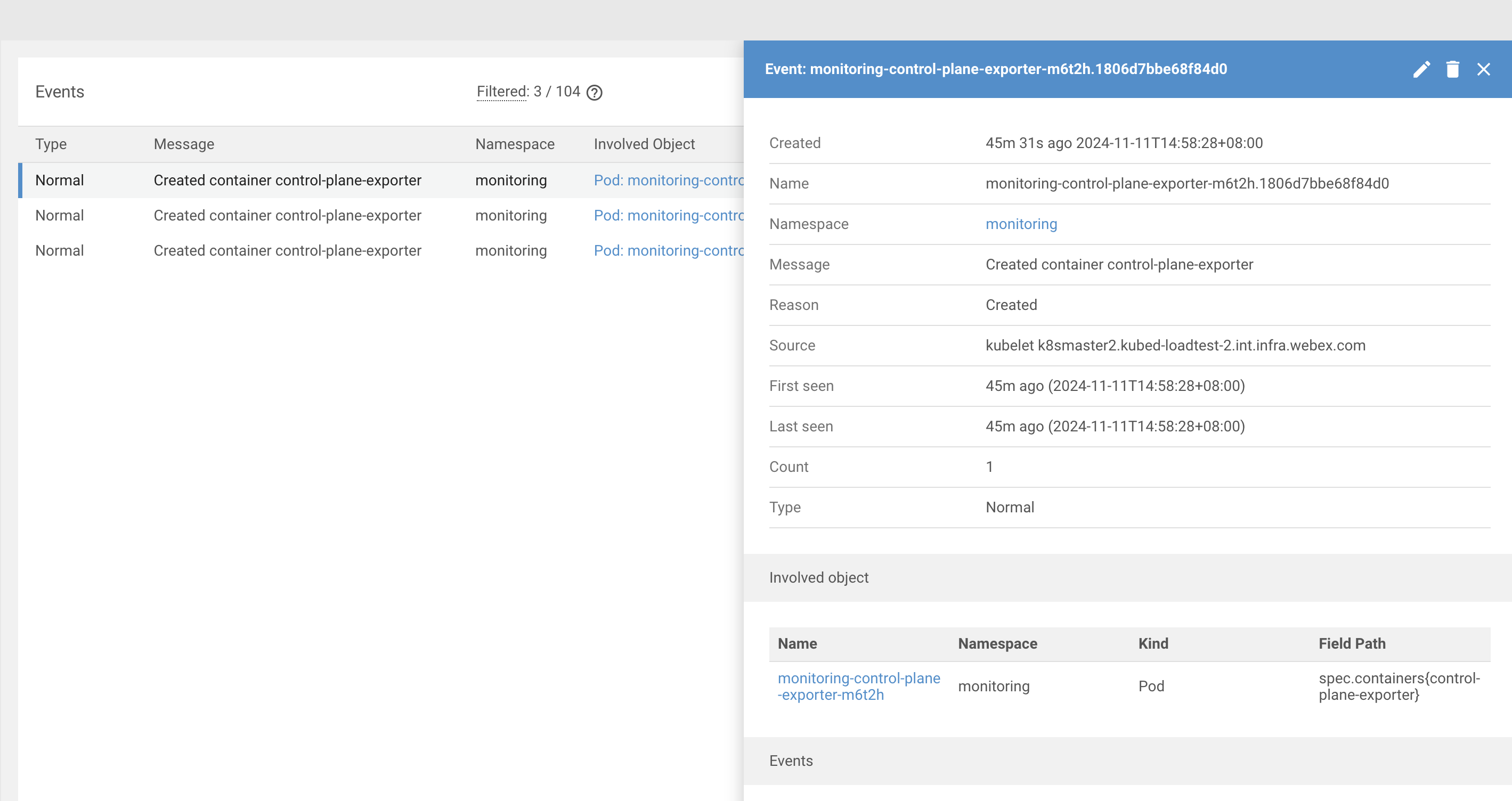
2. Warning Events 
Warning events indicate issues or problems that require attention. These events might not always mean a critical failure but highlight situations where something did not happen as expected or requires investigation. Examples of warning events include:
- FailedScheduling: A Pod could not be scheduled onto any Node due to insufficient resources or other constraints.
- FailedMount: A volume mount operation for a Pod has failed.
- ImagePullBackOff: Kubernetes is unable to pull a container image, and it is retrying with a backoff strategy.
- CrashLoopBackOff: A container repeatedly crashes and fails to start, indicating a potential issue with the application or configuration.
- Unhealthy: A health check has failed for a container or Node, indicating a service may be unresponsive or malfunctioning.
Warning events are crucial for troubleshooting and diagnosing issues within the cluster, as they provide early indicators of potential problems that may affect application availability or performance.
Sample FailedMount event: 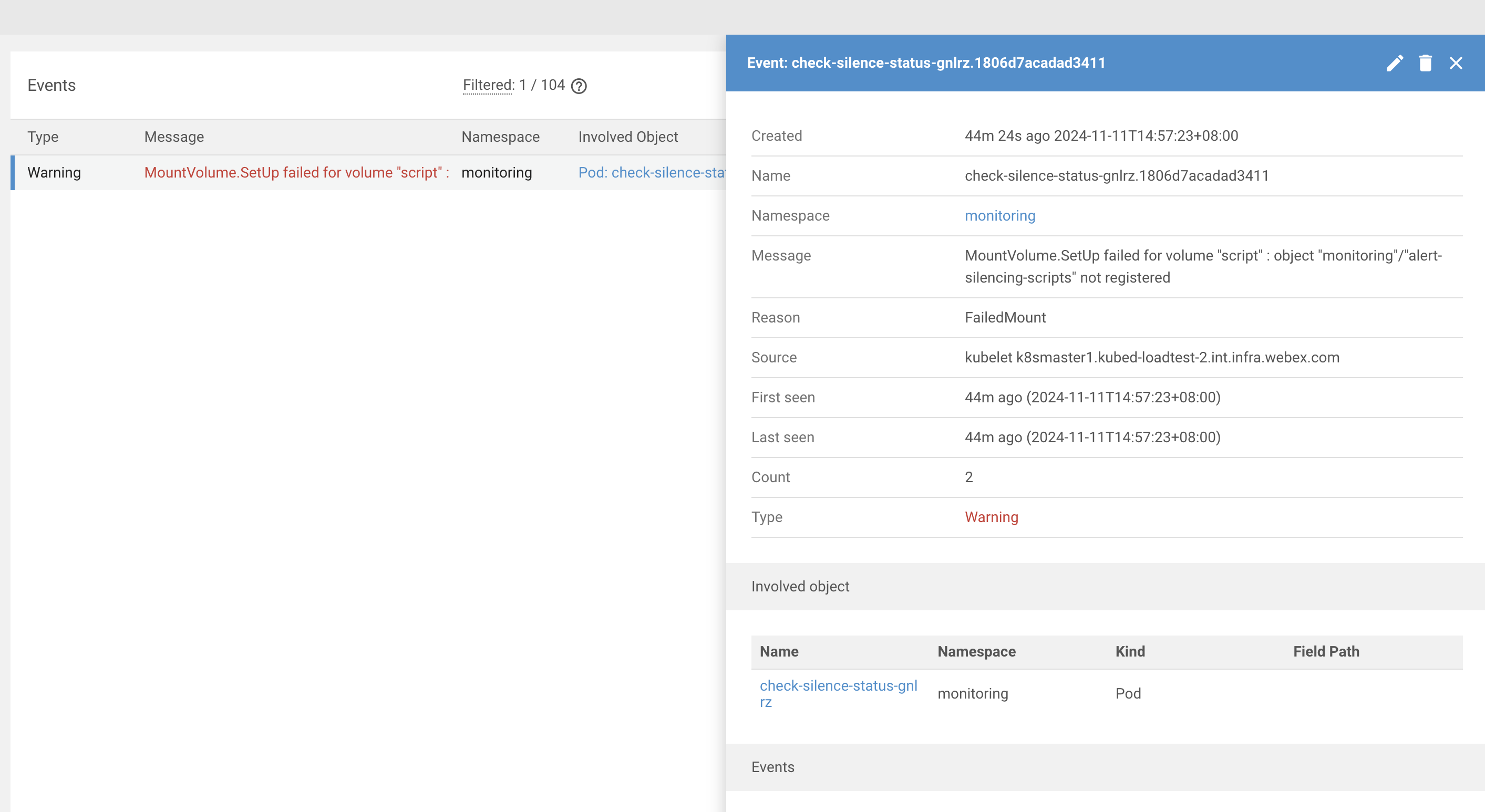
Resource Associations 
Kubernetes events are always tied to a specific resource in your cluster. This association provides valuable context, allowing you to trace events back to the resources they impact and understand the lifecycle and state changes of these resources.
Each event includes an involvedObject field that contains details about the resource with which the event is associated. These details specify the type of resource, its name, namespace, and a unique identifier. Events can be associated with a wide variety of Kubernetes resources, including but not limited to:
1. Pods 
Events related to Pods are among the most common. These events include messages about scheduling decisions, container restarts, image pull failures, and successful or unsuccessful readiness checks. Examples:
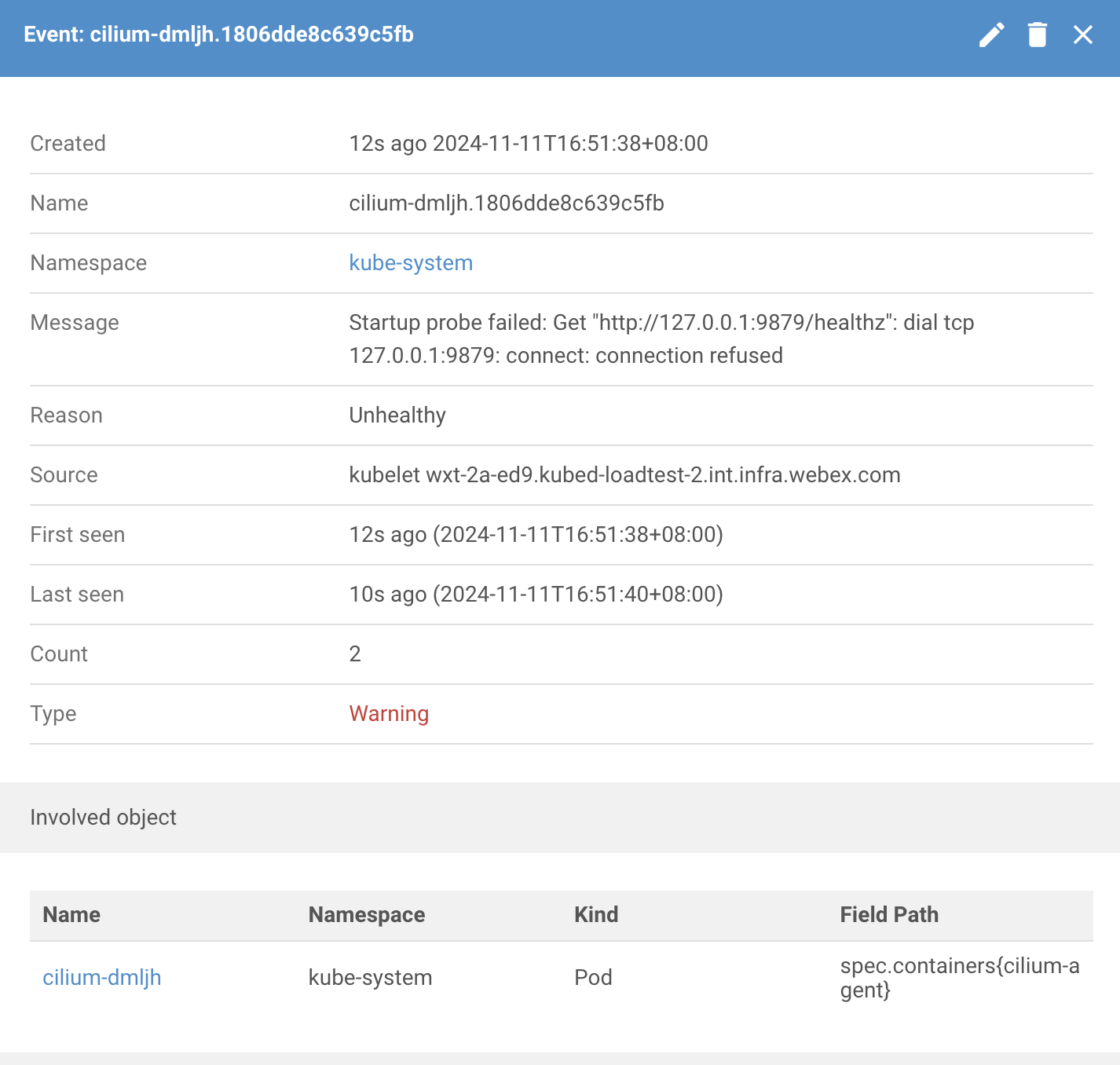
2. Nodes 
Node-related events provide insights into the health and status of Nodes within the cluster. These may include notifications about Nodes being marked as unreachable, out of disk space, or recovered. Examples:
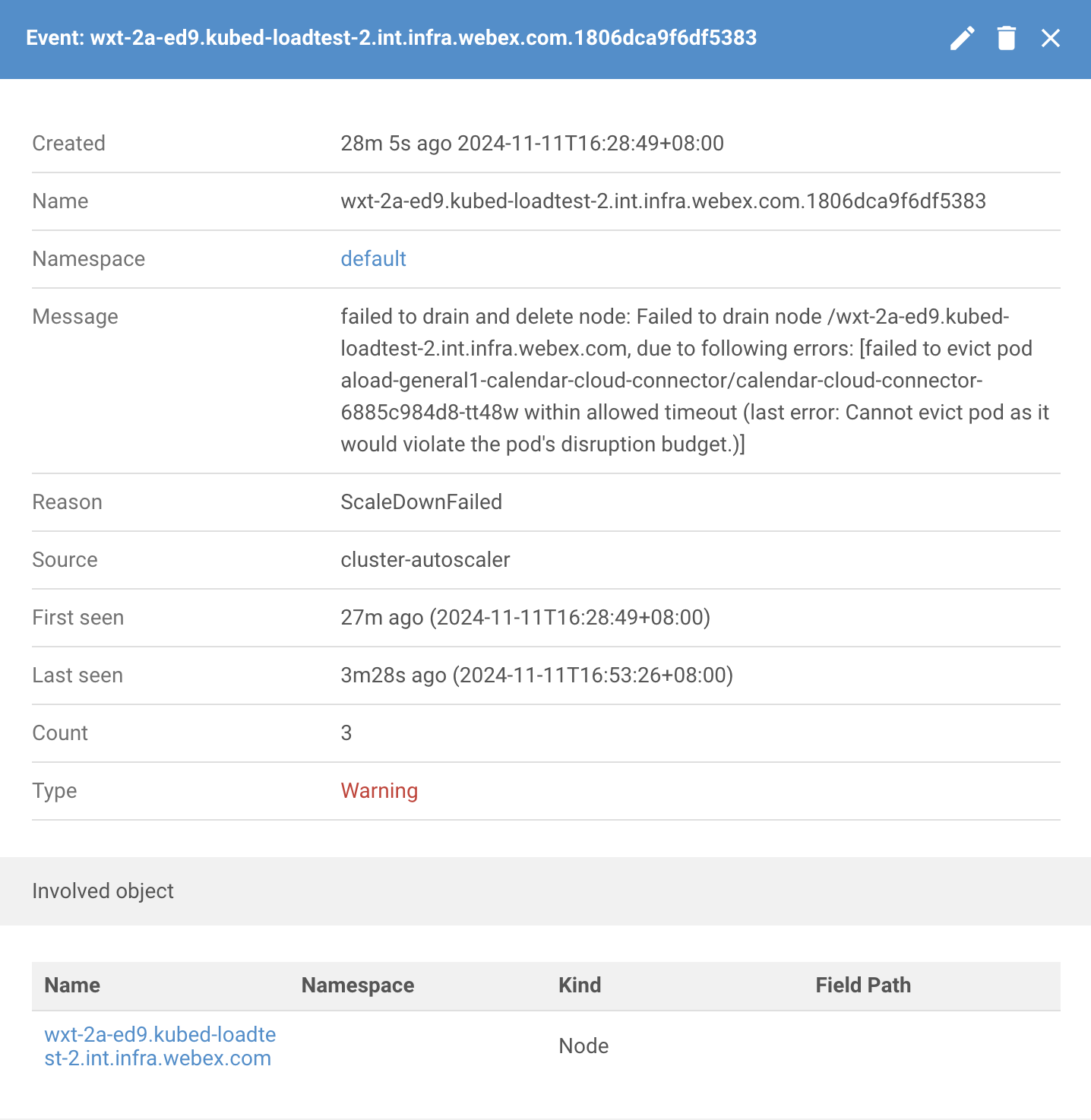
3. Services 
Service-related events can alert you about changes in the network configuration or issues related to service discovery. Examples:
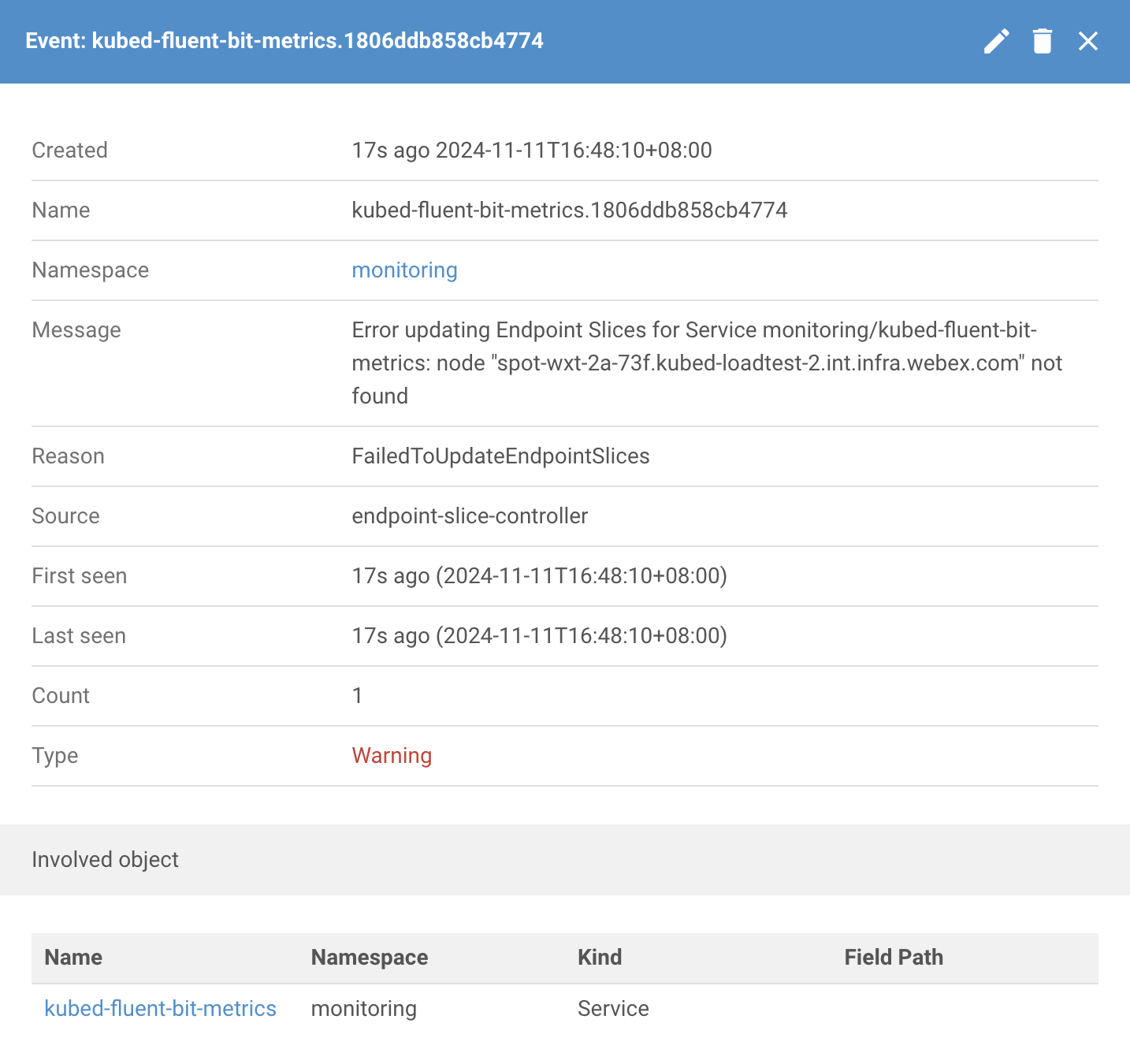
When troubleshooting or monitoring your cluster, resource associations help pinpoint the root cause of issues. By reviewing the involvedObject field in an event, you can quickly identify which resource is affected and take appropriate action. For example, if a Pod is in a CrashLoopBackOff state, you can check the associated events to understand why the container is failing to start and address the underlying problem.
Troubleshoot with Event Reasons 
The Reason field in an event provides a short string that categorizes the event. It helps in understanding what caused the event to occur. The Reason field is crucial for debugging and monitoring the state of Kubernetes objects and the cluster itself. The following are key types of event reasons for troubleshooting cluster issues:
Container Event Reasons 
- Failed (for FailedToCreateContainer and FailedToStartContainer): These indicate failures related to container operations, specifically in creating or starting containers. The reason "Failed" is a generic label used for these unsuccessful operations.
Pod Event Reasons 
- FailedKillPod: Indicates a failure in killing a pod. This can occur due to issues like network problems or miscommunication between components.
- FailedCreatePodContainer: Signifies a failure in creating a container within a pod, possibly due to resource constraints or incorrect configurations.
- Failed (for FailedToMakePodDataDirectories): This suggests a failure in setting up necessary directories for pod data, potentially due to permission issues or lack of disk space.
Image Event Reasons 
- Failed (for FailedToPullImage): Represents a failure in pulling a container image from a registry, which might be due to network problems or incorrect image references.
- InspectFailed: Indicates a failure in inspecting a container image, possibly due to corruption or access issues.
Image Manager Event Reasons 
- FreeDiskSpaceFailed: Represents a failure in freeing up disk space, possibly due to an inability to delete unnecessary files or images.
Pod Worker Event Reasons 
- FailedSync: Indicates a failure in synchronizing the desired state of a pod with its actual state on the node.
Config Event Reasons 
- FailedValidation: Represents a failure in validating configuration, preventing resources from being applied or updated.
Lifecycle Hooks 
- FailedPostStartHook: Logged when the execution of a post-start lifecycle hook fails in a container.
- FailedPreStopHook: Indicates a failure in executing a pre-stop lifecycle hook, affecting the graceful termination of a container.
Kubelet Event Reasons 
- KubeletSetupFailed: Indicates a failure during the Kubelet setup, which can prevent the node from managing pods effectively.
- FailedAttachVolume: Marks a failure in attaching a volume to a pod, affecting its ability to access necessary storage.
- FailedMount: Indicates a failure in mounting a volume to a pod, which can prevent applications from accessing required data.
- VolumeResizeFailed: Signifies a failure in resizing a persistent volume, which could be due to storage limitations or configuration errors.
- FileSystemResizeFailed: Indicates a failure in resizing the filesystem on a volume after its size has been increased.
- ContainerGCFailed: Represents a failure in the garbage collection process for containers, which could lead to resource constraints.
- ImageGCFailed: Marks a failure in garbage collection of images, potentially resulting in insufficient disk space.
- FailedNodeAllocatableEnforcement: Indicates a failure in enforcing resource constraints at the node level, leading to possible resource contention.
- FailedCreatePodSandBox: Indicates a failure in creating the pod sandbox, which is necessary for running containers in a pod.
- FailedPodSandBoxStatus: Suggests a failure in obtaining the status of a pod sandbox, affecting pod management.
- FailedMountOnFilesystemMismatch: Indicates a failure when trying to mount a volume due to a filesystem mismatch.
Node Reasons 
- NodeNotReady: Signifies that the node is not in a healthy state and cannot run pods. This may be due to issues like network problems, kubelet failures, or resource exhaustion.
- NodeNotSchedulable: Indicates that the node is marked as unschedulable, often for maintenance or administrative reasons, preventing new pods from being scheduled on it.
- Evicted is used to indicate that a pod has been removed from a node due to certain resource constraints or policy decisions. Eviction is a process where the system proactively terminates pods to reclaim resources or enforce policies.
- FailedScheduling is used to indicate that the scheduler could not place a pod on any node in the cluster. This event occurs during the scheduling process, where Kubernetes attempts to find a suitable node to run a new pod based on its resource requirements and other constraints.
Sample event case 
{
  "verb": "UPDATED",
  "event": {
    "metadata": {
      "name": "aws-node-termination-handler-5bd965c67d-rj2p4.18066e0500338d1a",
      "namespace": "kube-system",
      "uid": "63e89505-7116-4f76-96d7-86617c83cc9d",
      "resourceVersion": "429309072",
      "creationTimestamp": "2024-11-09T22:41:14Z"
    },
    "involvedObject": {
      "kind": "Pod",
      "namespace": "kube-system",
      "name": "aws-node-termination-handler-5bd965c67d-rj2p4",
      "uid": "121202d9-6477-4691-89b1-9ad518aba880",
      "apiVersion": "v1",
      "resourceVersion": "305168250"
    },
    "reason": "FailedScheduling",
    "message": "0/17 nodes are available: 1 node(s) had untolerated taint {dedicated: istio-ingress-ciscoint}, 2 node(s) had untolerated taint {dedicated: anycast-proxy-node}, 2 node(s) had untolerated taint {dedicated: istio-ingress}, 2 node(s) had untolerated taint {type: ingress}, 3 node(s) didn't have free ports for the requested pod ports, 7 node(s) didn't match Pod's node affinity/selector. preemption: 0/17 nodes are available: 14 Preemption is not helpful for scheduling, 3 node(s) didn't have free ports for the requested pod ports.",
    "source": {
      "component": "default-scheduler"
    },
    "firstTimestamp": "2024-11-09T22:41:14Z",
    "lastTimestamp": "2024-11-20T02:36:32Z",
    "count": 3732,
    "type": "Warning"
  }
}
The provided JSON event describes a FailedScheduling issue with the pod named aws-node-termination-handler-5bd965c67d-rj2p4 in the kube-system namespace. This event is triggered by the default-scheduler, which is unable to place the pod on any of the 17 available nodes.
Breakdown of the FailedScheduling Event:
Taints and Tolerations: The scheduler encountered several nodes with taints that the pod could not tolerate:
- 1 node had the taint {dedicated: istio-ingress-ciscoint}.
- 2 nodes had the taint {dedicated: anycast-proxy-node}.
- 2 nodes had the taint {dedicated: istio-ingress}.
- 2 nodes had the taint {type: ingress}.
Port Availability: There were 3 nodes that lacked available ports required by the pod, preventing it from being scheduled.
Node Affinity/Selector Mismatch: 7 nodes did not match the pod's node affinity or selector requirements, further complicating the scheduling process.
Preemption: The message also mentions that preemption was not helpful for scheduling, indicating that even potential preemptions would not resolve the issue for 14 nodes.
This event is a typical example of a FailedScheduling scenario. The scheduler couldn't find a suitable node for the pod due to a combination of untolerated taints, insufficient free ports, and node affinity or selector mismatches. These conditions lead to the pod remaining unscheduled.
How to Collect Kubernetes Events 
Use kubectl 
There are two primary commands for collecting event data: kubectl describe and kubectl get events.
kubectl events 
kubectl get events -n monitoring node-problem-detector-z2gmw.1806dba77497dcc3
LAST SEEN   TYPE     REASON   OBJECT                            MESSAGE
58m         Normal   Pulled   pod/node-problem-detector-z2gmw   Successfully pulled image "527856644868.dkr.ecr.us-east-2.amazonaws.com/platform/thirdparty/node-problem-detector:v0.8.12_52bcae4" in 31.970846351s
kubectl describe 
kubectl describe events -n monitoring node-problem-detector-z2gmw.1806dba77497dcc3
Name:             node-problem-detector-z2gmw.1806dba77497dcc3
Namespace:        monitoring
Labels:           <none>
Annotations:      <none>
API Version:      v1
Count:            1
Event Time:       <nil>
First Timestamp:  2024-11-11T08:10:19Z
Involved Object:
  API Version:       v1
  Field Path:        spec.containers{node-problem-detector}
  Kind:              Pod
  Name:              node-problem-detector-z2gmw
  Namespace:         monitoring
  Resource Version:  618516304
  UID:               9683853f-c243-4b19-8102-af6b7b05f7e2
Kind:                Event
Last Timestamp:      2024-11-11T08:10:19Z
Message:             Successfully pulled image "527856644868.dkr.ecr.us-east-2.amazonaws.com/platform/thirdparty/node-problem-detector:v0.8.12_52bcae4" in 31.970846351s
Metadata:
  Creation Timestamp:  2024-11-11T08:10:19Z
  Resource Version:    618522605
  UID:                 a64f6e9b-2296-4147-81fc-d98e334b726b
Reason:                Pulled
Reporting Component:
Reporting Instance:
Source:
  Component:  kubelet
  Host:       spot-wxt-2b-22a3.kubed-loadtest-2.int.infra.webex.com
Type:         Normal
Events:       <none>
Kubed Event Logging 
Kubed platform integrated with thirdparty Eventrouter to send k8s events to agregated logging.
The event router serves as an active watcher of event resource in the kubernetes system, which takes those events and pushes them to a user specified sink.
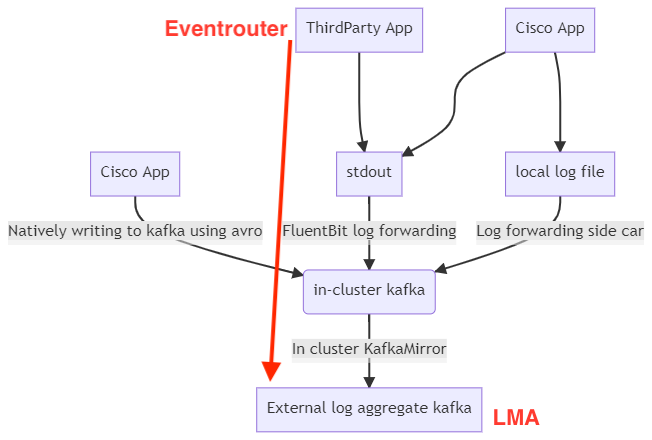
The original diagram is referred from Concepts of WebexKubed logging
Sample Event Schema 
A Kubernetes event is represented as a structured object in JSON or YAML. Below is a sample JSON schema of a typical Kubernetes event:
{
  "apiVersion": "v1",
  "count": 1,
  "eventTime": null,
  "firstTimestamp": "2024-11-11T08:10:19Z",
  "involvedObject": {
      "apiVersion": "v1",
      "fieldPath": "spec.containers{node-problem-detector}",
      "kind": "Pod",
      "name": "node-problem-detector-z2gmw",
      "namespace": "monitoring",
      "resourceVersion": "618516304",
      "uid": "9683853f-c243-4b19-8102-af6b7b05f7e2"
  },
  "kind": "Event",
  "lastTimestamp": "2024-11-11T08:10:19Z",
  "message": "Successfully pulled image \"527856644868.dkr.ecr.us-east-2.amazonaws.com/platform/thirdparty/node-problem-detector:v0.8.12_52bcae4\" in 31.970846351s",
  "metadata": {
      "creationTimestamp": "2024-11-11T08:10:19Z",
      "name": "node-problem-detector-z2gmw.1806dba77497dcc3",
      "namespace": "monitoring",
      "resourceVersion": "618522605",
      "uid": "a64f6e9b-2296-4147-81fc-d98e334b726b"
  },
  "reason": "Pulled",
  "reportingComponent": "",
  "reportingInstance": "",
  "source": {
      "component": "kubelet",
      "host": "spot-wxt-2b-22a3.kubed-loadtest-2.int.infra.webex.com"
  },
  "type": "Normal"
}
Explanation of Fields
- apiVersion: The API version of the Event resource.
- kind: The type of the resource, which is always "Event".
- metadata: Standard metadata about the event, including its name, namespace, and creation timestamp.
- involvedObject: The resource that the event is associated with, including its type, name, and unique identifier.
- reason: A short, machine-readable string describing why the event was generated.
- message: A human-readable description of what happened.
- source: The component that generated the event, such as "kubelet" or "scheduler".
- firstTimestamp: The time at which the event was first observed.
- lastTimestamp: The most recent time at which the event was observed.
- count: The number of times the event has been observed.
- type: Indicates if the event is of type "Normal" or "Warning".
Eventrouter - stdout 
{
  "verb": "ADDED",
  "event": {
    "metadata": {
      "name": "llm2-api-test-job-28847656-wkwmn.18053f6b596c7f9b",
      "namespace": "prod-achm-registration2-llm2-api",
      "uid": "3372d88d-a55f-4605-a98b-3f6542ca36d3",
      "resourceVersion": "2747969635",
      "creationTimestamp": "2024-11-06T02:16:02Z"
    },
    "involvedObject": {
      "kind": "Pod",
      "namespace": "prod-achm-registration2-llm2-api",
      "name": "llm2-api-test-job-28847656-wkwmn",
      "uid": "6d099c21-e34d-40a4-88f5-68a7989c0bad",
      "apiVersion": "v1",
      "resourceVersion": "2747969408",
      "fieldPath": "spec.containers{llm2-api-test}"
    },
    "reason": "Failed",
    "message": "Error: ImagePullBackOff",
    "source": {
      "component": "kubelet",
      "host": "worker-2b-6c7b.acmhwxt-prd-4.prod.infra.webex.com"
    },
    "firstTimestamp": "2024-11-06T02:16:02Z",
    "lastTimestamp": "2024-11-06T02:16:02Z",
    "count": 1,
    "type": "Warning"
  }
}
This JSON represents an event captured from Kubernetes, related to a pod experiencing an issue when trying to pull an image:
- Event Type: A new event (
"verb": "ADDED") has been recorded. - Affected Pod: The pod
"llm2-api-test-job-28847656-wkwmn"in the"prod-achm-registration2-llm2-api"namespace. - Issue: The pod encountered an error pulling its container image, leading to a
"Failed"state. The specific error is"ImagePullBackOff", which indicates a failure to fetch the container image after repeated attempts. - Source of Event: The event was reported by the Kubernetes component
"kubelet", running on the node"worker-2b-6c7b.acmhwxt-prd-4.prod.infra.webex.com". - Timestamps: The event occurred at
"2024-11-06T02:16:02Z", and the event count is 1. - Severity: The event is categorized as a
"Warning".
This suggests a container in the pod failed to start due to issues pulling its image, potentially related to image availability or network problems.
logs.o.webex.com - opensearch 
This json log is filtered based on above event.metadata.uid
{
  "_index": "wxm-app:logstash-wxm-app-005093",
  "_id": "AJFZ_5IBOd-Ra9gsI7MW",
  "_version": 1,
  "_score": null,
  "_source": {
    "owner": "wbx3_acmhwxt-prd-4_noreply@cisco.com",
    "old_event": {
      "type": "Warning",
      "lastTimestamp": "2024-11-06T02:17:46Z",
      "message": "Error: ImagePullBackOff",
      "firstTimestamp": "2024-11-06T02:16:02Z",
      "metadata": {
        "creationTimestamp": "2024-11-06T02:16:02Z",
        "name": "llm2-api-test-job-28847656-wkwmn.18053f6b596c7f9b",
        "namespace": "prod-achm-registration2-llm2-api",
        "uid": "3372d88d-a55f-4605-a98b-3f6542ca36d3",
        "resourceVersion": "2747980418"
      },
      "involvedObject": {
        "resourceVersion": "2747969408",
        "name": "llm2-api-test-job-28847656-wkwmn",
        "namespace": "prod-achm-registration2-llm2-api",
        "uid": "6d099c21-e34d-40a4-88f5-68a7989c0bad",
        "kind": "Pod",
        "apiVersion": "v1",
        "fieldPath": "spec.containers{llm2-api-test}"
      },
      "count": 6,
      "reason": "Failed",
      "source": {
        "host": "worker-2b-6c7b.acmhwxt-prd-4.prod.infra.webex.com",
        "component": "kubelet"
      }
    },
    "target": [
      "elasticsearch",
      "placeholder_for_logstash_bug"
    ],
    "stream": "stdout",
    "buildNumber": "527856644868.dkr.ecr.us-east-2.amazonaws.com/platform/thirdparty/eventrouter:v0.2_18f9394",
    "@timestamp": "2024-11-06T02:41:14.242869920Z",
    "event": {
      "type": "Warning",
      "lastTimestamp": "2024-11-06T02:17:46Z",
      "message": "Error: ImagePullBackOff",
      "firstTimestamp": "2024-11-06T02:16:02Z",
      "metadata": {
        "creationTimestamp": "2024-11-06T02:16:02Z",
        "name": "llm2-api-test-job-28847656-wkwmn.18053f6b596c7f9b",
        "namespace": "prod-achm-registration2-llm2-api",
        "uid": "3372d88d-a55f-4605-a98b-3f6542ca36d3",
        "resourceVersion": "2747980418"
      },
      "involvedObject": {
        "resourceVersion": "2747969408",
        "name": "llm2-api-test-job-28847656-wkwmn",
        "namespace": "prod-achm-registration2-llm2-api",
        "uid": "6d099c21-e34d-40a4-88f5-68a7989c0bad",
        "kind": "Pod",
        "apiVersion": "v1",
        "fieldPath": "spec.containers{llm2-api-test}"
      },
      "count": 6,
      "reason": "Failed",
      "source": {
        "host": "worker-2b-6c7b.acmhwxt-prd-4.prod.infra.webex.com",
        "component": "kubelet"
      }
    },
    "datacenter": "acmhwxt-prd-4",
    "hostname": "k8snode1.acmhwxt-prd-4.prod.infra.webex.com",
    "verb": "UPDATED",
    "k8s": {
      "container_hash": "527856644868.dkr.ecr.us-east-2.amazonaws.com/platform/thirdparty/eventrouter@sha256:392fec815ed34787c746a8dea3a290a3c75b4a20c8a4bb33f5fd72161caa2aef",
      "namespace_name": "monitoring",
      "pod_name": "eventrouter-789f8f7d66-rxvz9",
      "container_name": "eventrouter"
    },
    "tags": "k8s-eventrouter",
    "wbx3": {
      "internal_topic": "logs2_platform",
      "app_group": "platform",
      "cluster": "acmhwxt-prd-4"
    },
    "log_level": "INFO"
  },
  "fields": {
    "event.lastTimestamp": [
      "2024-11-06T02:17:46.000Z"
    ],
    "event.metadata.creationTimestamp": [
      "2024-11-06T02:16:02.000Z"
    ],
    "old_event.lastTimestamp": [
      "2024-11-06T02:17:46.000Z"
    ],
    "event.firstTimestamp": [
      "2024-11-06T02:16:02.000Z"
    ],
    "old_event.firstTimestamp": [
      "2024-11-06T02:16:02.000Z"
    ],
    "old_event.metadata.creationTimestamp": [
      "2024-11-06T02:16:02.000Z"
    ],
    "@timestamp": [
      "2024-11-06T02:41:14.242Z"
    ]
  },
  "highlight": {
    "event.metadata.uid": [
      "@opensearch-dashboards-highlighted-field@3372d88d@/opensearch-dashboards-highlighted-field@-@opensearch-dashboards-highlighted-field@a55f@/opensearch-dashboards-highlighted-field@-@opensearch-dashboards-highlighted-field@4605@/opensearch-dashboards-highlighted-field@-@opensearch-dashboards-highlighted-field@a98b@/opensearch-dashboards-highlighted-field@-@opensearch-dashboards-highlighted-field@3f6542ca36d3@/opensearch-dashboards-highlighted-field@"
    ]
  },
  "sort": [
    1730860874242
  ]
}