Push images to ECR
There may exist many ways to push images to ECR(Elastic Container Registry), and this guide will introduce a CI-recommended and maintainable approach. In simple terms, this approach involves doing some configuration and invoking the "buildCI" method, and then your images can be seen on ECR.
Follow below steps to push images to ECR.
Do configuration 
1. Jenkins 
1.1 cert && key 
Cert and Key are two files created by CI team(should be regenerated annually). You can think of these two files as authentication for accessing ECR. They should be saved as secret file on Jenkins credentials and the credential id will be used later. Go to Manage Jenkins -> Jenkins -> Global Credentials(unrestricted) -> Add Credentials -> Kind=Secret file.
1.2 account 
You should add a credential with kind of "Username with password" on Jenkins. This credential is used to pull code from git and log in RMC. The username only needs to be recognizable, while the password is the access token you've created on GitHub. When using this credential to log in to RMC(Repository Management System), RMC will not verify the validity of the account.
1.3 Global pipeline library 
The buildCI method is provided by ci-shared-helpers, so you need to install the shared library on your Jenkins instance. Go to Manage Jenkins -> Configure System -> Global Pipeline Libraries. Add a library entry with the following configuration: 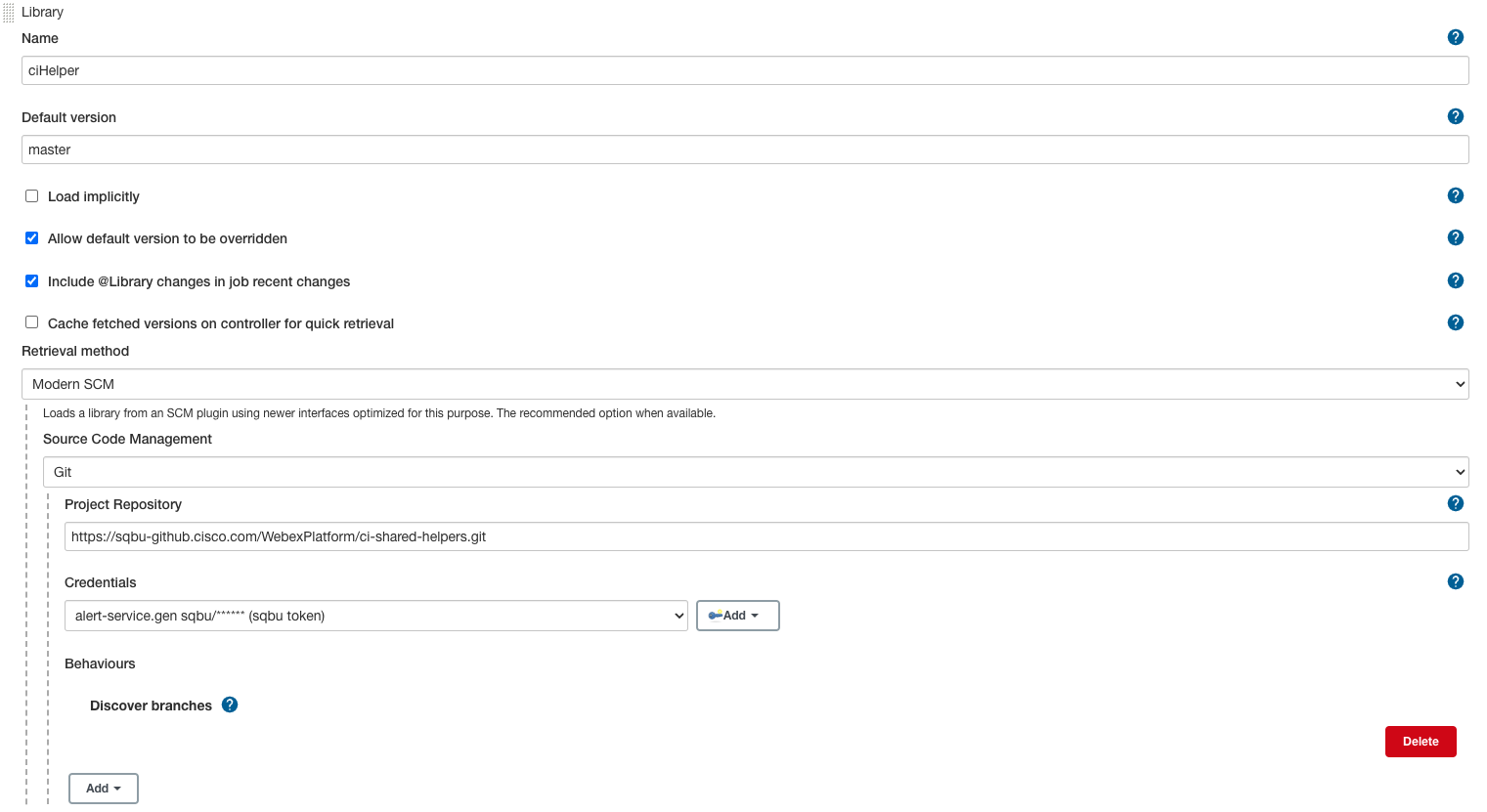
2. Github repo 
2.1 your own repository 
Create a manifest.yaml file in the root directory of Your repository. You can refer to alert-service for guidance.
Below is a basic manifest template. You can customize this template with your project's specific information, dependencies, and deployment instructions.
# Information about the application
  - name: monitoring-alerting-service
  repository: https://sqbu-github.cisco.com/Monitoring/alert-service.git
  graceful_shutdown: false
  metadata:
    - url: "https://metadata.prod.infra.webex.com"
      # Created in 1.1, set the Jenkins credential id here.
      cert-id: "mas-metadata-service-prod-client-cert"
      key-id: "mas-metadata-service-prod-client-key"
  registries:
    - name: "registry-qa.webex.com" # RMC url
      namespace: "mas" # component in RMC, and it's the component which you config in 2.2
      component: "alert-service-analysis"
      service_group: "monitoring-alerting-service"
      operation_type: "QA-Done"
      type: docker
      # Created in 1.2, set the Jenkins credential id here.
      jenkins-id: "22420297-7fcb-47e4-a36d-b8357a40a800"
      publish: true
      publish-always: true
      docker:
        # This is the location of the Dockerfile relative to the root directory of the project.
        - dockerfile: ../alert-service-config/_deploy/docker/analysis.dockerfile
          lint:
            enable: false
          scan:
            enable: false
          build: true
  security:
    - policy-repo: https://sqbu-github.cisco.com/WebexPlatform/wbx3-policies.git
      bundle: meetpaas_default_bundle.json
      jenkins-id: "22420297-7fcb-47e4-a36d-b8357a40a800"
      threat-levels:
        - "Critical"
        - "High"
      gate: false
  contact:
    - mailer:
        - csg-hz-uas@cisco.com
      teams-space-id: Y2lzY29zcGFyazovL3VzL1JPT00vYjAwMTk5YTAtYzFlMS0xMWVjLThiMTUtZDVjM2VjMWU5YjY4
      teams-jenkins-id: "uas-pipeline-bot-token" # Bot access token config on Jenkins
2.2 ecr-repos 
You need to configure the mapping relationship between the RMC and ECR on ecr-metadata-sync.yaml. Images uploaded to the specified directory in RMC will be automatically synchronized to the corresponding directory in ECR.
Create Jenkins Job 
Jenkins file should be created in the root directory of Your repository. You can refer to alert-service for more detailed code. Below is some of the crucial sections from it.
import lib 
libraries {
  lib('ciHelper')
}
invoke buildCI 
stage("Push ${service} image to ECR") {
  dir("alert-service") {
      def component = "alert-service-${service}"
      echo component
      def tag = "${env.tagName}"
      def dockerArgs = "JAR_FILE=alert-service-${service}-${env.tagName}.jar"
      def metaBody = {
          image_tag = tag
      }
      buildCI(this, [component: component, tag: tag, metadata: metaBody, dockerArgs: dockerArgs])
  }
}
Problems 
1.docker login https://registry-qa.webex.com permission denied 
======================================== ECR Publish Stage ============================================
[Pipeline] withEnv
[Pipeline] {
[Pipeline] withDockerRegistry
$ docker login -u alert-service.gen -p ******** https://registry-qa.webex.com
WARNING! Using --password via the CLI is insecure. Use --password-stdin.
Got permission denied while trying to connect to the Docker daemon socket at unix:///var/run/docker.sock: Post http://%2Fvar%2Frun%2Fdocker.sock/v1.40/auth: dial unix /var/run/docker.sock: connect: permission denied
Solution:
Log in Jenkins node which run this pipeline and execute following command.
usermod -aG docker your_username  # add user into docker user group
chmod 777 /var/run/docker.sock  # not recommend for it gives permissions to anyone to use Docker in the machine
2.docker build fail 
If your Dockerfile requires a COPY instruction, and the file you need to copy is not in the same directory as the dockerfile, you may encounter the following issue.
> [4/4] COPY ./alert-service-etl/target/ .:
------
failed to solve with frontend dockerfile.v0: failed to build LLB: failed to compute cache key: "/alert-service-etl/target" not found: not found
docker command:
This is the docker build command that buildCI executes for us. It assumes that the file path of the Dockerfile is the Docker build context by default.
+ DOCKER_BUILDKIT=1
+ docker build -t registry-qa.webex.com/mas/alert-service-etl:test-tag -f ../alert-service-config/_deploy/docker/etl.dockerfile ../alert-service-config/_deploy/docker
Solution:
Copy the file to the path of Dockerfile by Jenkins.
sh "sudo cp -R ./alert-service ./alert-service-config/_deploy/docker"
sh "sudo cp -R ./alert-service-config/prod ./alert-service-config/_deploy/docker/alert-service-config"
sh "sudo cp -R ./alert-service-config/bts ./alert-service-config/_deploy/docker/alert-service-config"
sh "sudo cp -R ./alert-service-config/qa ./alert-service-config/_deploy/docker/alert-service-config"
sh "sudo cp -R ./alert-service-config/dev ./alert-service-config/_deploy/docker/alert-service-config"
sh "sudo cp -R ./alert-service-config/_deploy/nginx ./alert-service-config/_deploy/docker/alert-service-config/_deploy"
sh "sudo chmod -R 777 ./alert-service-config/_deploy/docker"