1. Getting start 
- https://docs.kubed.webex.com/
How to create a cluster 
2. Golang 
Characteristics of Go 
- Simple Syntax: easy to learn, read and write code
- Fast build time, start up and run
- Requires fewer resources
- Garbage collection
- Concurrency is easier
Compiled vs Interpreted 
- Compilation:
- Translate instructions once before running the code
- C C++ Java(partially)
- Translation occurs only once, saves time
- Translate instructions once before running the code
- Interpretation:
- Translate instructions while code is executed
- Python, Java(partially)
- Translation occurs every execution
- Requires an interpreter
- Translate instructions while code is executed
Objects in Go 
- Go does not use the term class
- Go uses structs with associated methods
- Simplified implementation of classes
- No inheritance
- No constructors
- No generics
Concurrency in Go 
Concurrent Programming 
- Concurrency is the management of multiple tasks at the same time
- key requirement for large systems
- Concurrent programming enables parallelism
- Management of task execution
- Communication between tasks
- Synchronization between tasks
Performance Limits 
- Moore's Law used to help performance
- Number of transistors doubles every 18 months
- More transistors used to lead to higher clock frequencies
- Power/temperature constraints limit clock frequencies now
Concurrency primitives 
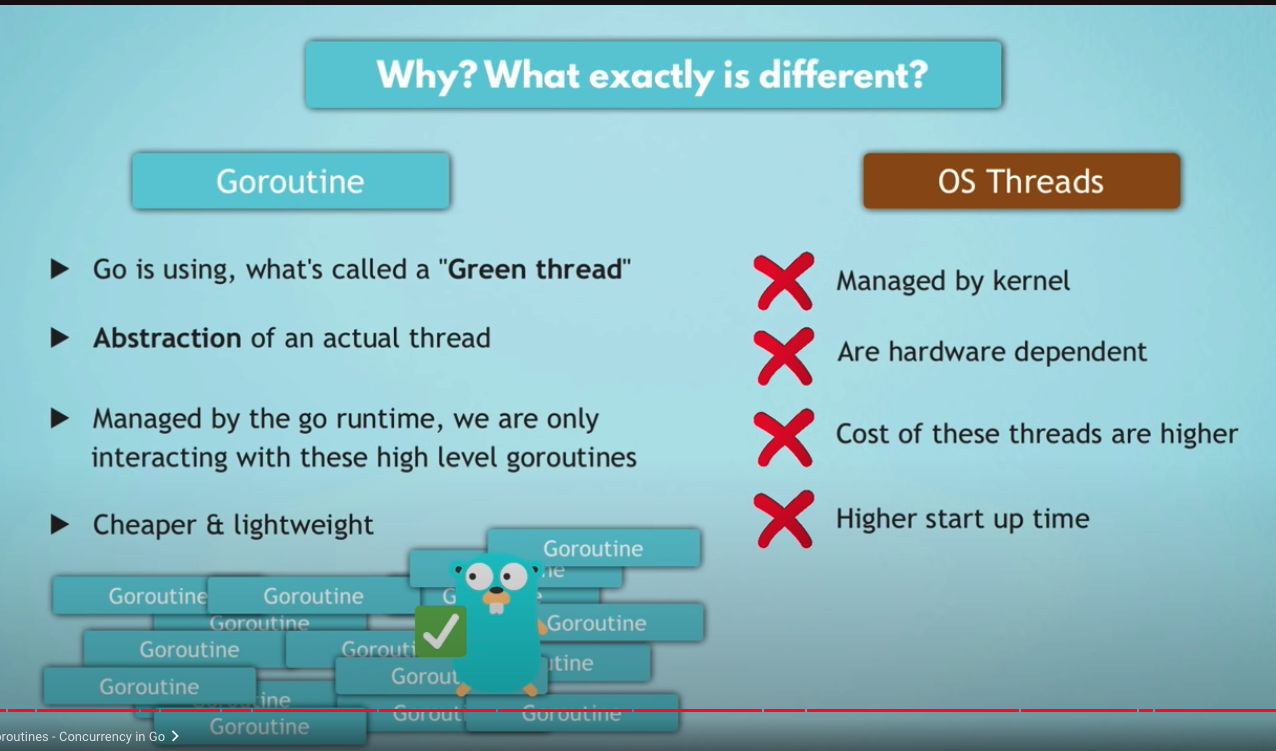
- Goroutines represent concurrent tasks
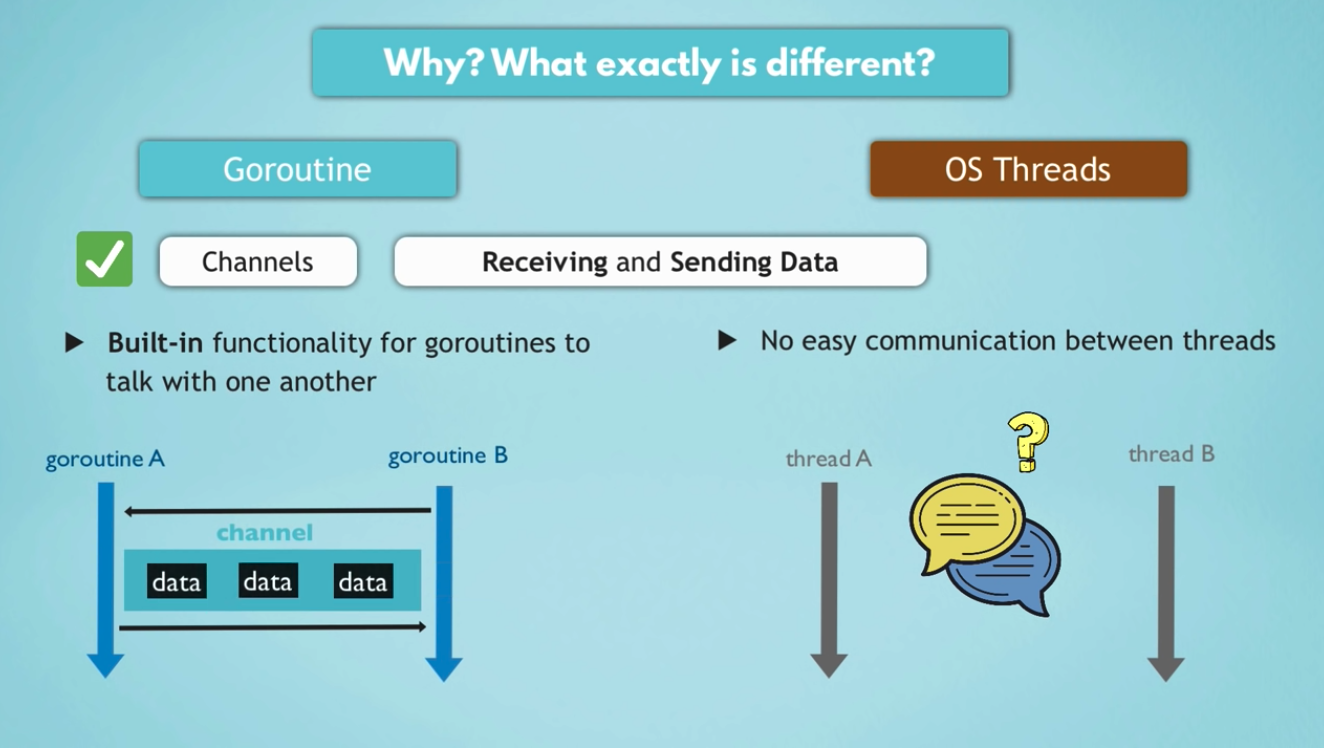
- Channels are used to communicate between tasks
- Select enables task synchronization
"go" keyword 
- "go ..." - starts a new goroutine
- a goroutine is a lightweight thread managed by the Go runtime
// change below *sendTicket* task to seperate thread

bookTicket(userTicket, firstName, lastName, email)
sendTicket(userTicket, firstName, lastName, email)

bookTicket(userTicket, firstName, lastName, email)
go sendTicket(userTicket, firstName, lastName, email)
- 👎 by default, the main goroutine does NOT wait for other goroutine
- Waitgroup from sync package
- Waits for the launched goroutine to finish
- Package "sync" provides basic synchronization functionality
- Add: sets the number of goroutines to wait for (increases the counter by the provided number )
- Wait: Blocks until the Waitgroup counter is 0
- Done: Decrements the Waitgroup counter by 1 so this is called by the goroutine to indicate that it's finished.
Workspaces 
- 3 subdirectories
- src - contains source code files
- pkg - contains packages
- bin - contains executables
- Directory hierarchy is recommended, not enforced.
Type Declarations 
- Defining an alias (alternate name) for a type
-
May improve clarity
go type Celsius float64 type IDnum int- Can declare variables using the type alias
go var temp Celsius var pid IDnum
Pointers 
var x int = 1
var y int
var ip *int // ip is pointer to int

ip = &x     // ip now points to x
y = *ip     // y is now 1
Arrays vs Slices 
var bookings = [50]string{}    // array with fixed length
var bookings = []string{}   // slices with flexible length
Loop 
- You only have For loop
Exporting a function/variable 
- Make a function in a package to be used in another package, simple way: Capitalize the function name to make it Public this is called Exporting a variable
Maps 
- All keys have the same data type
- All values have the same data type
var userData map[string]string
var userData = make(map[string]string)
userData["firstName"] = firstName

var bookings = make([]map[string]string, 0)
Struct 
- Stands for "structure"
- Can hold mixed data types
- json.Marshal() returns JSON representation as []byte
- json.Unmarshal() converts a JSON []byte into a Go object
type UserData struct {
  firstName string
  lastName string
  email string
  numberOfTickets uint
  isOptedInForNewsletter uint
}

var bookings = make([]UserData, 0)

baar, err := json.Marshal(bookings)
Files 
- Basic operations
- Open - get handle for access
- Read - read bytes into []byte
- Write - write []byte into file
- Close - release handle
- Seek - move read/write head
- ioutil File Read
- 'io/ioutil' package has basic functions
dat, err := ioutil.ReadFile("test.txt")- dat is []byte filled with contents of entire file
- Explicit open/close are not needed
- Large files cause a problem
- ioutil File Write
- write []byte to file
- create a file
Reference 
- Article: Go By Example
- Video: Golang Tutorial for Beginners Full Go Course
- Video: Learn Go Programming by Building 11 Projects - Full Course
- GitHub - ardanlabs/gotraining: Go Training Class Material
- GitHub - quii/learn-go-with-tests: Learn Go with test-driven development
- Github - leango
3. Kubernetes ** 
3.1 K8s Basics 
- Kubernetes Tutorial for Beginners
- What is Kubernetes
- Open source container orchestration tool
- Developed by Google
- What Features do orchestration tools offer?
- High Availability or no downtime
- Scalability or high performance
- Disaster recovery - backup and restore
- Pod
- Smallest unit of K8s
- Abstraction over container
- Usually 1 application per Pod
- Each Pod gets its own IP address
- New IP address on re-creation
- Services:
- Permanent IP address
- Load balancer
- lifecycle of Pod and Service NOT connected
- External service vs Internal service
ChatGPT:
The
typefield specifies the type ofServiceto create. There are several types ofService, including:
ClusterIP: The default type, which creates a virtual IP address that is only accessible from within the cluster.NodePort: Exposes theServiceon a static port on each node in the cluster.LoadBalancer: Creates an external load balancer in a cloud environment that routes traffic to theService.ExternalName: Maps theServiceto a DNS name that is external to the cluster.
- Ingress
- An API object that manages external zccess to the services in a cluster, typically HTTP
- Ingress may provide load balancing, SSL termination and name-based virtual hosting
Prompt: Explain the different load balancing functionality between
ServicewithIngressin K8s.ChatGPT:
ServiceandIngressare both used for load balancing in Kubernetes, but they serve different purposes and operate at different layers of the network stack.A
Serviceprovides load balancing at the IP level (Layer 4), and directs traffic to a set of pods that provide the same service. AServicecan be accessed from within the cluster or from outside the cluster (if theServiceis of typeNodePortorLoadBalancer).An
Ingressprovides load balancing at the HTTP/HTTPS level (Layer 7), and allows external traffic to be routed to differentServices within the cluster based on the request URI or hostname. AnIngressacts as a reverse proxy, routing traffic to the appropriateServicebased on the rules defined in theIngress.Here's a high-level comparison of the load balancing functionality provided by
Servicevs.Ingress:
Service
- Provides load balancing at the IP level (Layer 4)
- Routes traffic to a set of pods that provide the same service
- Can be accessed from within or outside the cluster
- Does not provide routing based on request URI or hostname
- Can only route traffic based on IP address and port number
Ingress
- Provides load balancing at the HTTP/HTTPS level (Layer 7)
- Routes traffic to different
Services based on the request URI or hostname- Can only be accessed from outside the cluster
- Provides routing based on request URI or hostname
- Can route traffic based on other HTTP request attributes such as headers, cookies, etc.
In summary,
Serviceis used for basic load balancing at the IP level, whereasIngressprovides more advanced HTTP/HTTPS load balancing and routing based on request URI and hostname. If you need to expose multiple services over HTTP/HTTPS and perform advanced routing, you should use anIngress. If you just need to expose a single service over a network and perform basic load balancing, aServiceshould suffice.
- ConfigMap
- external configuration of your application
ConfigMaps are API Objects that store non-confidential key-value pairs
- Secrets
Although Secrets are also used to store key-value pairs, they differ from ConfigMaps in that they're intended for confidential/sensitive information and are stored using Base64 encoding. This makes secrets the appropriate choice for storing such things as credentials, keys, and tokens
- Deployment
- blueprint for my-app pods
- you create Deployments
- abstraction of Pods
- StatefulSet
- for STATEFUL apps (mostly database pods)
- Deploying StatefulSet is not easy
- DB are often hosted outside of K8s clusters
Prompt: In all these
kind, what are required if I wanna build a K8s cluster?ChatGPT: If you want to build a Kubernetes cluster, there are a number of
kindtypes that are required. Here is a list of the requiredkindtypes for building a basic Kubernetes cluster:
Node: ANodeis a worker machine in the Kubernetes cluster. You will need at least oneNodein your cluster to run your applications.Pod: APodis the smallest deployable unit in Kubernetes, and it represents a single instance of a running process in your cluster. You will create one or morePodsto run your applications.Service: AServiceis an abstraction that defines a set ofPodsand a policy to access them. You will create aServiceto provide network access to yourPods.Namespace: ANamespaceprovides a way to partition resources in a cluster. You can create one or moreNamespacesto group your resources.Deployment: ADeploymentmanages a set ofReplicaSetsandPods. You will create aDeploymentto ensure that a specified number of replicas of your application are running.ReplicaSet: AReplicaSetensures that a specified number of replicas of aPodare running at any given time. You will create aReplicaSetas part of aDeployment.ConfigMap: AConfigMapis a way to store configuration data as key-value pairs. You can create aConfigMapto store configuration data for your applications.Secret: ASecretis a way to store sensitive data, such as passwords or API keys. You can create aSecretto store sensitive data for your applications.These are the basic
kindtypes that you will need to create a simple Kubernetes cluster. However, the exactkindtypes that you need will depend on the specific requirements of your applications and the features that you want to use in your cluster.
Master processes 
- API server - entrypoint to Kubernetes cluster
- some request -> API server -> validates requests -> other proceses -> container
- Controller manager - keeps track of whats happending in the cluster
- detects cluster state changes
- Controller Manager -> Scheduler -> Kubelet
- Scheduler - ensures Pods placement
- schedule new Pod -> API server -> Scheduler -> Where to put the Pod?
- Scheduler just decide on which Node new Pod should be scheduled
- etcd - kubernetes backing store
- key value store
- etcd is the cluster brain - holds the current status
- What resources are available?
- Did the cluster state change?
- Application data is NOT stored in etcd
- Virtual network - turns multiple nodes into one node
- API servers are load balanced
- Distributed storage across all master notes
Worker machine in K8s cluster 
- Kubelet
- Kube Proxy
- Container runtime
Minikube and Kubectl 
- minikube means both Master and Worker processes and Node processes run on ONE machine
- Kubectl is command line tool for K8s cluster
3.2 Basic Kubectl commands 
Layers of Abstraction 
- Deployment manages a ReplicaSet, ReplicaSet manages a Pod, Pod is an abstraction of Container.
- Everything below Deployment is handled by Kubernetes
kubectl get nodeskubectl get serviceskubectl create -h-- can't create Pod, can use Deploymentkubectl create deployment nginx-depl --image=nginxkubectl get deploymentkubectl get podkubectl get replicasetkubectl edit deployment nginx-deplkubectl logs <pod_name>kubectl create deployment mongo-depl --image=mongokubectl describe pod <pod_name>kubectl exec -it <pod_name> -- bin/bashkubectl delete deployment mongo-deplkubectl apply -f <config_file>. -- *use deployment file as spec for deployment*kubectl expose deployment hello-deploy --type=NodePort --port=8080 -n hello- expose pods to serviceskubectl scale deployments/kubernetes-bootcamp --replicas=4-- scale applicationskubectl set image deployments/kubernetes-bootcamp kubernetes-bootcamp=jocatalin/kubernetes-bootcamp:v2- rolling upgradekubectl rollout undo deployments/kubernetes-bootcamp- rollback deployment
Practice case 1: if want to delete running pods, use
kubectl delete pod <podname>can delete but the pod will created back as belowReference: https://minikube.sigs.k8s.io/docs/start/ Start with minikube
➜  ~  k delete pods --all --force
Warning: Immediate deletion does not wait for confirmation that the running resource has been terminated. The resource may continue to run on the cluster indefinitely.
pod "my-release-mariadb-0" force deleted
pod "my-release-wordpress-6df6cbc7b4-n4qwb" force deleted
➜  ~  k get pods
NAME                                    READY   STATUS    RESTARTS   AGE
my-release-mariadb-0                    0/1     Running   0          8s
my-release-wordpress-6df6cbc7b4-xc7w2   0/1     Running   0          8s
So we have to check if any
deploymentorstatefulsetexisting and related to this pod.
➜  ~  k get deployment --all-namespaces
NAMESPACE     NAME                   READY   UP-TO-DATE   AVAILABLE   AGE
default       my-release-wordpress   1/1     1            1           7d15h
kube-system   coredns                1/1     1            1           11d
➜  ~  kubectl delete -n default deployment my-release-wordpress
deployment.apps "my-release-wordpress" deleted
➜  ~  k get pods
NAME                   READY   STATUS    RESTARTS   AGE
my-release-mariadb-0   1/1     Running   0          5m4s
➜  ~  k get all
NAME                       READY   STATUS    RESTARTS   AGE
pod/my-release-mariadb-0   1/1     Running   0          3m31s

NAME                 TYPE        CLUSTER-IP   EXTERNAL-IP   PORT(S)   AGE
service/kubernetes   ClusterIP   10.96.0.1    <none>        443/TCP   27d

NAME                                  READY   AGE
statefulset.apps/my-release-mariadb   1/1     7d15h
➜  ~  k delete statefulset statefulset.apps/my-release-mariadb
error: there is no need to specify a resource type as a separate argument when passing arguments in resource/name form (e.g. 'kubectl get resource/<resource_name>' instead of 'kubectl get resource resource/<resource_name>'
➜  ~  k delete statefulset statefulset.apps
Error from server (NotFound): statefulsets.apps "statefulset.apps" not found
➜  ~  k delete statefulset my-release-mariadb
statefulset.apps "my-release-mariadb" deleted
➜  ~  k get pods
No resources found in default namespace.
- practice as below:
$:~ calviny$ kubectl create deployment nginx-depl --image=nginx
deployment.apps/nginx-depl created
$:~ calviny$ kubectl get pod
NAME                         READY   STATUS              RESTARTS   AGE
nginx-depl-c88549479-w25zh   0/1     ContainerCreating   0          6s
$:~ calviny$ kubectl get nodes
NAME       STATUS   ROLES    AGE   VERSION
minikube   Ready    <none>   38m   v1.25.3
$:~ calviny$ kubectl get pod
NAME                         READY   STATUS              RESTARTS   AGE
nginx-depl-c88549479-w25zh   0/1     ContainerCreating   0          19s
$:~ calviny$ kubectl get replicaset
NAME                   DESIRED   CURRENT   READY   AGE
nginx-depl-c88549479   1         1         1       27s
$:~ calviny$ kubectl edit deployment nginx-depl
Edit cancelled, no changes made.
$:~ calviny$ kubectl logs nginx-depl-c88549479-w25zh
/docker-entrypoint.sh: /docker-entrypoint.d/ is not empty, will attempt to perform configuration
/docker-entrypoint.sh: Looking for shell scripts in /docker-entrypoint.d/
/docker-entrypoint.sh: Launching /docker-entrypoint.d/10-listen-on-ipv6-by-default.sh
10-listen-on-ipv6-by-default.sh: info: Getting the checksum of /etc/nginx/conf.d/default.conf
10-listen-on-ipv6-by-default.sh: info: Enabled listen on IPv6 in /etc/nginx/conf.d/default.conf
/docker-entrypoint.sh: Launching /docker-entrypoint.d/20-envsubst-on-templates.sh
/docker-entrypoint.sh: Launching /docker-entrypoint.d/30-tune-worker-processes.sh
/docker-entrypoint.sh: Configuration complete; ready for start up
2022/12/20 08:00:45 [notice] 1#1: using the "epoll" event method
2022/12/20 08:00:45 [notice] 1#1: nginx/1.23.3
2022/12/20 08:00:45 [notice] 1#1: built by gcc 10.2.1 20210110 (Debian 10.2.1-6)
2022/12/20 08:00:45 [notice] 1#1: OS: Linux 5.10.57
2022/12/20 08:00:45 [notice] 1#1: getrlimit(RLIMIT_NOFILE): 1048576:1048576
2022/12/20 08:00:45 [notice] 1#1: start worker processes
2022/12/20 08:00:45 [notice] 1#1: start worker process 29
2022/12/20 08:00:45 [notice] 1#1: start worker process 30
$:~ calviny$ kubectl describe pod nginx-depl-c88549479-w25zh
Name:             nginx-depl-c88549479-w25zh
Namespace:        default
Priority:         0
Service Account:  default
$:~ calviny$ kubectl get deployment
NAME         READY   UP-TO-DATE   AVAILABLE   AGE
nginx-depl   1/1     1            1           4m
$:~ calviny$ kubectl delete deployment nginx-depl
deployment.apps "nginx-depl" deleted
$:~ calviny$ kubectl get pod
No resources found in default namespace.
# scacel down from 4 to 2

$ kubectl get pods
NAME                                  READY   STATUS    RESTARTS   AGE
kubernetes-bootcamp-fb5c67579-lghn6   1/1     Running   0          8m48s
kubernetes-bootcamp-fb5c67579-qgjfc   1/1     Running   0          8m48s
kubernetes-bootcamp-fb5c67579-w25v7   1/1     Running   0          8m48s
kubernetes-bootcamp-fb5c67579-xxvpj   1/1     Running   0          13m
$ kubectl scale deployment/kubernetes-bootcamp --replicas=2
deployment.apps/kubernetes-bootcamp scaled
$ kubectl get pods
NAME                                  READY   STATUS        RESTARTS   AGE
kubernetes-bootcamp-fb5c67579-lghn6   1/1     Terminating   0          9m37s
kubernetes-bootcamp-fb5c67579-qgjfc   1/1     Terminating   0          9m37s
kubernetes-bootcamp-fb5c67579-w25v7   1/1     Running       0          9m37s
kubernetes-bootcamp-fb5c67579-xxvpj   1/1     Running       0          14m
3.3 Yaml file 
- YAML is a data serialization language like XML and JSON
- Standard format to transfer data, not Markup Language
- File exension: `.yaml, .yml.
- YAML is superset of JSON
Syntax 
microservice:                         # object
    app: user-auth                    # key-value
    port: 9000
    version:                          # list
    - 1.7
    - 1.8
    multilineString: |                # multiple lines
        this is a multiline string
        that can be cross multiple
        lines
    singlelineString: >
        this is a single line, but
        make it pretty formatted
        when editing
    command:
        - sh
        - -c
        - |
            #!/usr/bin/env bash -e
            http() {
                local path="${1}"
            }
            http "/app/kibana"
        - /bin/sh
        - -ec
        - >-
            mysql -h 127.0.0.1 -p$MYSQL_ROOT_PASSWORD  # Environment variable
apiVersion: v1                                                            # key-value pairs
kind: Pod
metadata:                                                                 # metadata = object
    name: {{ .Values.service.name }}                                      # placeholder
    labels:                                                               # labels = object
        app: nginx
spec:                                                                     # spec = object
    containers:                                                           # containers = list of objects
    - name: nginx-container
        image: nginx
        ports:                                                            # ports = list
        - containerPort: 80
        volumeMounts:                                                     # volumeMounts = list of objects
        - name: nginx-vol
            mountPath: /usr/nginx/html
    - name: sidecar-container
        image: curlimages/curl
        command: ["/bin/sh"]
        args: ["-c", "echo Hello from the sidecar container; sleep 300"]
Each configuration file has 3 parts 
- metadata
metadata:- the component of creating - specification
spec:- configuration to apply- Attributes of "spec" are specific to the kind
- status
status:- get etcd information as of current status of any K8s components
Namespace 
What is Namespace 
- Organize resources in namespaces
- Virtual cluster inside a cluster
- 4 Namespaces per Default
- kubernets-dashboard only with minikube
- kube-system - DO NOT create or modify in kube-system; System processes; Master and Kubectl processes
- kube-public - publicly accessible data; a configmap, which contains cluster information
- kube-node-lease - heartbeats of nodes; each node has associated lease object in namespace; determines the availability of a node.
- default - resources you create are located here
kubectl create namespace my-namespace- create your own namespace. Suggest to create by.yaml
Why to use Namespace 
- Resource grouped in Namespaces
- Conflicts: Many teams, same application
- Resource sharing: Blue/Green Deployment
- Access and Resource Limits on Namespaces
kubectl apply -f mysql-configmap.yaml --namespace=mynamespace  # to apply namespace

brew install kubectx. # to install kubens to edit namespaces
apiVersion: v1
kind: ConfiguMap
metadata:
    name: mysql-configmap
    namespace: my-namespace
data:
    db_url: mysql-service.database
External Service vs. Ingress 
- Dont need service to expose IP and port
- External requests will go to Ingress, and Ingress will redirect to Internal Service
Example YAML file: Ingress 
Ingress:
apiVersion: networking.k8s.io/v1beta1
kind: Ingress
metadata:
    name: myapp-ingress
spec:
    rules:                                                                  # Routing rules
    - host: myapp.com
        http:                                                               # Not the http://xxx in the browser. This is Incoming Reqeust gets forwarded to internal service
            paths:
            - backend:
                    serviceName: myapp-internal-service                     # forward request to internal service
                    servicePort: 8080
Internal Service:
apiVersion: v1
kind: Service
metadata:
    name: myapp-internal-service
spec:
    selector:
        app: myap
    ports:
    - protocol: TCP
        port: 8080
        targetPort: 8080
- Need an implementation for Ingress! which is Ingress Controller; Need to additionally install
What is Ingress Controller 
- evaluates all the rules
- manages redirections
- entrypoint to cluster
- many 3rd party implementations
- e.g. K8s Nginx Ingress Controller
minikube addons enable ingress
- Define Ingress Rule
apiVersion: networking.k8s.io/vi
kind: Ingress
metadata:
    name: dashboard-ingress
    namespace: kubenetes-dashboard
spec:
    rules:
    - host: dashboard.com
        http:
            paths:
            - backend:
                    serviceName: kubenetes-dashboard
                    servicePort: 80
3.4 Helm 
What is Helm 
- Package Manager for Kubernetes. similar with yum, homebrew etc.
- To package YAML files and distribute them in public and private repositories
What is Helm Charts 
- Bundle of YAML files
- Create your own Helm Charts with Helm
- Push them to Helm Repository
- Download and use existing ones
Helm features 
Sharing Helm Charts
- helm search <keyword> - Helm Hub - Share in organization for Private Repository - Templating Engine
  # values.yaml

  name: my-app
  container:
      name: my-app-container
      image: my-app-image
      port: 9001
  # Template YAML config
  apiVersion: v1
  kind: Pod
  metadata:
      name: {{ .Values.name }}
  spec:
      containers:
      - name: {{ .Values.container.name }}
          image: {{ .Values.container.image }}
          port: {{ .Values.container.port }}
- Practical for CI/CD - Can replace the values in the Build on the fly
Helm Chart Structure 
-
Directory structure:
shell mychart/ # Top level folder -> name of chart Chart.yaml # meta info about chart values.yaml # values for the template files charts/ # chart dependencies templates/ # the actual template fileshelm install <chartname>Template files will be filled with the values from values.yaml
Values injection into template files
-
```yaml # values.yaml
imageName: myapp port: 8080 version: 1.0.0
my-values.yaml 
version: 2.0.0
`` -heml install --values=my-values.yaml` - Release management
Reference 
K8s Volumes 
- Storage that doesn't depend on pod lifecycle
- Storage must be available on all nodes
- Storage need to survive even if cluster crashed
Persistent Volume 
- use that physical storages in the spec section
yaml apiVersion: v1 kind: PersistentVolume metadata: name: pv-name spec: capacity: storage: 5Gi volumeMode: Filesystem accessModes: - ReadWriteOnce persistentVolumeReclaimPolicy: Recycle storageClassName: slow mountOptions: - hard - nfsvers=4.0 nfs: path: /dir/path/on/nfs/server server: nfs-server-ip-address- Depending on storage type, spec attributes differ
- PV outside of the namespaces - Accessible to the whole cluster
PersistentVolumeClaim (pvc) 
yaml apiVersion: v1 kind: PersistentVolumeClaim metadata: name: pvc-name spec: storageClassName: manual volumeMode: Filesystem accessModes: - ReadWriteOnce resources: requests: storage: 10Gi- Use the PVC in Pods configuration
- Pod requests the volume through the PV claim -> Claim tries to find a volume in cluster -> Volume has the actual storage backend
- Claims must be in the same namespace
yaml apiVersion: v1 kind: Pod metadata: name: mypod spec: containers: - name: myfrontend image: nginx volumeMounts: - mountPath: "/var/www/html" name: mypd volumes: - name: mypd persistentVolumeClaim: claimName: pvc-name
StatefulSet 
- stateful applications - deployed using StatefulSet
- stateless applications - deployed using Deployment
Deployment vs StatefulSet 
- For stateless applications (e.g. java app)
- identical and interchangable
- created in random order with random hashes
- one Service that load balances to any Pod
- For stateful applications (e.g. mysql)
- can't be created/deleted at same time
- can't be randomly addressed
- replica Pods are not identical - Pod Identity
- Pod Identity
- sticky identity for each pod
- created from same specification, but not interchangeable
- persistent identifier across any re-scheduling
Kubernetes Services 
What is a Service and when we need it? 
-
Each Pod has its own IP address
- Pods are ephemeral - are destroyed frequently !
- Services
- stable IP address
- loadbalancing
- loose coupling
- within & outside cluster
- ClusterIP Services
- default type
- Service Communication: port vs targetPort
- Service port is arbitrary
- targetPort must match the port, the container is listening at
- ClusterIP only accessible within cluster
- NodePort Service
yaml apiVersion: v1 kind: Service metadata: name: my-service spec: type: NodePort selector: app: microservice-one ports: - protocol: TCP port: 3200 targetPort: 3000 nodePort: 30008 # Range 30000 - 32767- ClusterIP Service is automatically created
- LoadBalancer Servie
- Becomes accessible externally through cloud providers LoadBalancer
- NodePort and ClusterIP Service are created automatically
- LoadBalancer Service is an extension of NodePort Service
- NodePort Service is an extension of ClusterIP Service
3.5 Argo CD 
- Argo is a continuous deployment tool that runs in the CnC cluster and executes workflow tasks. The workflow tasks are defined here.
CD workflow without Argo CD 
- Install and setup tools like kubectl
- Configure access to K8s
- Configure access to cloud platform (e.g. AWS, Azure)
- Security challenge
- No visibility of deployment status
Argo CD as a better alternative 
- ArgoCD is part of K8s cluster
- ArgoCD agent pulls K8s manifest changes and applies them
CD workflow with ArgoCD 
- Deploy ArgoCD in K8s cluster
- Configure ArgoCD to track Git repository
- ArgoCD monitors for any changes and applies automatically
Best Practice 
- separation of application git repo and configuration git repo
- Git as single source of Truth
- Git Repo(Desired target state) - Argo CD (Agent) - K8s cluster (Actual live state)
- ArgoCD makes sure that these 2 are always in sync
Reference 
3.6 Service Mesh 
What is Service Mesh 
- Service Mesh manages communication between microservices
What's the challenges of a microservice architecture 
- business logic (BL)
- communication configuration (COMM)
- security logic (SEC)
- retry logic (R)
- metrics & tracing logic (MT)
all these non-business logic must be added to each application
developers don't work on application
make the application complicated
Solution: Service Mesh with Sidecar Pattern 
- Sidecar Proxy
- handles these network logic
- acts as a Proxy
- 3rd party application
- cluster operator can configure it easily
- developers can focus on the actual business logic
- Control Plane injects the sidecar proxy
Core feature: Traffic Splitting 
3.7 Istio (v1.5+) 
What is Istio 
- Istio is a Service Mesh Implementation
Istio Architecture 
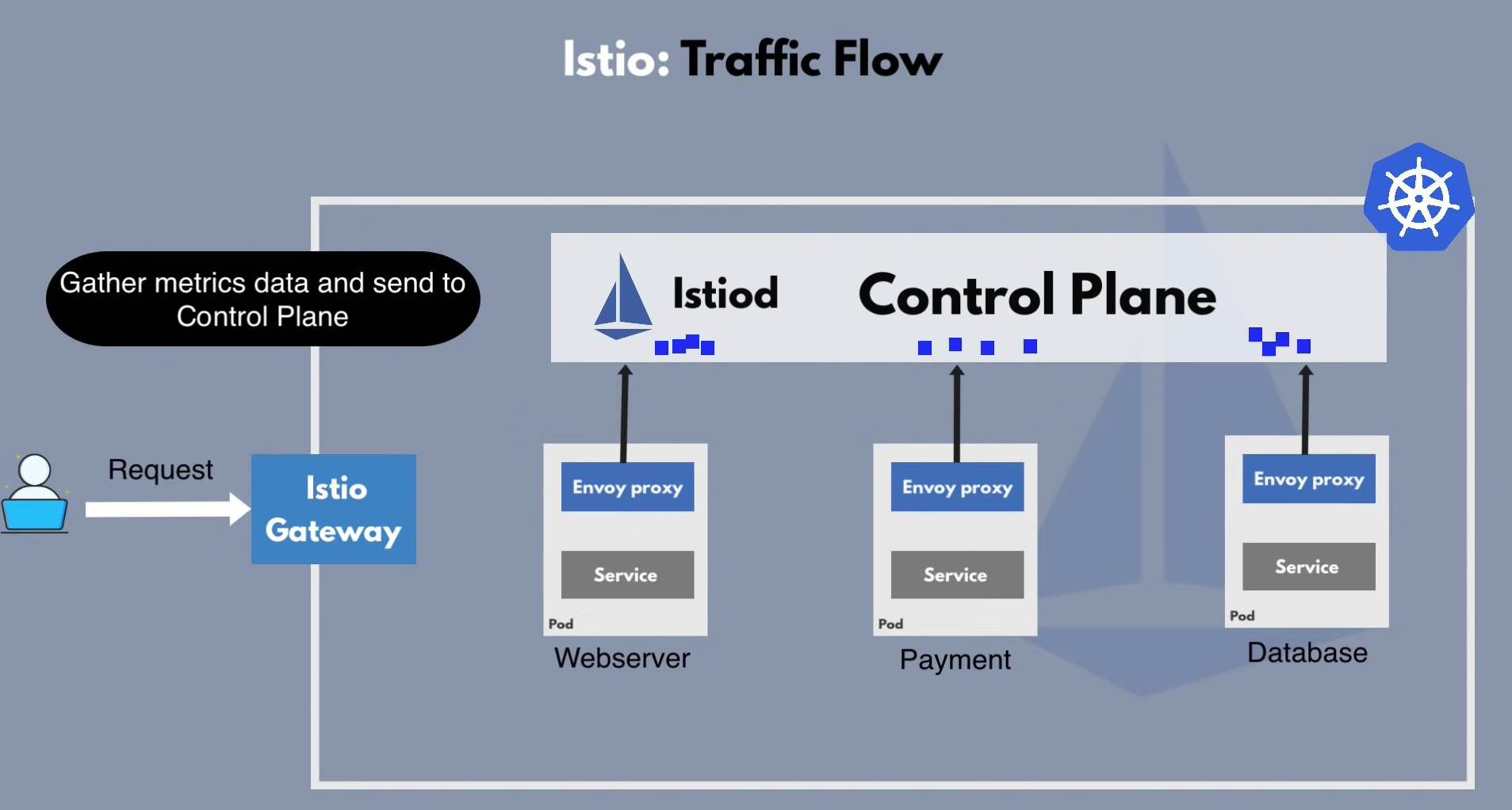
- Istiod = Control Plane
- Envoy proxy = Sidecar Proxy (Data Plane)
How to configure Istio 
- Istio is configured with K8s Yaml files
- Istio uses Kubernetes CustomResourceDefinitions (CRD)
- extending the Kubernetes API
- custom KUbernetes component/object for e.g. 3rd-party technologies (like Istio, Prometheus etc)
- can be used like any other native Kubernetes objects
Features of Istio 
- configuration
- service discovery
- certificate management
- gather telemetry data
Istio Ingress Gateway 
- entrypoint to your cluster
Reference 
- Youtube: Istio & Service Mesh - simply explained in 15 mins
- Youtube: Practice: Istio Setup in Kubernetes
4. Terraform 
Infrastructure as Code (IaC) 
- Coding the provisioning instead of using console from providers
- Can make any infrastructure components as code like database, network or even app configuration.
- By using scripts like shell, python is not easy and logic will be complicated
Types of IAC Tools 
- Configuration Management
- Ansible
- Puppet
- Server Templating
- Docker
- Packer
- Vagrant
- Provisioning Tool
- Terraform
- CloudFormation
What is Terraform 
- automate and manage your infrastructure, your platform and services that run on that platform
- open source
-
declarative
- Declarative = define What end result you want
- Imperative = define exact steps - How
- HashiCorp Configuration Language. e.g.:
- ```shell
Set provider 
provider "aws" { region = "us-west-2" }
Create EC2 instance 
resource "aws_instance" "example" { ami = "ami-0c55b159cbfafe1f0" instance_type = "t2.micro" key_name = "my-key-pair" vpc_security_group_ids = [ "sg-0123456789abcdef0" ]
tags = { Name = "example-instance" } }
Create ELB 
resource "aws_elb" "example" { name = "example-elb" availability_zones = ["us-west-2a", "us-west-2b"] listener { instance_port = 80 instance_protocol = "http" lb_port = 80 lb_protocol = "http" } }
Create S3 bucket 
resource "aws_s3_bucket" "example" { bucket = "example-bucket" acl = "private" tags = { Name = "example-bucket" } } ``` - Declarative Language to make current state to desired state
- init
- plan
- apply
- Everything is Resource
- Files
- ES2
- S3
- IAM groups
- Roles
- ...
HCL 
<block type> "<block label>" "<block label" {
  # block body
}


<block> <parameters> {
    key1 = value1
    key2 = value2
}
- Create a local file as a sample
➜  terraform  terraform init

Initializing the backend...

Initializing provider plugins...
- Finding latest version of hashicorp/local...
- Installing hashicorp/local v2.3.0...
- Installed hashicorp/local v2.3.0 (signed by HashiCorp)

Terraform has created a lock file .terraform.lock.hcl to record the provider
selections it made above. Include this file in your version control repository
so that Terraform can guarantee to make the same selections by default when
you run "terraform init" in the future.

Terraform has been successfully initialized!

You may now begin working with Terraform. Try running "terraform plan" to see
any changes that are required for your infrastructure. All Terraform commands
should now work.

If you ever set or change modules or backend configuration for Terraform,
rerun this command to reinitialize your working directory. If you forget, other
commands will detect it and remind you to do so if necessary.
➜  terraform  terraform plan

Terraform used the selected providers to generate the following execution plan. Resource actions are indicated with the
following symbols:
  + create

Terraform will perform the following actions:

  # local_file.pet will be created
  + resource "local_file" "pet" {
      + content              = "We love pets!"
      + directory_permission = "0777"
      + file_permission      = "0777"
      + filename             = "./pets.txt"
      + id                   = (known after apply)
    }

Plan: 1 to add, 0 to change, 0 to destroy.

─────────────────────────────────────────────────────────────────────────────────────────────────────────────────────────

Note: You didn't use the -out option to save this plan, so Terraform can't guarantee to take exactly these actions if you
run "terraform apply" now.
➜  terraform  terraform apply

Terraform used the selected providers to generate the following execution plan. Resource actions are indicated with the
following symbols:
  + create

Terraform will perform the following actions:

  # local_file.pet will be created
  + resource "local_file" "pet" {
      + content              = "We love pets!"
      + directory_permission = "0777"
      + file_permission      = "0777"
      + filename             = "./pets.txt"
      + id                   = (known after apply)
    }

Plan: 1 to add, 0 to change, 0 to destroy.

Do you want to perform these actions?
  Terraform will perform the actions described above.
  Only 'yes' will be accepted to approve.

  Enter a value: yes

local_file.pet: Creating...
local_file.pet: Creation complete after 0s [id=cba595b7d9f94ba1107a46f3f731912d95fb3d2c]

Apply complete! Resources: 1 added, 0 changed, 0 destroyed.
➜  terraform  terraform show
# local_file.pet:
resource "local_file" "pet" {
    content              = "We love pets!"
    directory_permission = "0777"
    file_permission      = "0777"
    filename             = "./pets.txt"
    id                   = "cba595b7d9f94ba1107a46f3f731912d95fb3d2c"
}
➜  terraform  ls
local.tf          pets.txt          terraform.tfstate
➜  terraform  cat pets.txt
We love pets!%
Naming Convention 
- main.tf - Main configuration file containing resource definition
- variables.tf - Contains variable declarations
- outputs.tf - Contains outputs from resources
- provider.tf - Contains Provider definition
Variable Definition Precedence 
export TF_VAR_filename=""- terraform.tfvars;
- terraform.auto.tfvars
terraform apply -var "filename=/root/best-pet.txt"
Reference 
5. Vault 
- Why do you need key vault
- Keeper is the enterprise version of Vault
Reference 
- Youtube | Practice: Kubernetes ConfigMap and Secretes as K8s Volumes
- Youtube | How to Get Vault Secrets into Kubernetes - YouTube
- How Vault works - 8'32"
6. Ansible 
- Visit Ansible Documentation.
Atlantis 
- Atlantis is another CD tool running in the CnC cluster that automates the terraform process
Reference 
kubespray 
7. Cluster API 
8. Vagrant 
ChatGPT: Vagrant is not specifically related to Kubernetes, but it can be used to set up and manage Kubernetes clusters for development or testing purposes.
Vagrant is an open-source tool that allows you to create and manage lightweight, reproducible, and portable virtual environments. These environments are created using virtualization technologies such as VirtualBox, VMware, or Docker, and can be easily provisioned with the necessary software packages and configurations needed for your application or system.
With Vagrant, you can define a set of virtual machines (VMs) that make up a Kubernetes cluster, and then use tools like kubeadm, kops, or kubespray to install and configure Kubernetes on those VMs. Vagrant also allows you to easily share these environments with others, as well as tear them down and recreate them as needed.
Using Vagrant to manage your Kubernetes clusters can be a good way to test and develop your applications in a safe and isolated environment, without the need for expensive hardware or complex setup processes. It can also help you avoid issues with different environments or configurations that can arise when working with multiple developers or teams.
Docker 
- Docker Tutorial for Beginners. 3hours Full Course
-
The difference between
docker runanddocker startdocker runstart container with certain paramsdocker startjust start existing containers- Docker Volume
- Folder in physical host file system is mounted into the virtual file system of Docker
9. Harness 
TBD
10. CRD 
- Resource
- a resource is an endpoint in the Kubernetes API that stores a collection of API object
- apps/v1 is API Endpoint group
- Deployment is resource - api object
- Custom Resource
- Customized Resources are extension of the Kubernetes API
- Once Custom Resource is created, can access using kubectl
- Provides declarative API
Prompt: What's the difference between api-resources and apiservices in kubernetes?
ChatGPT: In Kubernetes, API resources and API services are two different concepts, although they are related to the Kubernetes API server.
API Resources refer to the objects that can be managed by Kubernetes. Examples of API resources include pods, services, deployments, and configmaps. Each API resource is represented by a CustomResourceDefinition (CRD) in Kubernetes, which defines its structure and behavior.
API Services, on the other hand, are an abstraction layer that provides a stable endpoint for accessing Kubernetes API resources. API Services act as a load balancer for the Kubernetes API server, allowing clients to access the API server through a single endpoint, regardless of which node the API server is running on. This endpoint is typically exposed as a Kubernetes Service object with the type 'Service' and a selector that matches the API server pods.
In summary, API Resources define the objects that can be created, updated, and deleted within Kubernetes, while API Services provide a stable endpoint for accessing the Kubernetes API server.
Custom Resources 
Prompt: What is Custom Resources in Kubernetes
Custom Resources in Kubernetes are a way to extend the Kubernetes API by defining custom objects that can be managed using the Kubernetes API server. Custom Resources allow you to create your own objects with their own properties, status, and behaviors that can be used by other components in the Kubernetes ecosystem.
Custom Resources are defined using Custom Resource Definitions (CRDs), which are a way to define new object types in Kubernetes. Once a CRD is defined, Kubernetes automatically generates a RESTful API endpoint for managing objects of that type.
Custom Resources can be used to represent any type of application-specific data, such as databases, queues, or other stateful components. They can also be used to represent higher-level abstractions, such as a "Deployment" or "Cluster" that are composed of multiple Kubernetes objects.
Using Custom Resources in Kubernetes enables you to integrate your own applications and services more deeply with Kubernetes, and to manage them using the same tools and interfaces that you use to manage Kubernetes itself. It also allows you to create your own abstractions that can be used by other teams in your organization, making it easier to build and manage complex applications in Kubernetes.
Custom Resources Definition (CRD) 
- The CustomResourceDefinition API resource allows you to define custom resources
- Define CustomResourceDefinition using YAML
- Create Custom Resource using YAML
- Want Really CRDs to work like Pods?
- Once CRD is created, Create new Custom Controller on resource handling create/update/delete events
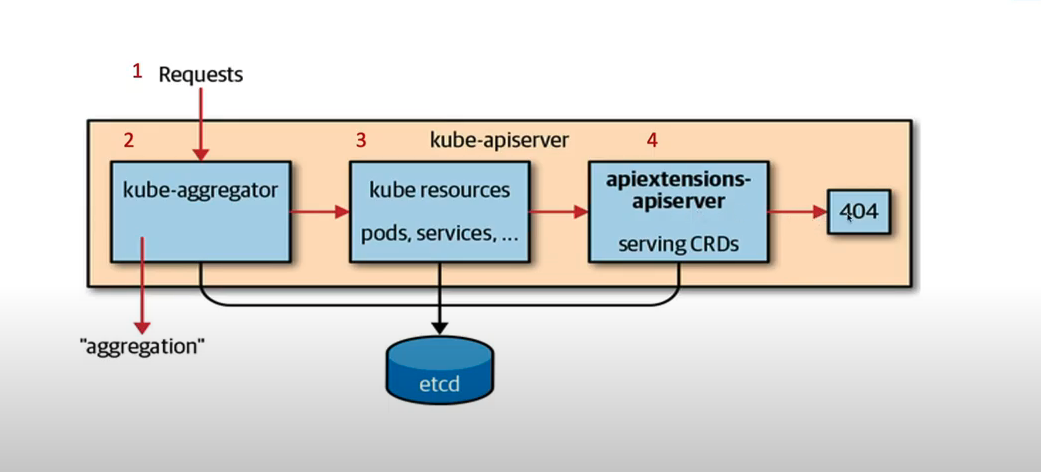
- Build Custom Controller & deploy to work CRD as aggregated API for Declarative Resources using kubectl
How CRD will work in Kubernetes 
11. Observability 
Kubernetes monitoring with Prometheus Architecture overview 
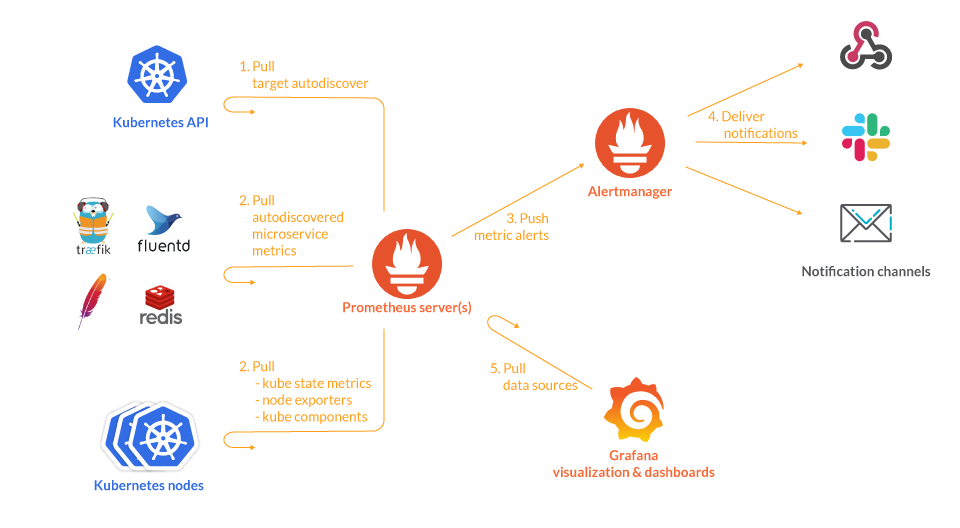
- Nod level metrics - Natively by cAdvisor, and addon as node-exporter
- Orchestration level metrics - kube-state-metrics
What is a Kubernetes Operator? 
Operators are Kubernetes-specific applications (pods) that configure, manage and optimize other Kubernetes deployments automatically
Using Kube-Prometheus-Stack to monitor Kubernetes 
Install Kube-Prometheus-Stack 
- create a monitoring namespace
- add prometheus-community repo helm repo add prometheus-community https://prometheus-community.github.io/helm-charts helm repo update prometheus-community
- use helm to install the kube-prometheus-stack helm install kube-prometheus-stack prometheus-community/kube-prometheus-stack -n monitoring
Setup Alertmanager, Grafana etc 
Prometheus and Alertmanager Web Panel kubectl port-forward svc/kube-prometheus-stack-prometheus 9090:9090 -n monitoring
kubectl port-forward alertmanager-kube-prometheus-stack-alertmanager-0 9093 -n monitoring
Grafana Web Panel kubectl port-forward svc/kube-prometheus-stack-grafana 3000:80 -n monitoring
user: admin
pass: prom-operator
- You can watch Key Metrics through Grafana
# Create *Hello* pods as sample application for Pometheus to monitor.

kubectl create deployment hello-minikube1 --image=kicbase/echo-server:1.0
kubectl expose deployment hello-minikube1 --type=LoadBalancer --port=8080
Reference 
- Repo: kube-state-metrics
- Doc: Kubernetes Monitoring
- Doc: Kubernetes Observability
- Doc: Prometheus metrics type
- Blog : Kubernetes best practices for monitoring and alerts **
- Youtube: Best Practices in Monitoring a Kubernetes Cluster with Prometheus, Grafana and Loki
Reference 
- Github: docker development youtube series
- Youtube: Introduction to HashiCorp Vault to Kubernetes for beginners
- Doc: How to Use minikube for Local Kuberntes Development and Testing
- Youtube | Practice: Learn Kubernetes by Minikube
- Youtube | Practice: The complete course to getting started with Kubernetes
- Youtube | Practice: Complete Kubernetes Tutorial for Beginners
- Interactive Practice
Kind 
kind is a tool for running local Kubernetes clusters using Docker container “nodes”. kind was primarily designed for testing Kubernetes itself, but may be used for local development or CI.