Mybatis Generator
This guide provides how to use Mybatis Generator in your project. 
Introduction 
As we see, we have a lot of low usability and duplicate sql queries. Actually we can use example bean to query one result, and don't need to query the result by id / name / other fields in different sql queries.
Mybatis Generator (MBG) is a code generator for MyBatis. It will generate code for all versions of MyBatis.
It will introspect a database table (or many tables) and will generate artifacts that can be used to access the table(s). This lessens the initial nuisance of setting up objects and configuration files to interact with database tables. MBG seeks to make a major impact on the large percentage of database operations that are simple CRUD (Create, Retrieve, Update, Delete). You will still need to hand code SQL and objects for join queries, or stored procedures.
Configurations 
To get up and run quickly with MyBatis Generator (MBG), follow these steps:
Create one generatorConfig xml file 
I suggest you put the generatorConfig xml in ./resources/easy-code. If don't have this folder path, maybe you can create one.
Here you can download Generator Config Sample.
I will introduce some key points on how to configure generatorConfig xml. Below I use MCT project configuration as example.
-
Import the property if need to read some parameters by configuration, like DB configuration.
xml <properties resource="api.properties"/> -
When one table name or field name is SQL keyword, we can configure below value to true.
xml <property name="autoDelimitKeywords" value="true"/> -
The default value are double quote for beginningDelimiter and endingDelimiter, but we need to write default value which is back single quote in MySQL. Others, like Oracle and Postgresql, we can comment them and keep default double quote.
xml <property name="beginningDelimiter" value="`"/> <property name="endingDelimiter" value="`"/> -
Configure the example bean generator path.
xml <plugin type="com.itfsw.mybatis.generator.plugins.ExampleTargetPlugin"> <property name="targetPackage" value="com.webex.mct.platform.dao.example"/> </plugin> -
We can use ${} to get configurations from application.properties.
<jdbcConnection driverClass="${pg_driver}" connectionURL="${pg_url}" userId="${pg_username}" password="pass"> </jdbcConnection> -
Configure the POJO generator path.
<javaModelGenerator targetPackage="com.webex.mct.platform.entity" targetProject="src/main/java"/> -
Configure the DAO XML generator path.
<sqlMapGenerator targetPackage="com.webex.mct.platform.dao" targetProject="src/main/java"/> -
Configure the DAO interface generator path.
<javaClientGenerator targetPackage="com.webex.mct.platform.dao" targetProject="src/main/java"/> -
Configure the POJO, DAO XML, and table names which you want to generate.
<table domainObjectName="MCTAgent" enableCountByExample="false"
  enableDeleteByExample="true" enableInsert="true"
  enableSelectByExample="true" enableUpdateByExample="true"
  mapperName="MCTAgentDao" selectByExampleQueryId="false"
  tableName="mct_agent">
  <property name="useActualColumnNames" value="false"/>
  <generatedKey column="id" sqlStatement="select nextval('S_MCT_AGENT')"/>
  <columnOverride column="impactCI" javaType="java.lang.String" jdbcType="VARCHAR"/>
</table>
Configure Mybatis Generator dependency and plugin 
-
The dependency configuration is as below.
xml <dependency> <groupId>org.mybatis.generator</groupId> <artifactId>mybatis-generator-core</artifactId> <version>1.3.5</version> </dependency> -
The plugin configuration is as below. Also, you need to add the dependencies which are used during generating.
Please pay attention to configure the correct generatorConfig xml path as well.
xml <plugin> <groupId>org.mybatis.generator</groupId> <artifactId>mybatis-generator-maven-plugin</artifactId> <version>1.3.5</version> <executions> <execution> <id>Generate MyBatis Artifacts</id> <goals> <goal>generate</goal> </goals> </execution> </executions> <dependencies> <dependency> <groupId>com.itfsw</groupId> <artifactId>mybatis-generator-plugin</artifactId> <version>1.2.20</version> </dependency> <dependency> <groupId>org.postgresql</groupId> <artifactId>postgresql</artifactId> <version>9.3-1102-jdbc41</version> </dependency> </dependencies> <configuration> <verbose>true</verbose> <overwrite>true</overwrite> <configurationFile>src/main/resources/easy-code/generatorConfig.xml</configurationFile> </configuration> </plugin>
Mybatis Generator Outputs 
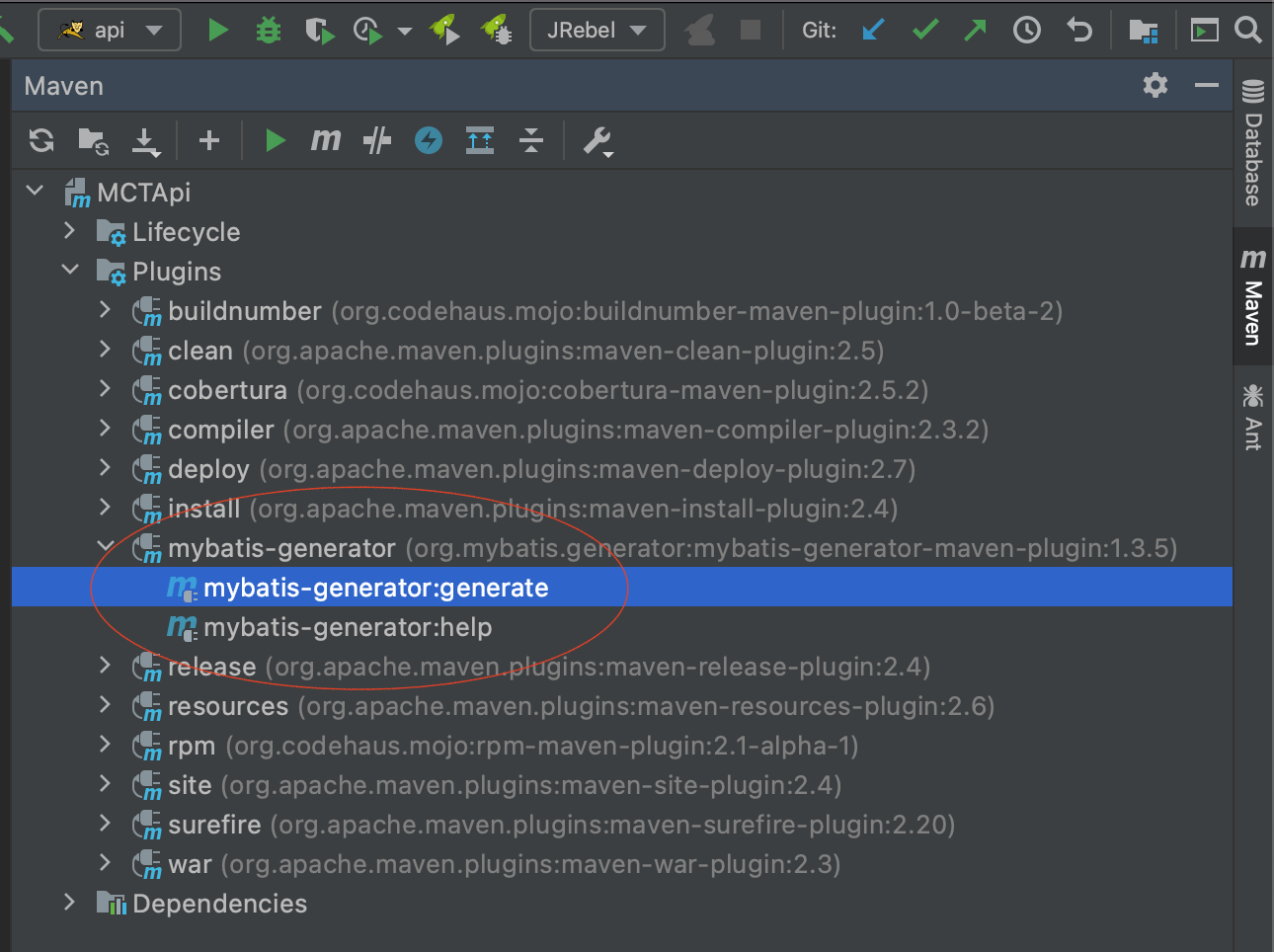
How to generate by Mybatis generator plugin 
- Click below marked place to generate.
What are outputs after generating 
- Below we will see POJO, Example bean, DAO interface, and DAO XML.



How to use example to query list result set 
public List<MCTAgent> queryMCTAgentsByAgentName(String agentName) throws PlatformException {
    try {
        MCTAgentExample example = new MCTAgentExample().createCriteria().andAgentNameEqualTo(agentName).example();
        List<MCTAgent> mctAgents = mctAgentDao.selectByExample(example);
        return mctAgents;
    } catch (Exception e) {
        logger.error("query mct agents failed error.", e);
        throw new PlatformException("query mct agents failed error.", e);
    }
}