UX Simulator
Introduction 
UX Simulator is a technique and solution used to track the performance and availability of an application or service by simulating user interactions to ensure that all components of the system are functioning correctly and efficiently from start to finish.
Comparing with other monitoring approaches like API monitors, metrics/logs-based monitoring etc, UX Simulator or simulating user experience monitoring monitoring can offer a holistic view by validating the workflow from the user's perspective. This user-centric approach ensures that every component works harmoniously in real-world scenarios, which might not be captured through traditional white-box monitoring techniques that require knowledge of the internal workings of the system.
In contrast, simulating UX monitoring is often classified as black-box testing, where the internal structure is not known to the tester. Black-box monitoring assesses the system's external behavior, which is crucial for understanding the actual user experience.
Following an extensive evaluation of vision-based behavior solutions, we have identified SikuliX as the primary library for implementing our automated end-to-end synthetic monitoring.
For a comprehensive understanding of the solution's appearance and functionality, please refer to this Vidcast which demonstrates the fully automated solution. 📹✨ Highly recommended to watch! 👍
SikuliX 
SikuliX automates anything you see on the screen of your desktop computer running Windows, Mac or some Linux/Unix. It uses image recognition powered by OpenCV to identify GUI components.
- Besides locating images on a screen SikuliX can run the mouse and the keyboard to interact with the identified GUI elements. This is available for multi monitor environments and even for remote systems with some restrictions.
- SikuliX comes with basic text recognition (OCR) and can be used to search text in images. This feature is powered by Tesseract.
- SikuliX supports as scripting languages like Python2.7, Ruby1.9-2.0, js, JAVA1.7+.
- SikuliX can be used with the respective emulators on a desktop computer or based on VNC solutions.
Prof of Concept 
In March, 2024, we have completed a PoC to run the create meeting via web case on a Mac (as the dispatcher) and connected it to a Windows server (as the agent) via VNC. Using simple code and the basic functions of SikuliX (keyboard typing and image recognition click), we have proven that SikuliX is capable of achieving what we want.
Capability Analysis 
Can and Can't 
- Focus on screen-based user behavior testing exclusively.
- Unable to handle out-of-screen behavior like Duo, email. Will need extra approach to achieve.
- Excludes testing media quality levels.
- For performance monitoring, to make the results more accurate, it is necessary to combine them with other metrics such as network status and test server status, etc.
- The cases rely on UI icons/images and need to be updated accordingly if there are significant UI changes (leverage AI to lower false positive in future).
- The cases should be recorded based on the test server's resolution, theme, style, etc., and ensure that all test server groups have the same configuration.
Monitoring scope 
There are already comprehensive test cases for each product feature. This end-to-end Synthetic Monitoring solution will NOT encompass all UX features; it will focus solely on Core Features displayed on status.webex.com.
Delivery Plan 
As the core features of Webex, we will start with below use case to be applied with this new end-to-end synthetic monitoring:
- Start meeting via web/app (browser initiated meeting) (done)
- Start meeting via client/app (Webex App initiated meeting) (done)
- Share content in meeting (Webex Messaging) (done)
Code Repository 
In Phase 1, the code repository will be in Monitoring/e2e_synthetic. In Phase 2, it will be part of MCT java plugin code repository.
Observability 
Timeline 
Phase 1: Run as standalone service (May 15, Accomplished) 
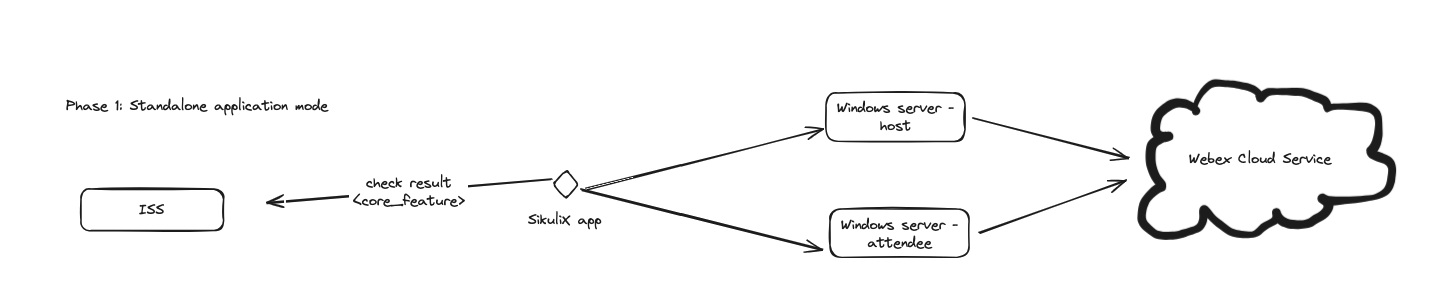
Run the service on 1 Linux server as a dispatcher and connect to 2 Windows servers using VNC to run the test case. Write the test fail/recover result as alerts to ISS.
- The result will be in plain text without rich format.
- The proper tag should be passed along with the result for ISS to categorize.
Tasks:
- Test case for create meeting via web - Daniel
- Test case for start meeting via client - Daniel
- VNC session M-N mode research/verify - Jimmy
- Research text recognition (OCR) to help icon finding more accurate - Jimmy
- Key metrics collection to measure key result - Jimmy
- Accident detect and recover when run Sikulix case
- Test servers initialize
- Project build and deploy
- Send test result to ISS
- ISS provide API to receive alerts
Additional:
- Screen capture for failed cases
- Screen recording for all cases
- Integration with AI recognition to doule check failed cases
Phase 2: Run as MCT Plugin (July 30 October 31) 

The development of a new MCT plugin utilizing SikuliX will encompass the following:
- Accept test commands configured in a JSON context, which includes login information, site URL, interval, test case ID, and other relevant parameters.
- Establish a connection to the node server and execute the test cases, specifically targeting Windows environments.
Additionally, the MCT dispatcher service will be enhanced to support the new SikuliX plugin.
The highlevel design will be like below:
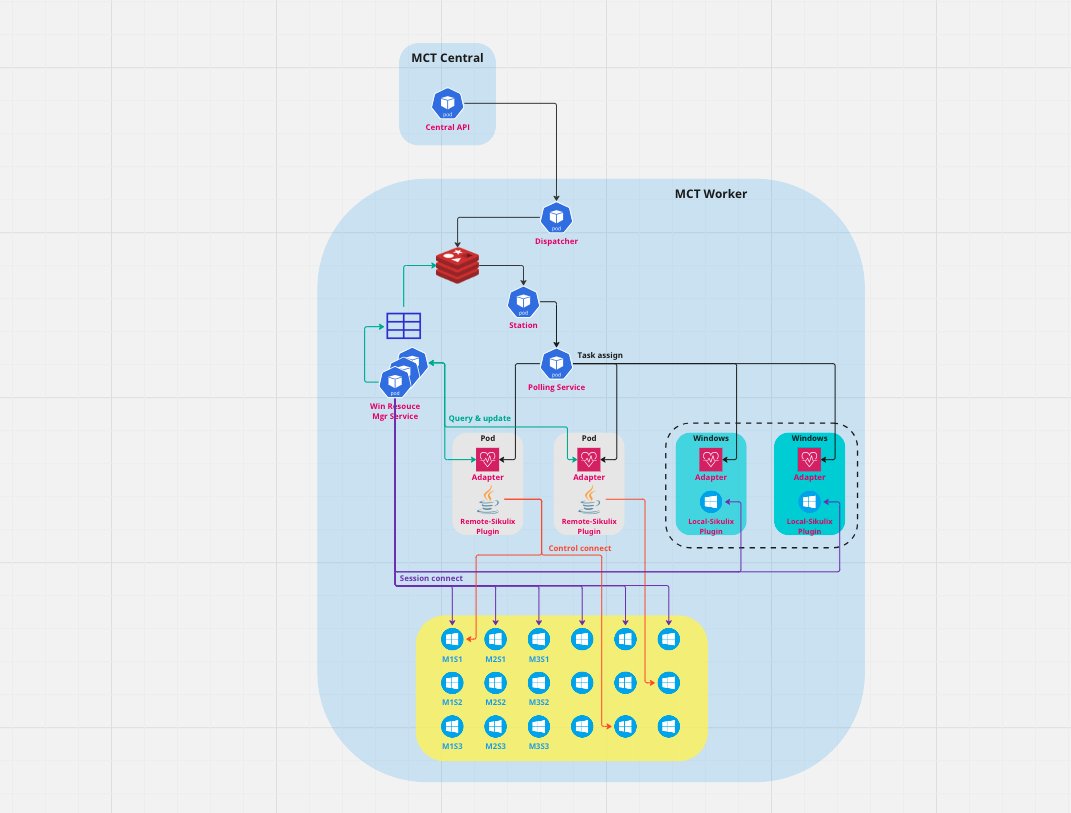
Schedule was pushed from July to Oct because of priority adjustment for TAP capability buildup
Phase 3: Implementation of Modularized Test Cases for MCT Plugin (Pending on Phase 2) 
Building upon Phase 2, the enhanced MCT SikuliX Plugin will support the execution of modularized test cases.
Test cases can be defined in JSON format by selecting various modules, such as login, join meeting, mute, and hands up.
The test results will provide comprehensive details, including screen captures and recordings.
Furthermore, a robust mechanism will be implemented to detect and filter false alerts, and to notify the responsible owner when a test case requires updating.