Centralized Account Management Design
Meta 
| Feature ID | WBXPLTFM-95798 |
|---|---|
| Feature Name | [MCT] MCT account centralize management research |
| Dev Team | MCT |
| Developers | Rocky Chi |
| Delivery Manager | Bernie Bobnar |
| Scrum Master | Selly Huang |
Background 
Lots of MCT tests require authentication, and related username / password are configured as parameters either on zone level or check level. On the other hand, major of the account password needs regular update; it would be a huge effort to do it if an account is configured for a hundred of tests. We need a mechanism to centralize manage those accounts, so that one time modification is enough for each account refresh.
Where to Manage Accounts 
There shall be a place to manage all the accounts, so we need a new page on MCT.
Account Properties 
- ID: required, the record id, should be auto generated.
- Account Name: required, the username
- Account Password(encrypted): required, the user password
- Account ID: optional, on some cases, an account may have an id
- Type: optional, categorize the account, like generic account, ci account...
- Tag: optional, label of the account
- Memo: optional, user can add some descriptions for better understanding / remember
- Owner: required, AKA the creator
- Business Services: required, current account limited to which service
- Last Modified By: required, modification history for audit.
Note: Account Name + Tag can uniquely identify a record. (Add Type)
DB Table(Oracle) 
CREATE TABLE "MCT_ACCOUNT_INFO" (
    "ID" NUMBER(10,0), -- as well as sequence SEQ_MCT_ACCOUNT_INFO
    "ACCOUNT_NAME" VARCHAR2(100) NOT NULL,
    "ACCOUNT_PASSWORD" VARCHAR2(100) NOT NULL,
    "ACCOUNT_ID" VARCHAR2(100) DEFAULT '',
    "TYPE" VARCHAR2(100) DEFAULT 'Default', -- TBD, can list all the types
    "TAG" VARCHAR2(100) DEFAULT '',
    "OWNER" VARCHAR2(100) NOT NULL,
    "LAST_MODIFIED_BY" VARCHAR2(100) NOT NULL,
    "MEMO" VARCHAR2(100) DEFAULT '',
    "BUSINESS_SERVICES" VARCHAR2(1000) DEFAULT '',
    PRIMARY KEY ("ID"),
    CONSTRAINT ACCOUNT_UNIQUE UNIQUE (ACCOUNT_NAME, TAG)
);
COMMENT ON COLUMN MCT_ACCOUNT_INFO.BUSINESS_SERVICES IS 'business service uuid list seperated by comma';
Brief Mockup 
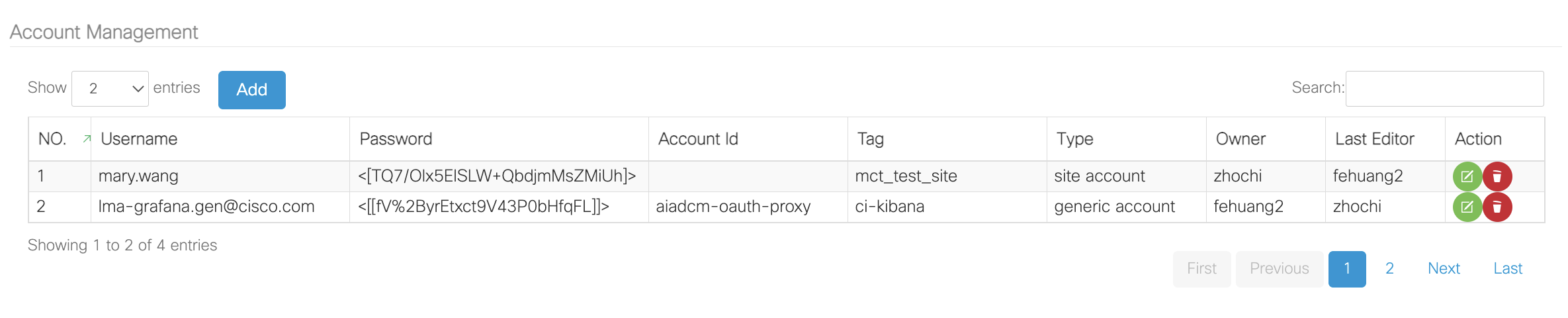
List all the account info in DB, field Owner and Last Editor should be auto generated.
Action of Edit 
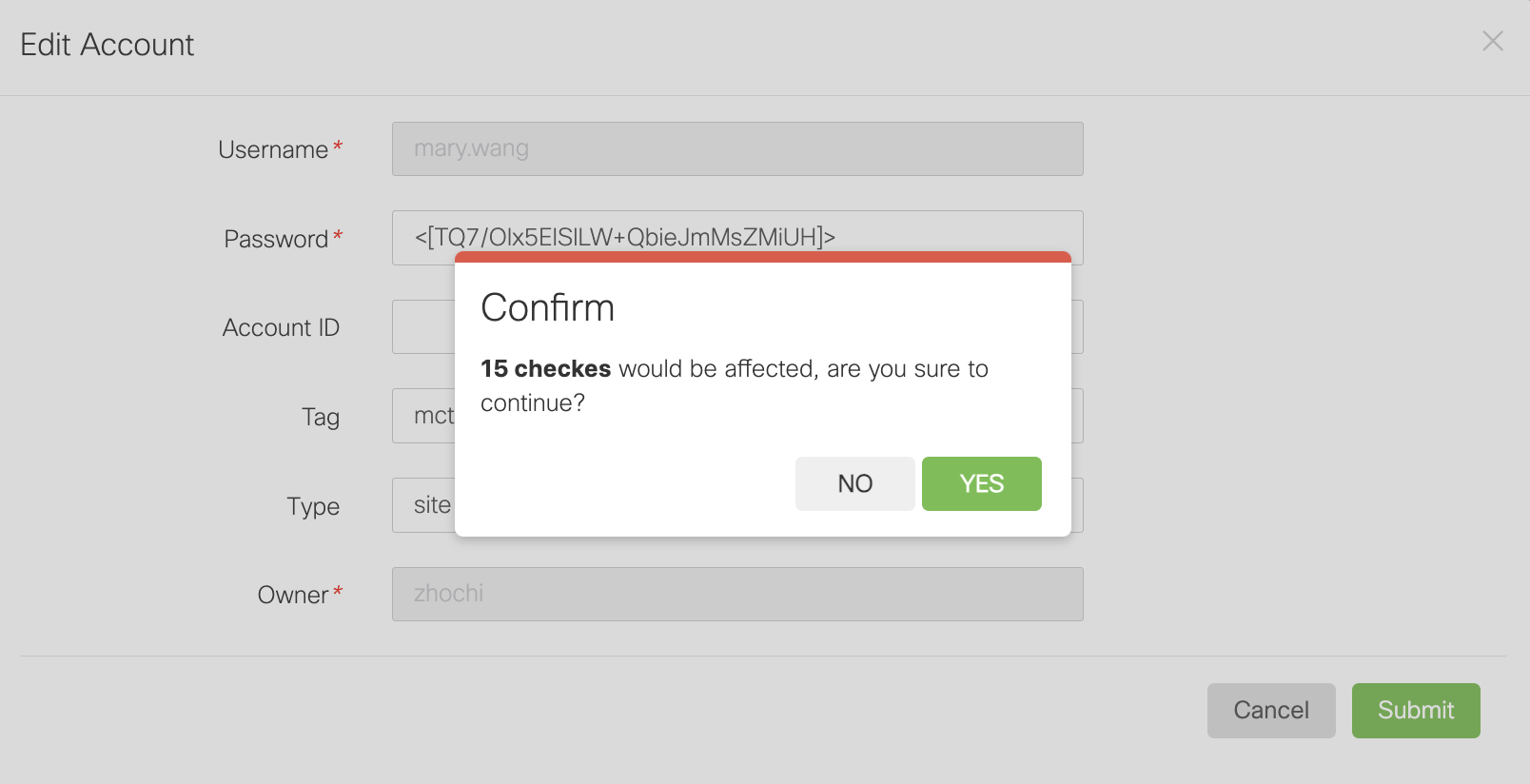
Confirmation will be needed before edit, If the affected checks can be listed would be better, update should contain below steps in same transaction:
- update table
MCT_ACCOUNT_INFO. - update
MCT_SERVER_PARAMETERfor linked account parameter (seelinkedAccountIdon below section). - update
MCT_ZONE_PARAMETERfor linked account parameter (seelinkedAccountIdon below section).
Action of Delete 
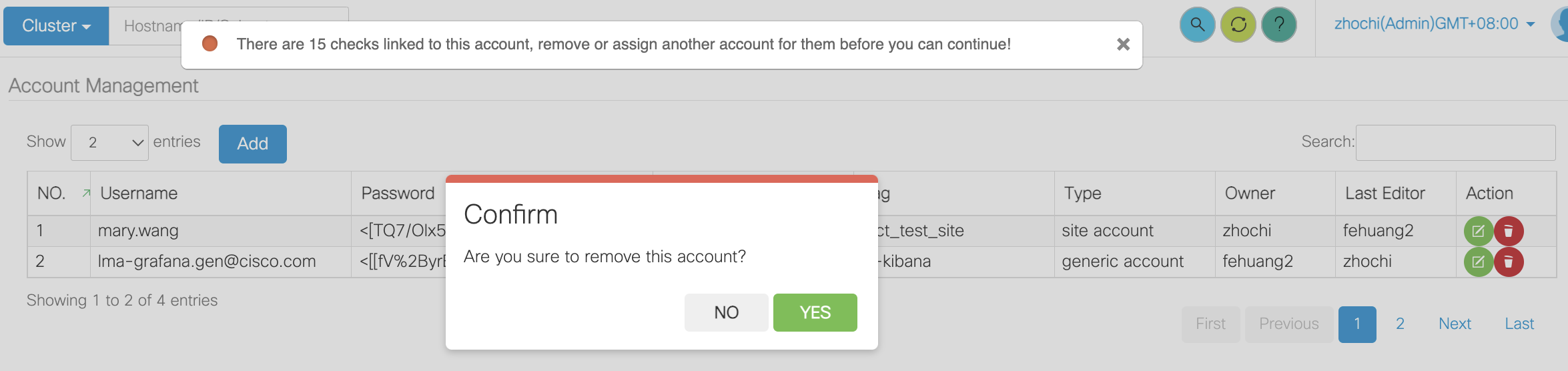
Confirmation will be needed before delete, and if there are checks linked to current account, delete will be not allowed.
How to Identify Accounts 
In MCT, parameters are defined in plugin configuration file, supported parameter types are text, textarea, number, password, checkbox, select. For each account (username password pair), there should be a field password, here comes the question: how do we identify the field username? Solution is, add a parameter type username, and link it to a password. Normally checkItem is used to list the options for target type, and is only available when type is checkbox and select. Now, if you need to set an account, follow below steps:
- Set a
passwordfield with proper key, let's saypwd_key. - Set a
usernamefield with attributepwd-keylinks to above password keypwd_key, to create an account pair.
Configuration Example 
<parameter key='site_url' name='Meeting webapi url' type='text' desc='the webex meeting web api url' check-regular=''>https://api.ciscospark.com</parameter>
<!-- pay attention to "checkitems" attribute -->
<parameter key='site_usr' name='Username' type='username' desc='the webex meeting user name' pwd-key='site_pwd' check-regular=''></parameter>
<parameter key='site_pwd' name='Password' type='password' desc='the webex meeting user password' check-regular=''></parameter>
Note: Documentation may be needed for above change, including but not limited to Plugin Parameter Manual.
Page Example 

Note:
- Changes on Plugin List page will be needed, which is, show
CheckItemattribute as well when type istext.- Plugin register logic should change too.
How to Link Account with Check / Zone 
We have our accounts being centralized managed so far, but it is still isolated, associating with check / zone is the final step.
Identify Account When Adding Check / Zone 
After getting all the check / zone parameters on add / update, if all below cases are matched, consider it is an account: - identify by type = username
- there is a parameter with type
password, assuming it's key is pwd. - there is a parameter with type
text, and it hascheckItem. - the
checkItemvalue for it is the key ofpasswordparameter pwd.
Behavior When Account Detected 
Even plugin parameter shows there is account, user still can choose not to use centralize managed account, it is also a flexible treatment for compatible reason. As a result, we need an additional parameter to deal with it - linkedAccountId. If linkedAccountId == -1, there is no account linked, username and password are all individual defined; if linkedAccountId > 0, linkedAccountId will point to target account.
Brief Mockup 
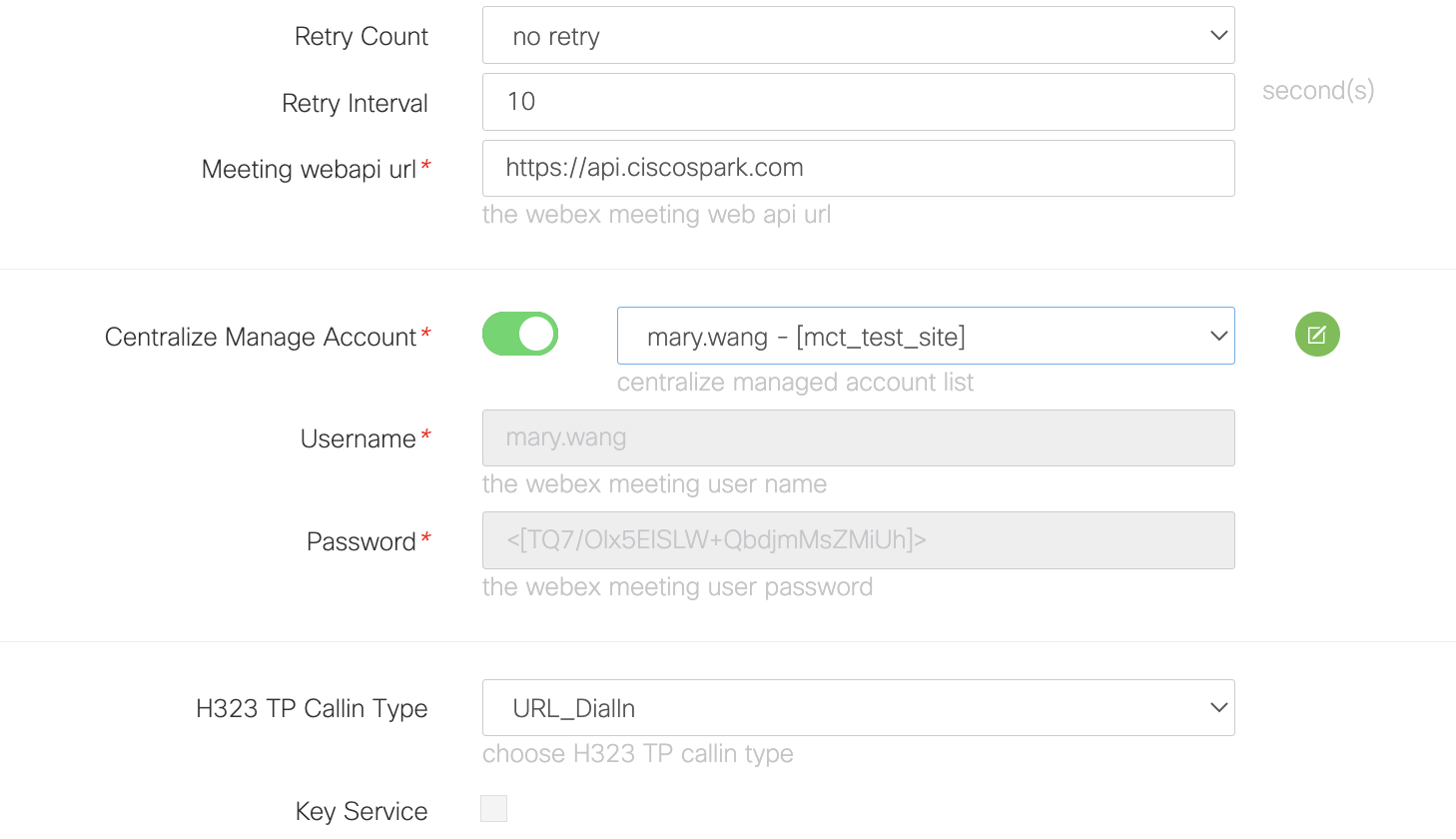
There will be a switch to toggle between Centralize Managed Account and Individual Account, below mockups are based on Check Level Configuration.
Centralize Management Enabled 
- Show account select, disable username and password input.
- The value of username and password input should be changed on account select change.
- The value of account select need to be cached in above-mentioned
linkedAccountId, which shall be passed to DB through API. - Show Edit Account button (Refresh Account) linking to Account Management Page.
Centralize Management disabled 
- Hide account select, enable username and password input.
- Value of
linkedAccountIdshould be set to-1. - Hide Edit Account button.
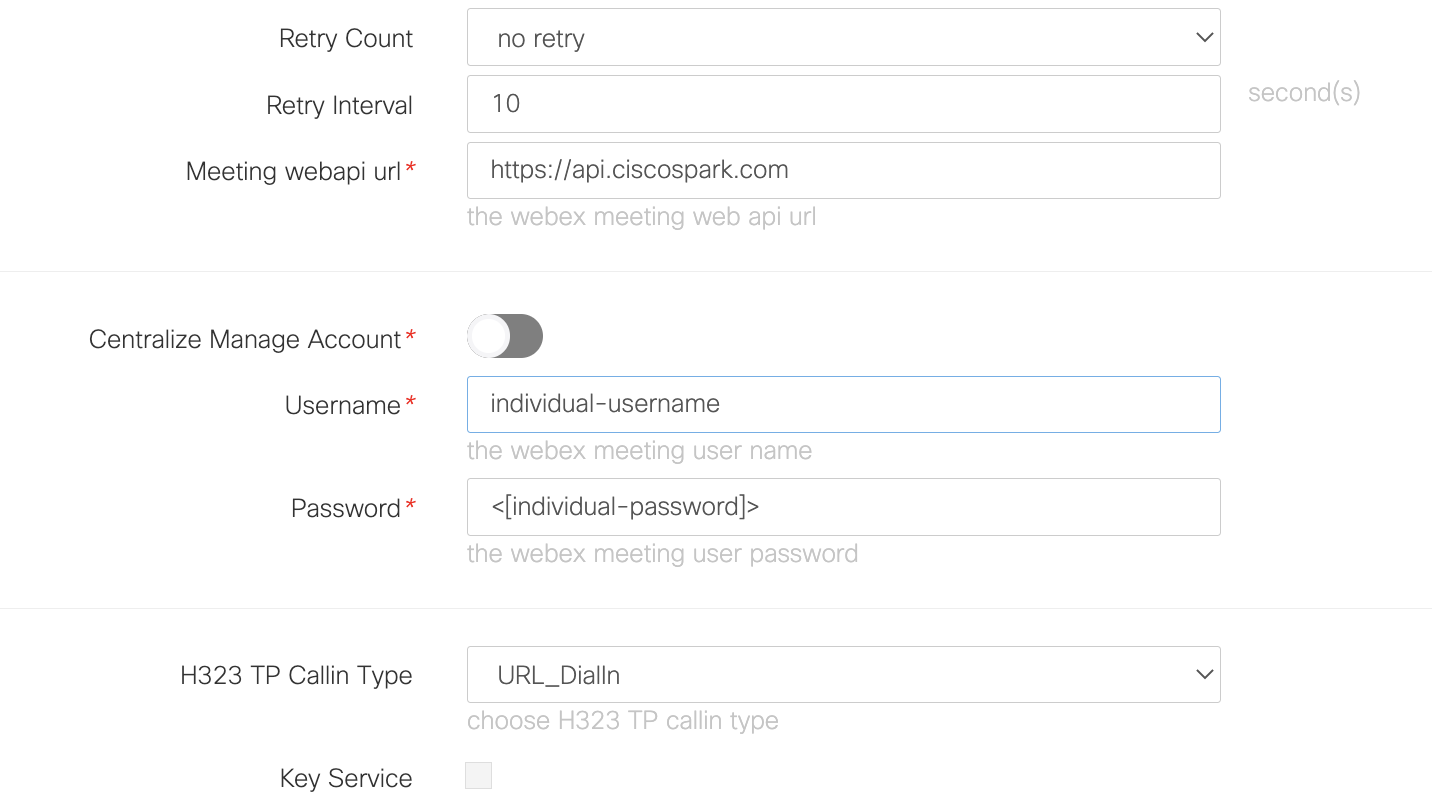
Note: on this situation, there is no difference with MCT normal setting.
Other Highlight 
Validation for account modification on both frontend and backend is needed: if target account is centralize managed (linkedAccountId > 0), then direct update for single parameter would not be allowed.
Conclusion 
Brief modification:
- Add a page / table to centralize manage accounts.
- Add an attribute
checkItemfor plugintextparameter, and ponit it to apassword, to define a MCT Account (pair). - When configuring zone / check, predefined accounts could be selected and linked to current check.
Benefit of this solution:
- Least business logic intrusive.
- Friendly for old plugin migration (compatible).
- Easy to implement and relatively fewer code changes.
Open Discussion 
- Is account validation check needed? - Not needed
- How to better deal with privilege control?
- Supported plugin list
- Linking: Show all the account list on adding check, after on-boarding business service, add privilege check by service; Adding: add privilege check by business service, service owner / service admin can only edit their own accounts, refer to Service Impact Rule.