Introduction of Java Plugin Executor
As part of the MCT Kubed Onboarding process, the execution logic of Java plugins should be moved to an independent Plugin Adapter. For performance considerations, plugins executing by java -jar is not allowed. Therefore, we need to migrate the Java execution solution in Cloud Agent to a new module named Java Plugin Executor.
Java Plugin Executor 
The Java Plugin Executor runs as a Java Daemon and exposes several interfaces. It serves as middleware between the Plugin Adapter and Java Plugins.
When the Adapter receives a task from the Polling Service, it performs a HTTP request to the Java Plugin Executor. The Executor then attempts to find and load the Java Plugin related to current task. If the Plugin is successfully loaded, the Executor calls Plugin's entrance method to invoke the task's main logic..
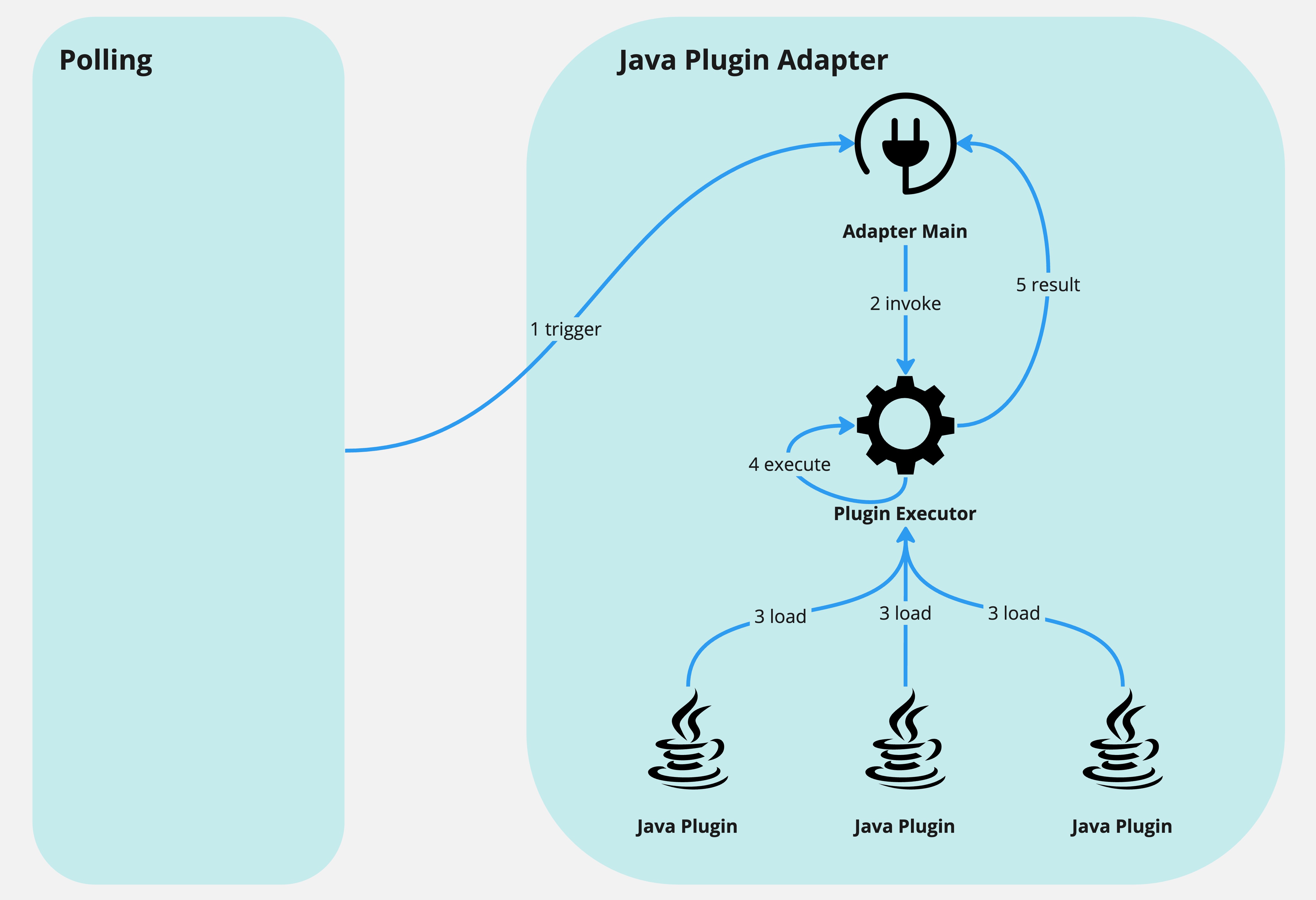
Executor Functionalities 
Java Plugin Management 
Each java -jar command triggers a JVM to execute the main logic of the Jar, which is resource-consuming. To enhance performance, the Java Plugin Executor serves as a platform to run these plugins. This approach eliminates a lot of JVM bootstrap / destroy logics.
At present, the Executor utilizes a third-party library, PF4J, to manage plugins. It encapsulates ClassLoader logic and presents simple interfaces to load and unload Jars using paths. However, there is no firm dependency between them. Instead, the Executor maintains an abstract layer for plugin access (Adapter Pattern), and PF4J is merely the implementer in the current version. It could be easily switched to another Class-Loading / Plugin-Management library if needed.
Task Management 
The Executor supports the synchronous and asynchronous execution of tasks.
- Sync: When a task is submitted, the Executor waits until task execution is finished and returns the result.
- Async: The Executor breaks immediately after the task is submitted and returns the task id. Clients need to query the result themselves later on.
Both sync and async tasks are executed in thread pools. One plugin type corresponds to one thread pool, meaning tasks of the same plugin type are executed in the same pool, while different types are executed in different pools.
Tasks are not allowed to occupy a thread permanently. By default, if a task remains active for 10 minutes, it is marked as Timeout and canceled. For memory LRU considerations, a task will be EOL after 12 minutes, and related context will be discarded.
Interfaces for Adapter 
The Executor provides several interfaces for the Adapter:
- API to execute tasks synchronously: execute the task and wait for the result.
- API to execute tasks asynchronously: submit the task and return the task id.
- API to query task status: query task result / status by task id.
- API to cancel tasks: cancel a task by task id.
Executor Interfaces 
POST /executor/task/execute-sync?timeout={timeout} 
Description 
Execute the task synchronously.
Parameters 
timeout: task execute timeout time.
Body 
{
    "trackingId": "111111111", // optional, if not provided, will auto generate a id internally.
    "parameters": "-url \"www.google.com\" -positiveMatch \"google\" -foo \"bar\"", // required, task execute parameters
    "pluginLocation": "/opt/webex/mct/plugin/ESCountMonitor/ESCountMonitor/", // required, plugin absolute path
    "zoneTypeName": "ESCountMonitor", // optional, if not provided, will parse from `pluginLocation`
    "serverTypeName": "ESCountMonitor", // optional, if not provided, will parse from `pluginLocation`
    "fileName": "ESCountMonitor-1.0.0.jar" // required, plugin jar name
}
Response 
- 200 OK
{
    "errorCode": "OKOKOK",
    "localIp": "10.140.212.59",
    "errorMessage": "OK",
    "taskId": "111111111",
    "status": "COMPLETED", // INIT, IN_PROGRESS, COMPLETED
    "result": { // empty if `status` is not "COMPLETED"
        "code": 5, // 0: SUCCESS, 5: INTERNAL_ERROR, 478: IGNORE, other: COMMON_ERROR
        "message": "Command Line: [-authMode, \"2\", -username, \"lma-grafana.gen@cisco.com\", -password, \"P@ss!@#20220620\", -scope, \"#scope#\", -targetEnv, \"2\", -baseUrl, \"es-api.wx-common-id.aiadlogint-agg1.prod.infra.webex.com\", -topic, \"logstash-*\", -svrType, \"ydrsvr\", -message, \"#message#\", -pastMins, \"1\", -times, \"1\"] [Station IP = 10.242.44.11] [Station Name = mtam1mul001.webex.com] [Zone ID = 0] [Server ID = 0] [UUID = a6cf9d03-2603-45c3-9722-f60e2a45ad2e] [Thread ID = 1102779] [Start time = 03:01:45]\n Monitor main initialized successfully, parameter args: Parameter { username='lma-grafana.gen@cisco.com', targetEnv='2', baseUrl='es-api.wx-common-id.aiadlogint-agg1.prod.infra.webex.com', topic='logstash-*', syntax='0', svrType='ydrsvr', alertingRule='0', message='#message#', times='1', pastMins='1', dsl='null'}\n Failed to run monitor! com.webex.mct.exception.MonitorException: Failed to get sso session.\n Monitor main SELF_ERROR 5"
    }
}
- 400 Bad Request
{
    "errorCode": "INVALID_INPUT_PARA",
    "localIp": "10.140.212.59",
    "errorMessage": "`parameters` is required."
}
- 500 Server Internal Error
{
    "errorCode": "NONONO",
    "localIp": "10.140.212.59",
    "errorMessage": "Executor internal error"
}
POST /executor/task/execute-async 
Description 
Execute the task asynchronously.
Body 
{
    "trackingId": "111111111", // optional, if not provided, will auto generate a id internally.
    "parameters": "-url \"www.google.com\" -positiveMatch \"google\" -foo \"bar\"", // required, task execute parameters
    "pluginLocation": "/opt/webex/mct/plugin/ESCountMonitor/ESCountMonitor/", // required, plugin absolute path
    "zoneTypeName": "ESCountMonitor", // optional, if not provided, will parse from `pluginLocation`
    "serverTypeName": "ESCountMonitor", // optional, if not provided, will parse from `pluginLocation`
    "fileName": "ESCountMonitor-1.0.0.jar" // required, plugin jar name
}
Response 
- 200 OK
{
    "errorCode": "OKOKOK",
    "localIp": "10.140.212.59",
    "errorMessage": "OK",
    "id": "111111111" // taskId
}
- 400 Bad Request
{
    "errorCode": "INVALID_INPUT_PARA",
    "localIp": "10.140.212.59",
    "errorMessage": "Parameter `fileName` and `pluginLocation` are both required."
}
- 500 Server Internal Error
{
    "errorCode": "NONONO",
    "localIp": "10.140.212.59",
    "errorMessage": "Executor internal error"
}
GET /executor/task/result/{taskId} 
Description 
Get task result by id.
Parameters 
taskId: task id.
Response 
- 200 OK
{
    "errorCode": "OKOKOK",
    "localIp": "10.140.212.59",
    "errorMessage": "OK",
    "taskId": "111111111",
    "status": "COMPLETED", // INIT, IN_PROGRESS, COMPLETED
    "result": { // empty if `status` is not "COMPLETED"
        "code": 5, // 0: SUCCESS, 5: INTERNAL_ERROR, 478: IGNORE, other: COMMON_ERROR
        "message": "Command Line: [-authMode, \"2\", -username, \"lma-grafana.gen@cisco.com\", -password, \"P@ss!@#20220620\", -scope, \"#scope#\", -targetEnv, \"2\", -baseUrl, \"es-api.wx-common-id.aiadlogint-agg1.prod.infra.webex.com\", -topic, \"logstash-*\", -svrType, \"ydrsvr\", -message, \"#message#\", -pastMins, \"1\", -times, \"1\"] [Station IP = 10.242.44.11] [Station Name = mtam1mul001.webex.com] [Zone ID = 0] [Server ID = 0] [UUID = a6cf9d03-2603-45c3-9722-f60e2a45ad2e] [Thread ID = 1102779] [Start time = 03:01:45]\n Monitor main initialized successfully, parameter args: Parameter { username='lma-grafana.gen@cisco.com', targetEnv='2', baseUrl='es-api.wx-common-id.aiadlogint-agg1.prod.infra.webex.com', topic='logstash-*', syntax='0', svrType='ydrsvr', alertingRule='0', message='#message#', times='1', pastMins='1', dsl='null'}\n Failed to run monitor! com.webex.mct.exception.MonitorException: Failed to get sso session.\n Monitor main SELF_ERROR 5"
    }
}
- 400 Bad Request
{
    "errorCode": "INVALID_INPUT_PARA",
    "localIp": "10.140.212.59",
    "errorMessage": "Target taskId do not exists, either it's invalid or being cleared."
}
- 500 Server Internal Error
{
    "errorCode": "NONONO",
    "localIp": "10.140.212.59",
    "errorMessage": "Executor internal error"
}
POST /executor/task/{taskId}/cancel 
Description 
Cancel task by id.
Parameters 
taskId: task id.
Response 
- 200 OK
{
    "errorCode": "OKOKOK",
    "localIp": "10.140.212.59",
    "errorMessage": "OK",
    "number": "1" // 0: target task not exists; 1: task canceled successfully
}
- 500 Server Internal Error
{
    "errorCode": "NONONO",
    "localIp": "10.140.212.59",
    "errorMessage": "Executor internal error"
}
GET /executor/task/info 
Description 
Get task brief info list.
Response 
- 200 OK
{
    "errorCode": "OKOKOK",
    "localIp": "10.140.212.59",
    "errorMessage": "OK",
    "taskInfos": [
        {
            "taskId": "123",
            "pluginId": "hello-world-hello-world",
            "commandLine": "-url \"https://www.google.com\" -positiveMatch \"google\" -foo \"bar\" -_pluginTrackingId 123",
            "status": "CANCELLED", // IN_PROGRESS, COMPLETED, CANCELLED
            "age": 46512 // in seconds
        }
    ]
}
- 500 Server Internal Error
{
    "errorCode": "NONONO",
    "localIp": "10.140.212.59",
    "errorMessage": "Executor internal error"
}
GET /executor/task/size 
Description 
Get active task size, only count those tasks that still in progress.
Response 
- 200 OK
{
    "errorCode": "OKOKOK",
    "localIp": "10.140.212.59",
    "errorMessage": "OK",
    "number": 0 // active task size
}
- 500 Server Internal Error
{
    "errorCode": "NONONO",
    "localIp": "10.140.212.59",
    "errorMessage": "Executor internal error"
}
Communication between Adapter and Executor 
The Adapter communicates with the Executor by calling the Executor's RESTful API.
Synchronous Execution 
For synchronous execution, the Adapter calls the sync execute task API, and the request blocks until finished. Optionally, a timeout time (in seconds) can be passed.
Asynchronous Execution 
For asynchronous execution:
- The Adapter calls the async execute task API and retrieves the task id.
- The Adapter periodically queries the task result by the task id.
- The Adapter cancels the task if it reaches the timeout threshold.