Harness Migration
Overview 
What's harness? you can simply understand it as an alternative to argo deployment way.
why need harness migration?
- W4G project requires to use harness
- the jenkins for argo deployment will be retired
Contact:
- lewan@cisco.com for MCT business
- caeyao@cisco.com for harness knowledge
- Ask FedRAMPers - https://eurl.io/#NNxVTCTbt for harness PR approval
harness configuration 
Let's take mct-status-api pull request as an example to demonstrate how to migrate argo deployment to harness deployment.
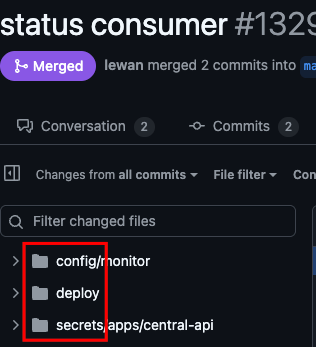
Here are three folder:
- config/ defines the application configuration including vault reference
- deploy/ defines the deployment configuration including helm chart template and values
- secrets/ defines the vault secret reference
config/monitor/mct-vault/import.mct-status-consumer.yaml 
mct-vault/ means this file is used to import vault secret reference
---
environments: alpha-wjfk, alpha-wdfw
Means this section will be applied to alpha-wjfk and alpha-wdfw environment
alpha-wdfw maps to wdfwgen-b-2 cluster
File: wbx3-application-groups/application-groups/webex-maas/manifest.yaml
  123:       - name: wbmaas-alpha-wdfw-maas2
  124:         region: us-east-2
  125:         csp: ocp
  126:         clusterType: generic
  127:         metadata:
  128:           DEPLOY_CLUSTER: alpha-wdfw # add for mct - wdfwgen-b-2
Here are two special environment: integration, production
- If you render alpha-wdfw configuration, it will include production conf too and production can be overlap with bts and prod env like alpha-wdfw、prod-wdfw.
- If you render int-wfra configuration, it will include integration conf too and integration can be overlapped with qa env like int-wfra environments.
For example, if there is a conf be applied to all bts and prod environments, you can set at production one place instead of set it in each environment.
"{{arbitrarySecret('mct-common-prod', 'redis_cluster_password')}}" maps to vault for mct-common-prod id's redis_cluster_password data
config/monitor/status-consumer/mct-status-consumer.yaml 
import.file means import other configuration files content here
File: configuration/config/monitor/status-consumer/mct-status-consumer.yaml
    3: import.file:
    4:   - ../mct-common/import.mct-common.yaml
    5:   - ../mct-vault/import.mct-status-consumer.yaml
deploy/mct-status-consumer.yaml 
This is the helm chart values template for mct-status-consumer deployment.
secrets/apps/central-api/mct-common-prod.yaml 
This file defines all MCT bts and prod vault secret reference.
secrets/apps/central-api/mct-common-int.yaml for qa vault secret reference.
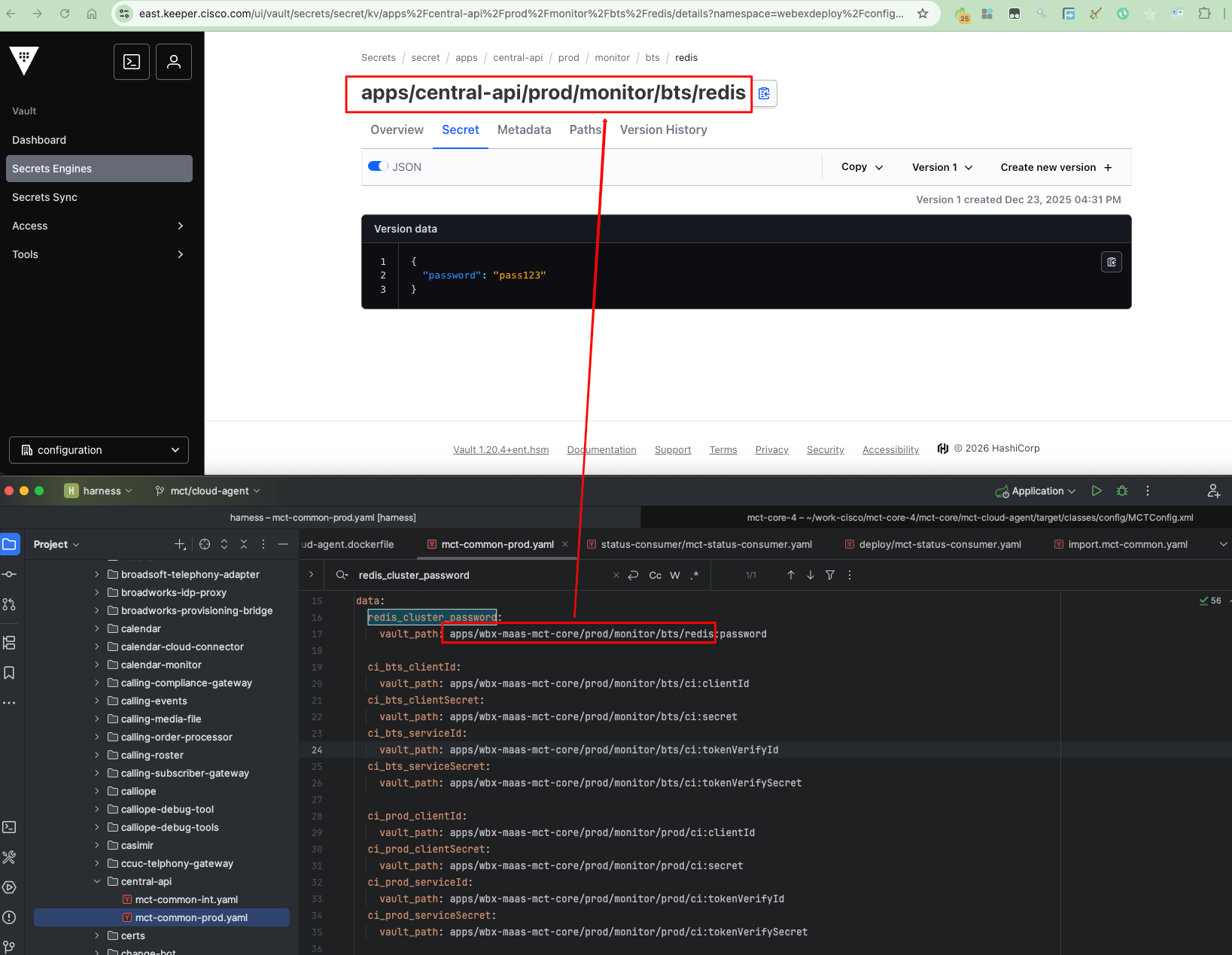
Remember to add application acl reference for target module e.g., mct-status-consumer otherwise it can't access vault secret.
File: configuration/secrets/apps/central-api/mct-common-prod.yaml
1: acl:
2:   app:
...
6:     - mct-status-consumer
File name should same with acl name
- config/monitor/status-consumer/mct-status-consumer.yaml maps to mct-status-consumer acl
- If mct-status-consumer.yaml rename to mct-status-consumer-new.yaml, then acl name should be mct-status-consumer-new too
deploy/application+ {env}.yaml 
Add target module to target environment's services list. For example, if you want to deploy mct-status-consumer on alpha-wjfk-maas2, you should add mct-status-consumer in application+alpha-wjfk-maas2.yaml.
File: configuration/deploy/application+alpha-wjfk-maas2.yaml
    8: services:
...
   12:   - mct-status-consumer
Configuration local test and deploy 
Prepare python env 
Install uv tool if you don't have it
lewan@LEWAN-M-6FV6 configuration % uv venv py3.12 --python 3.12
Using CPython 3.12.12 interpreter at: /opt/homebrew/opt/python@3.12/bin/python3.12
Creating virtual environment at: py3.12
Activate with: source py3.12/bin/activate
lewan@LEWAN-M-6FV6 configuration % source py3.12/bin/activate
python --version
Python 3.12.12
uv pip install -r scripts/requirements.txt
...
Interpretation of above command:
- uv venv py3.12 --python 3.12: create a python virtual environment named py3.12 with python3.12 interpreter
- source py3.12/bin/activate: activate the virtual environment
- uv pip install -r scripts/requirements.txt: install required python packages in the virtual environment
Login vault for conf rendering 
VAULT_TOKEN requirement:
- namespace: webexdeploy/configuration
- role: wbx-maas-mct-core-admin
export VAULT_TOKEN=hvs.CAESILZDMNAwY-gMakK20QYsarGuV2LKi1fvNCpt_23Oc3VPGioKImh2cy5RbTZnZERNdFhGbENXWXFDejNPem54T0YuU3hhTm0Qr-Th_iA && \
export VAULT_ADDR=https://keeper.cisco.com && \
vault login $VAULT_TOKEN
Render conf yaml 
cd /Users/lewan/work-cisco/harness/configuration && \
scripts/rendertemplate.py --template templates/wbx3-env.profile  --output mct-cloud-agent-alpha-dfw.sh --env alpha-wdfw-maas2 mct-cloud-agent
Interpretation of above command:
- cd /Users/lewan/work-cisco/harness/configuration: change directory to configuration repo
- --output mct-cloud-agent-alpha-dfw.sh: output file, you can name it as you like
- --env alpha-wdfw-maas2 mct-cloud-agent: target environment and application name
Render deploy yaml 
cd /Users/lewan/work-cisco/harness/configuration && \
scripts/rendertemplate.py --template templates/wbx3-values.yaml --output mct-cloud-agent-alpha-dfw-deploy.yaml --env alpha-wdfw-maas2 mct-cloud-agent
Interpretation of above command:
- cd /Users/lewan/work-cisco/harness/configuration: change directory to configuration repo
- --output mct-cloud-agent-alpha-dfw-deploy.yaml: output file, you can name it as you like
- --env alpha-wdfw-maas2 mct-cloud-agent: target environment and application name
Handle RENDER ERROR 
You may encounter RENDER ERROR if vault secret reference is not yours, you should comment it first, cuz your vault token may not have access permission to that secret. For example:
16:47:24 deploy ERROR RENDER ERROR on string '{{arbitrarySecret('arbitrary-production', 'APPDYNAMICS_AGENT_ACCOUNT_ACCESS_KEY')}}'
Search APPDYNAMICS_AGENT_ACCOUNT_ACCESS_KEY and comment it:
File: configuration/config/application+production.yaml
322: #APPDYNAMICS_AGENT_ACCOUNT_ACCESS_KEY: "{{arbitrarySecret('arbitrary-production', 'APPDYNAMICS_AGENT_ACCOUNT_ACCESS_KEY')}}"
There are plenty RENDER ERROR, it's a known issue.
Copy conf and deploy file to kubed-wxt-service/data 
cd /Users/lewan/work-cisco/harness/configuration && \
cp mct-cloud-agent-alpha-dfw.sh mct-cloud-agent-alpha-dfw-deploy.yaml /Users/lewan/work-cisco/kubed/kubed-charts/wxt/kubed-wxt-service/data
Login target deployment kube cluster 
VAULT_TOKEN requirement:
- namespace: meetpass
- role: (empty)
export VAULT_TOKEN=hvs.CAESICl-h6pp_KEM1tifKFgQarsXgda0R06cV8BrRG3cZ58FGioKImh2cy44ZHA5bnBxQ1FTa2JZd0NqaU9KYU1NeEQua2pncnQQntPT4x8
export CLUSTER_NAME=wdfwgen-b-2
export CLUSTER_DOMAIN=prod.infra.webex.com
export CNC_DOMAIN=prod.infra.webex.com
export CNC=mccprod
export VAULT_ADDR=https://keeper.cisco.com
export VAULT_NAMESPACE=meetpaas/mccprod
export INFRA_SERVICE_URL=https://infra.int.mccprod.prod.infra.webex.com
kubectl wbx3 login wdfwgen-b-2 --role wbmaas-mct-prod-admin
Prepare deploy file and deploy 
cd /Users/lewan/work-cisco/kubed/kubed-charts/wxt/kubed-wxt-service/data && \
rm -rf service-config.tgz service-config.sh deploy.yaml && \
cp mct-cloud-agent-alpha-dfw.sh service-config.sh && \
cp mct-cloud-agent-alpha-dfw-deploy.yaml deploy.yaml && \
tar -zcvf service-config.tgz service-config.sh && \
cd .. && \
helm upgrade -i mct-cloud-agent -n alpha-wdfw-maas2-mct-cloud-agent . -f data/deploy.yaml --set wbx3.image.tag=harness-20.11.0-84
Interpretation of above command:
- cd /Users/lewan/work-cisco/kubed/kubed-charts/wxt/kubed-wxt-service/data: change directory to kubed-wxt-service/data
- rm -rf service-config.tgz service-config.sh deploy.yaml: remove old deploy files
- cp mct-cloud-agent-alpha-dfw-deploy.yaml deploy.yaml: copy new deploy yaml file
- tar -zcvf service-config.tgz service-config.sh: package conf file to service-config.tgz
- helm upgrade -i mct-cloud-agent -n alpha-wdfw-maas2-mct-cloud-agent . -f data/deploy.yaml --set wbx3.image.tag=harness-20.11.0-73: deploy mct-cloud-agent to alpha-wdfw-maas2-mct-cloud-agent namespace with deploy.yaml and image tag harness-20.11.0-73
Configuration pull request merge 
Need two approvals for configuration pull request, one can from any team member, the other one should be from FedRAMP team for security review, you can ask FedRAMPers - https://eurl.io/#NNxVTCTbt for help.
You should pass all pull request check:
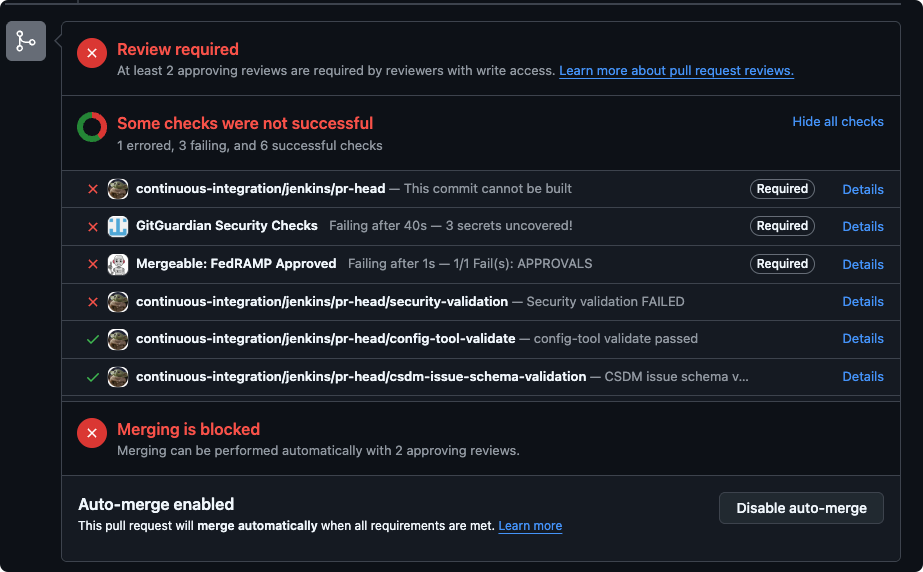
- Most of issue is lint related, for example use
'false'instead offalsefor boolean value. - Some issue seems not related to your change, especially
GitGuardian Security Checks.- You can try to create a new PR base on new branch for same code change.
git cherry-pick -n {commit_id}can help copy your change to new branch.git cherry-pick {commit_id}won't work.