How to fix docker cloud agent
Notice: for mcttx2 and webex external agent group, please check here
Troubleshoot Strategy 
Directly restart the agent, if want to resolve it quickly instead of finding the root cause. Otherwise, check the agent error log then dive into cloud agent code or even debug cloud agent for more specific clues.
Basic cloud agent operation 
Common cloud agent information DB data query: 
- Query all cloud agent
SELECT * FROM MCT_AGENT ma JOIN MCT_AGENT_VIRTUAL_GROUP mavg ON ma.ORG_ID = MAVG.ORG_ID JOIN MCT_AGENT_ORG mao ON mao.ORG_ID = ma.ORG_ID WHERE MAVG.TYPE = 2; - Query all cloud agent name
SELECT AGENT_NAME, COUNT (*) AS CNT FROM MCT_AGENT ma JOIN MCT_AGENT_VIRTUAL_GROUP mavg ON ma.ORG_ID = MAVG.ORG_ID JOIN MCT_AGENT_ORG mao ON mao.ORG_ID = ma.ORG_ID WHERE MAVG.TYPE = 2 GROUP BY AGENT_NAME; - Query all cloud agents outside Webex network
SELECT * FROM MCT_AGENT ma JOIN MCT_AGENT_VIRTUAL_GROUP mavg ON ma.ORG_ID = MAVG.ORG_ID JOIN MCT_AGENT_ORG mao ON mao.ORG_ID = ma.ORG_ID WHERE MAVG.TYPE = 2 AND AGENT_NAME IN ('CISCOAER01','AOH01', 'ANRT01', 'AOR01') ; - Query WBXSJC03 all cloud agents
SELECT *
FROM MCT_AGENT ma
JOIN MCT_AGENT_VIRTUAL_GROUP mavg ON ma.ORG_ID = MAVG.ORG_ID
JOIN MCT_AGENT_ORG mao ON mao.ORG_ID = ma.ORG_ID
WHERE MAVG.TYPE = 2
AND UPPER (MA.AGENT_NAME) = 'WBXDFW01';
Access cloud agent server 
1. External Webex network 
There are only 4 cloud agent clusters outside the Webex network. They need a jump server to log in cloud agent server:
| cloud agent | jump server |
|---|---|
| AOR01 | 35.165.61.241 |
| AOH01 | 13.59.115.96 |
| ANRT01 | 52.198.38.197 |
Access CISCOAER01 192.168.3.115 server case:
- log in CISCOAER01 jumper server: ssh wbxbuilds@144.254.67.105
- log in 192.168.3.115 in CISCOAER01 jumper server: ssh wbxbuilds@192.168.3.115
2. Internal Webex network 
No jumper server. You can directly log in with your CEC account/password
Access cloud agent log 
Linux:
[root@mctny21mul001 lewan]# docker exec -it mct-cloud-agent sh
sh-4.2# ls
acd.jtl  core.1103   core.19861  core.26159  core.29566  core.3835  core.9147       log                             wbxivrmgr_mct_12-24-2023_0.log  wbxivrmgr_mct_12-27-2023_0.log
bin      core.11286  core.21669  core.2638   core.29726  core.5349  dockerEntry.sh  wbxivrmgr_mct_12-22-2023_0.log  wbxivrmgr_mct_12-25-2023_0.log  wbxivrmgr_mct_12-28-2023_0.log
config   core.13564  core.24891  core.27554  core.32695  core.9075  jmeter.log      wbxivrmgr_mct_12-23-2023_0.log  wbxivrmgr_mct_12-26-2023_0.log  wbxivrmgr_mct_12-29-2023_0.log
sh-4.2# cd log
sh-4.2# ls
cloud-agent.error    cloud-agent.error.2  cloud-agent.log.1   cloud-agent.log.2  cloud-agent.log.4  cloud-agent.log.6  cloud-agent.log.8
cloud-agent.error.1  cloud-agent.log      cloud-agent.log.10  cloud-agent.log.3  cloud-agent.log.5  cloud-agent.log.7  cloud-agent.log.9
sh-4.2#
Windows log directory: C:\Cisco\mct-cloud-agent\log
Check cloud agent node information in cloud agent management page 
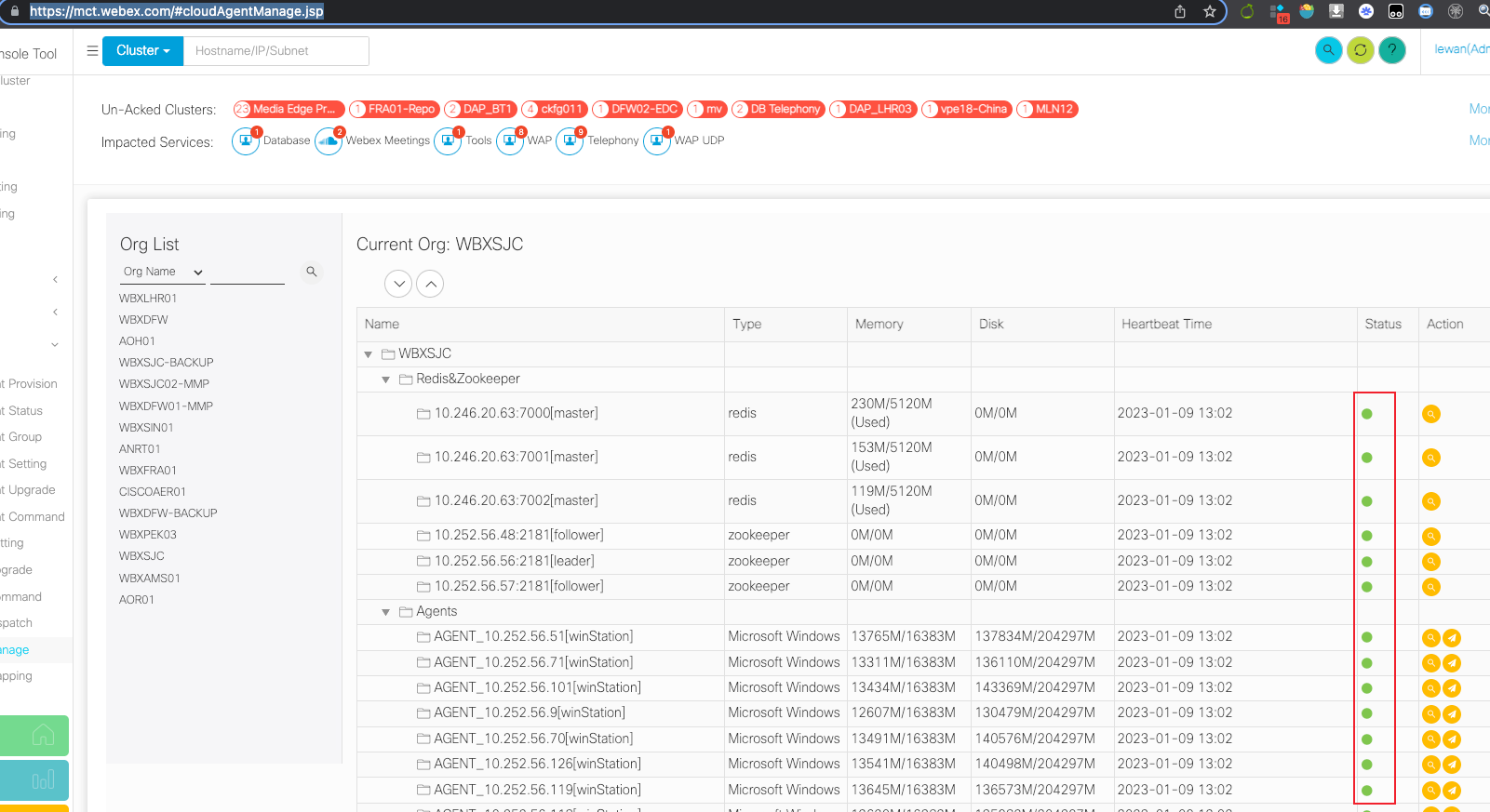
A Green dot means health state and other color means not health (e.g., cloud agent service is offline)
If any dot is not green, you can try to log in to the server, check the cloud agent service state and restart the cloud agent, generally, the dot will recover to green color within 5 minutes.
cloud agent healthcheck 
curl http://127.0.0.1:18088/station/healthcheck
Notice: you should execute it on an agent server because agent only accepts the local call
Restart the cloud agent on the agent server 
Linux (CMD with wbx-mct user): docker compose -f /opt/webex/mct/cloud-agent/docker-compose.yml restart
Windows (CMD with Admin user): sc stop mct-cloud-agent → sc start mct-cloud-agent
Also, it's doable from cmc: 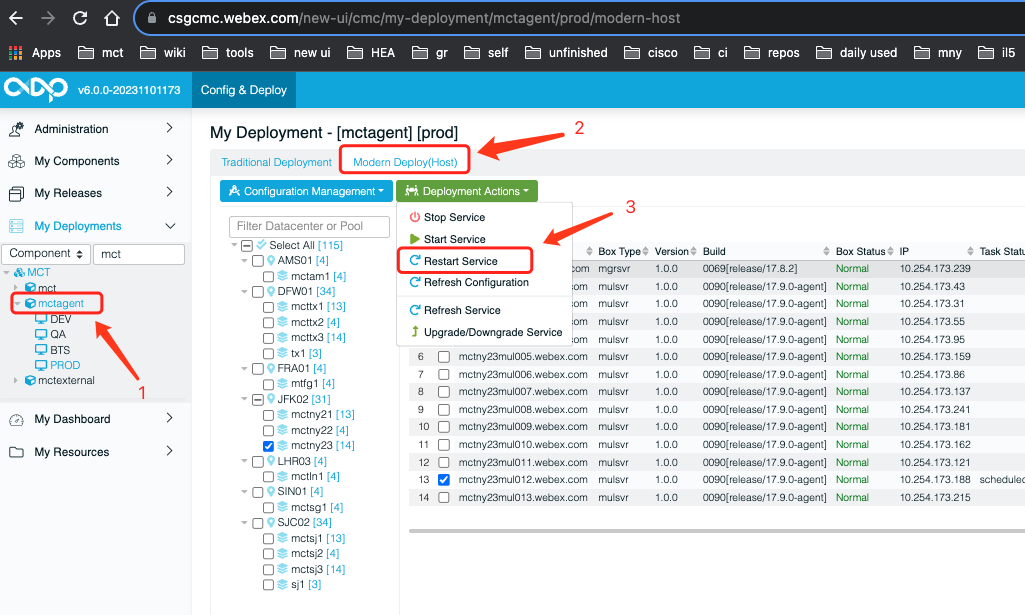
Refresh agent service with CMC 
Take mctny23 agent as an example: 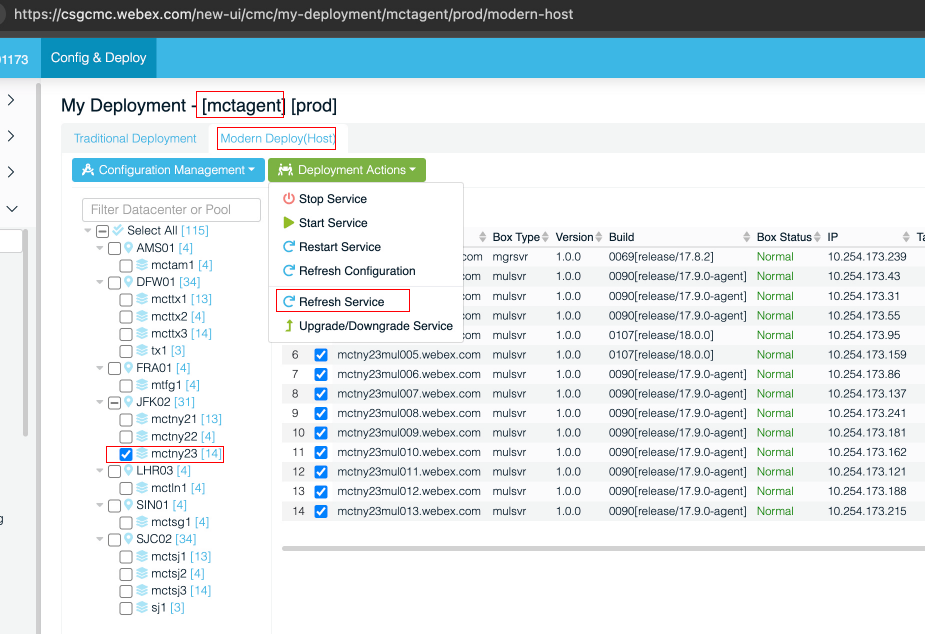
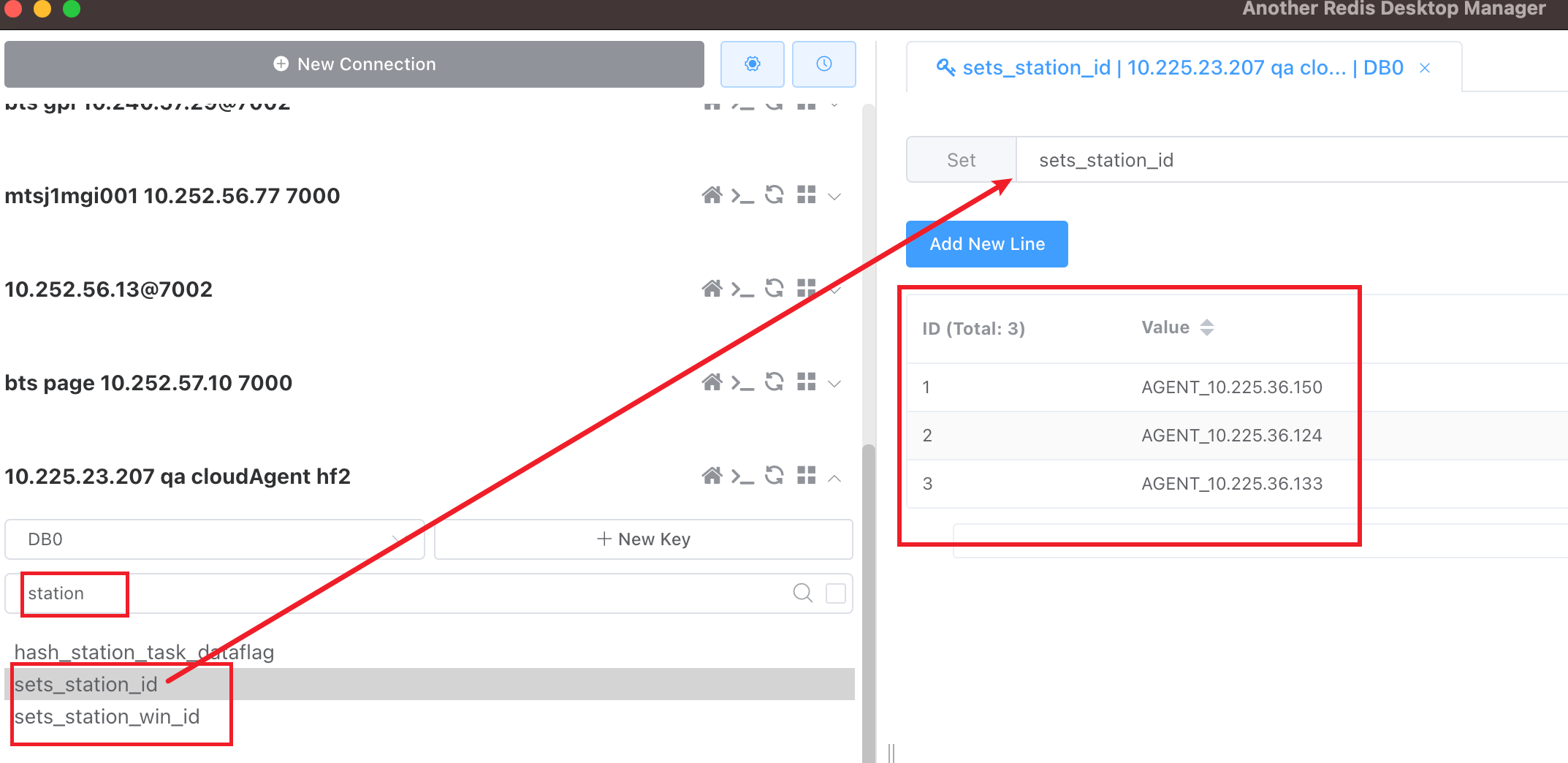
Check agent node information in Redis 
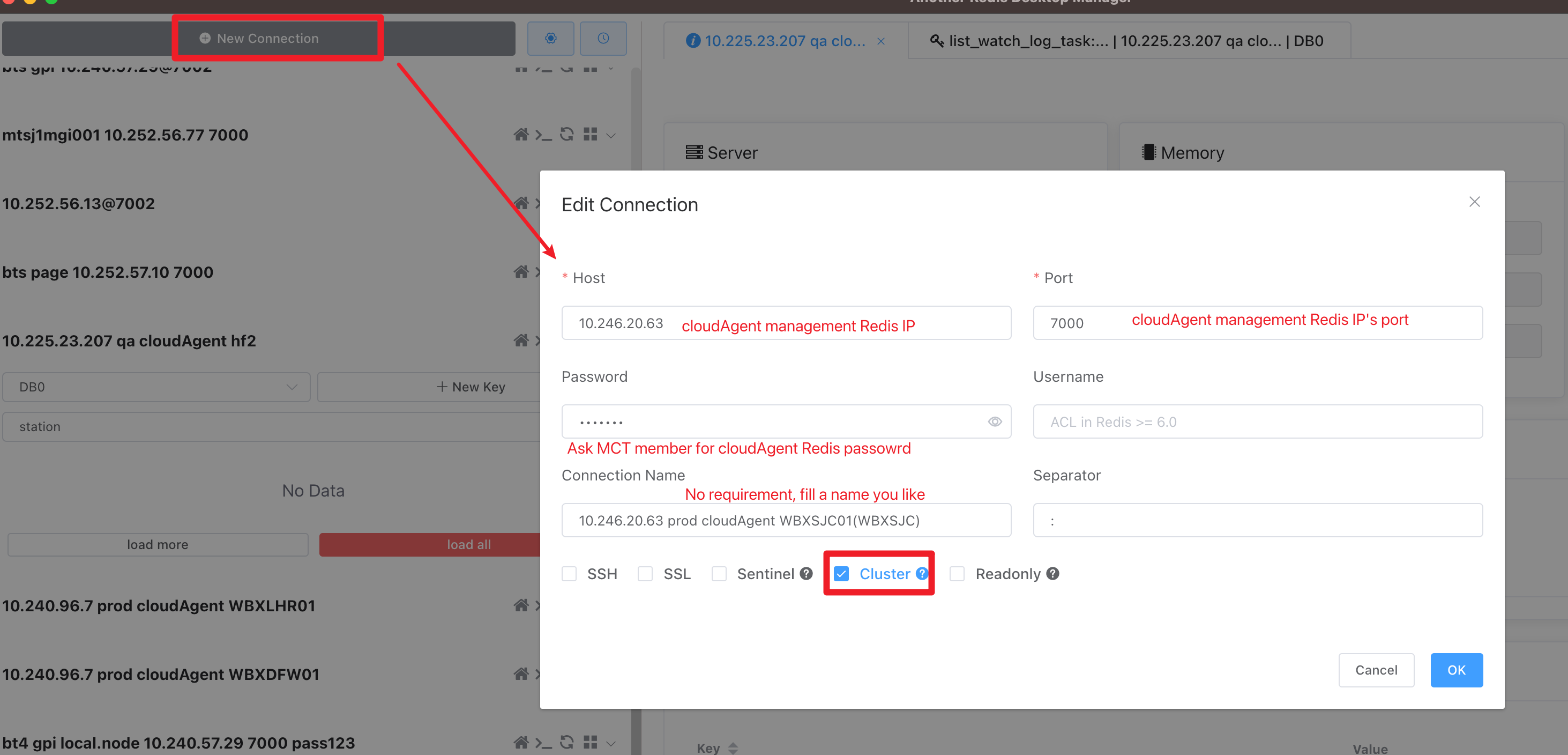
1. A Redis client is needed 
Another Redis Desktop Manager is a choose.
2. Find target cloud agent Redis cluster IP:port to connect 
Select the target Agent (e.g. WBXLHRO1), then Search "redis" on cloud agent management page to get the Redis cluster IP:port
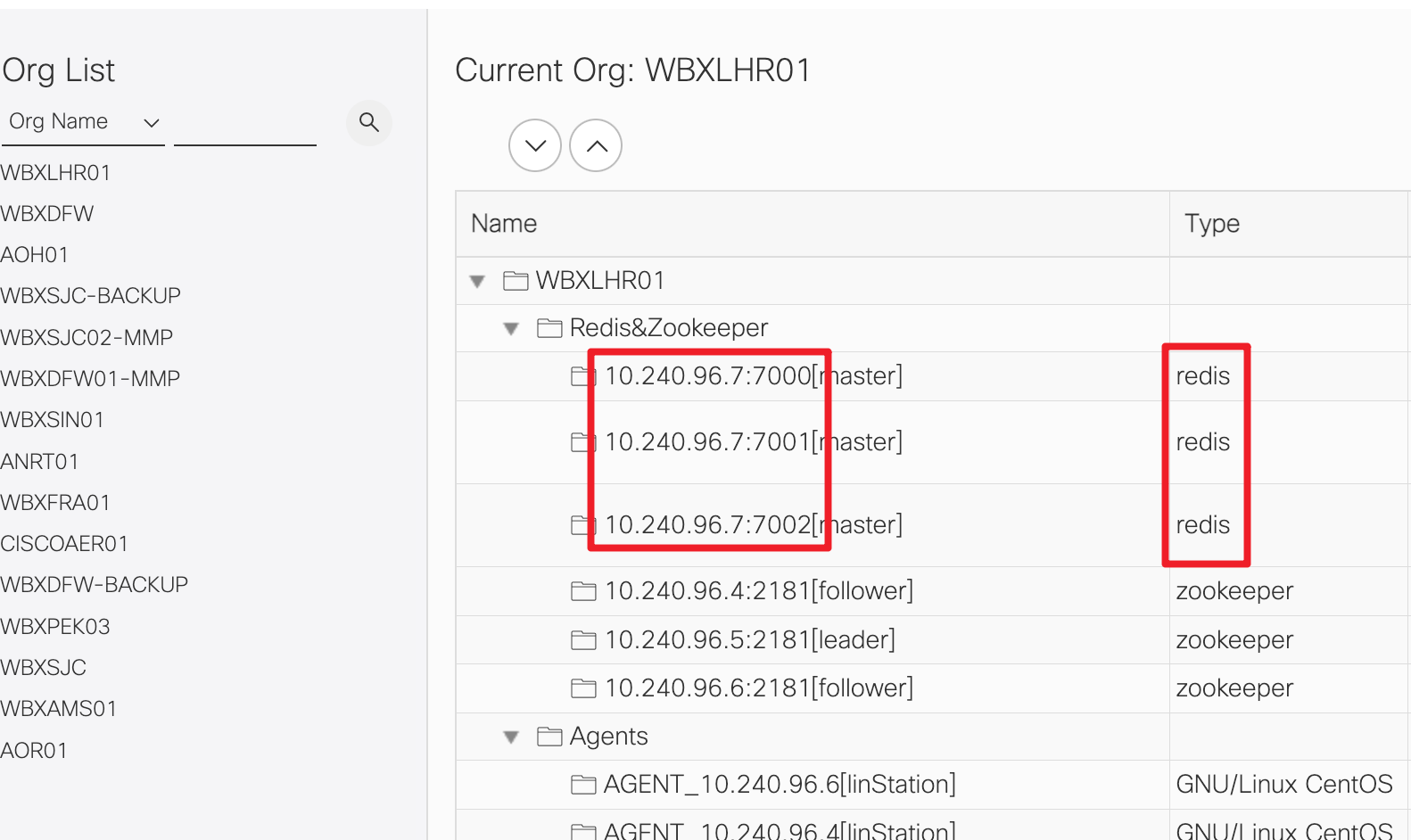
2. Connect to target cloud agent Redis cluster 
3. Check Agent node information 
The key word is station
Cloud agent issues fix case 
Agent container keeps unhealthy 
1. Description 
Agent state keeps unhealthy after restarting
2. Locate 
[root@mctny21mul007 ~]# docker compose -f /opt/webex/mct/cloud-agent/docker-compose.yml restart
[root@mctny21mul007 ~]# docker ps
CONTAINER ID   IMAGE                                                   COMMAND                  CREATED       STATUS                     PORTS                    NAMES
b69097b5f525   registry-rmc.webex.com/mct/mct-cloud-agent:1.0.0-0111   "/sbin/tini -- /opt/…"   2 weeks ago   Up 2 minutes (unhealthy)                            mct-cloud-agent
3. Analyse 
Not finding the root cause