DB release process
Overview 
We need to perform a DB release whenever we change the BTS / PROD / PSF databases.
In short:
- Commercial BTS and PROD DB: create a change ticket → send the change SQL to the DBA.
- PSF: write the DB script → build the DB patch → deploy the DB patch with an Argo command.
DBA Contacts:
- jozhao3@cisco.com, wentazha@cisco.com: DB scripts, deployment process, PR approval
- chuye@cisco.com: Git repo, Jenkins jobs
- adantuve@cisco.com, shcui@cisco.com: DBA on-call confirmation
Record DB Changes 
We need to record all DB changes for future reference, for example:
File: mct-core/database/20250702.sql
    1: -- Ted
    2: alter table mct_server_template
    3:     add column output_format varchar default 'PlainText';
DB verification 
After DB change complete, verify the DB change, like:
- whether the new table / column exists
- whether Shareplex sync is working
- insert new data test
- update existing data test
- whether sequence is correct for PRI and GSB
Commercial DB 
Only for Commercial BTS and PROD need follow this process. For Commercial QA, manually change will be okay.
Create DB change tickets, then send a DB change message to the Ask DBA space.
Here is an example message:
Hi DBA, MCT needs a PG change.

Change plan: (UTC+8; Primary side can be completed within the GSB window)

```
BTS  GSB: CHG0731467 (09/22/2025 09:00:00 - 09/22/2025 14:00:00)
BTS  PRI: CHG0731468 (09/22/2025 13:30:00 - 09/22/2025 18:30:00)
PROD GSB: CHG0731469 (09/24/2025 09:00:00 - 09/24/2025 12:00:00)
PROD PRI: CHG0731470 (09/24/2025 13:30:00 - 09/24/2025 18:30:00)
```

Shareplex: all changed columns need Shareplex bi-directional sync.

Change SQL: (pay attention to the different sequence between GSB and PRI)

```sql
-- PRI
create sequence mct.s_mct_resource_machines_assignment_strategy_mapping
    minvalue 1000000001
    increment by 2
    maxvalue 9999999999
    cache 10
    cycle;

-- GSB
create sequence mct.s_mct_resource_machines_assignment_strategy_mapping
    minvalue 1000000000
    increment by 2
    maxvalue 9999999999
    cache 10
    cycle;

create table mct.mct_resource_machines_assignment_strategy_mapping
(
    id             bigint default nextval('s_mct_resource_machines_assignment_strategy_mapping'::regclass) not null
        constraint mct_resource_strategy_mapping_pkey
            primary key,
    case_path      varchar                                                                                 not null,
    strategy       varchar                                                                                 not null,
    biz_group_name varchar                                                                                 not null,
    os_type        varchar                                                                                 not null
);

alter table mct.mct_resource_machines
    add biz_group_name varchar default 'shared'::character varying;
```
Confirm who is the DBA on-call for this DB change, so that you can remind them before the window and get verification in time.
PSF DB 
For the PSF environment, we need to create a DB patch for DB changes.
Write DB patch script 
Release version 
MCT DB release version should be in the 22xxx range, assigned by the DBA team.
- For example, if the largest 22xxx directory is 22001 in webex-db-schema-patch, then the new release version should be 22002.
- Add the new release version number in dbpatch_releases.yaml mct section
Change SQL 
Change SQL should use IF EXISTS / IF NOT EXISTS to avoid “already exists” errors, as required by the DBA team:
add column output_format varchar default 'PlainText';
-- wrong

alter table IF EXISTS mct.mct_server_template
    add COLUMN IF NOT EXISTS output_format varchar default 'PlainText';
-- correct
Execute SQL 
“Execute SQL” defines how to run the change SQL in the correct order.
Keep the preparation part unchanged:
SET client_encoding TO 'UTF8';
\set ON_ERROR_STOP ON

--Setting search_path
SET client_min_messages to notice;
SET search_path = mct,oracle,public,pg_catalog;
Specify the change part:
call dbPatchDeployCheckDBVersion('MCT', 'mct', 1, 1);
-- Usually, only the last "1" needs to be updated to the current DB minor version.
-- You can refer to the previous script to find the current minor DB version.
-- Explanation: this checks:
-- 1) Is the database type "MCT"?
-- 2) Is the current schema "mct"?
-- 3) Is the version ≥ 1.1?
-- If all are true, allow patch deployment; otherwise, raise an error.

INSERT INTO wbxdatabase (DATABASETYPE, VERSION, DESCRIPTION)
VALUES ('MCT','22002', 'script:alt_mct_mct.sql, db_release:22002');
-- Replace 22002 with your current release version.

\i database/postgresql/MCTDB/MCT/TABLES/ADD_COLUMN.sql
-- Point this to your actual change script.
-- For example, if you add a new table, create ADD_TABLE.sql and include it here.

UPDATE wbxdatabaseversion
SET MINOR_NUMBER=2, SCRIPT_NAME='alt_mct_mct.sql', RELEASE_NUMBER=22002, DESCRIPTION='Independent DB patch to change MCT tables';
COMMIT;
-- New MINOR_NUMBER = current DB minor version + 1.
-- RELEASE_NUMBER = your current release version.
Release process 
release_postgresql.yaml control how to do release on PRI and GSB with shareplex operation if need.
Deploy operation will follow the configuration order.
Explanation:
We can check the workflow firstly, this is the entry point.
File: 22002/release_postgresql.yaml
   99:   workflow_deploy:
  100:     mct_pri:
  101:       - workflow_group: mct_pri
  102:         workflow: mct_pri
  103:
  104:     mct_gsb:
  105:       - workflow_group: mct_gsb
  106:         workflow: mct_gsb
  107:       - workflow_group: mct_pri
  108:         workflow: mct_pri_post
This means we deploy on mct_pri first, then on mct_gsb.
Shareplex sync requires both sides have the sync objects, which means we need to do shareplex sync in mct_gsb for two sides.
Here is mct_pri, you can check the comment for explanation:
    mct_pri:
      # PRI -> GSB sync for changed tables (temporarily ignore new column)
      - schema_type: app
        execute_type: downstream_repl_change
        execute_content:
          target_db: mct
          tgt_schema_type: app
          deployment_step: 1
          dependent_release_num: 22001           # previous release version
          dependent_release_major_num: 1         # previous major version
          dependent_release_minor_num: 1         # previous minor version
          tgt_dependence_check_flag: False
          post_check_replica_flag: False
          action_type:
            add_table:
              mct_server_template:
                src_tab_name: mct_server_template     # table with new column
                tgt_tab_name: mct_server_template
                base_key:
                partition_h:
                partition_v: (server_tmp_id,zone_tmp_id,server_name,server_type,code_type,server_parameter,server_timeout,server_memo,filename,lastmodifiedtime,server_template,zone_type,package_name,package_component,multi_version_flag,multi_version_obtain,support_onprem,url_keyword,server_guide_url,server_folder,attributes,cmd_param,adapter_url,location,export_metrics)
                # 1. All existing columns of mct_server_template, in DDL order.
                # 2. Exclude the new column "output_format":
                #    GSB does not have it yet, so we cannot sync it now.
                partition_v_tgt:

      # Execute alt_mct_mct.sql (actual SQL change)
      - schema_type: app
        execute_type: sqlscript
        execute_content:
          dependent_release: 22001
          release_major_num: 1
          release_minor_num: 2
          pre_check_version_flag: False
          pre_check_redeploy_flag: False
          sqlscript:
            - alt_mct_mct.sql

      # Reactivate Shareplex after the Shareplex config change
      - schema_type: app
        execute_type: downstream_repl_change
        execute_content:
          target_db: mct
          tgt_schema_type: app
          deployment_step: 2
          dependent_release_num: 22001
          dependent_release_major_num: 1
          dependent_release_minor_num: 1
          tgt_dependence_check_flag: False
          post_check_replica_flag: False
          action_type: reactivate
In mct_pri_post (within the mct_gsb workflow), we restore full Shareplex sync for all columns:
    # PRI -> GSB sync for changed tables (include all columns, so the new column is also synced)
    mct_pri_post:
      - schema_type: app
        execute_type: downstream_repl_change
        execute_content:
          target_db: mct
          tgt_schema_type: app
          deployment_step: 3
          dependent_release_num: 22002
          dependent_release_major_num: 1
          dependent_release_minor_num: 2
          tgt_dependence_check_flag: False
          post_check_replica_flag: False
          action_type:
            add_table:
              mct_server_template:
                src_tab_name: mct_server_template
                tgt_tab_name: mct_server_template
                base_key:
                partition_h:
                partition_v:        # empty = include all columns
                partition_v_tgt:
Sequence Changes 
Sequences are special, because PRI and GSB usually use different SQL, for example in 22001.
Key points:
- We build different images for PRI and GSB.
- Normally you do not need the admin part e.g.,
admin/TABLES/admin_data_base_version.sql, because the admin part is needed only once.
File: build/build.sh
   73:         elif [ "x${PKGNAME}" == "xWBXdbpatch-22001" ]; then
   74:             # build package for Primary
   75:          ./rpmgen -p "${PKGNAME}-PRIMARY" -v $2 -i "${RPMTARGET}-PRIMARY" -d $4 -r $5 -o $6
   76:
   77:             # build package for GSB
   78:          ./rpmgen -p "${PKGNAME}-GSB" -v $2 -i "${RPMTARGET}-GSB" -d $4 -r $5 -o $6

File: build/build.sh
  475:         elif [ "${RELEASE_VERSION}" == "22001" ]; then
  476:                 db_types=("PRIMARY" "GSB")
  477:                 for t in ${db_types[@]}
  478:                 do
  479:                    if [ "${t}" == "PRIMARY" ]; then
  480:                    mv $WORKDIR/${RELEASE_VERSION}/database/postgresql/MCTDB/admin/TABLES/admin_data_base_version_PRI.sql $WORKDIR/${RELEASE_VERSION}/database/postgresql/MCTDB/admin/TABLES/admin_data_base_version.sql
  481:                    mv $WORKDIR/${RELEASE_VERSION}/database/postgresql/MCTDB/MCT/SEQUENCES/CREATE_SEQUENCE_PRI.sql $WORKDIR/${RELEASE_VERSION}/database/postgresql/MCTDB/MCT/SEQUENCES/CREATE_SEQUENCE.sql
  482:                    else
  483:                    mv $WORKDIR/${RELEASE_VERSION}/database/postgresql/MCTDB/admin/TABLES/admin_data_base_version_GSB.sql $WORKDIR/${RELEASE_VERSION}/database/postgresql/MCTDB/admin/TABLES/admin_data_base_version.sql
  484:                    mv $WORKDIR/${RELEASE_VERSION}/database/postgresql/MCTDB/MCT/SEQUENCES/CREATE_SEQUENCE_GSB.sql $WORKDIR/${RELEASE_VERSION}/database/postgresql/MCTDB/MCT/SEQUENCES/CREATE_SEQUENCE.sql
  485:                    fi
  486:
  487:                    TEMP_BUILD_VERSION="${RELEASE_VERSION}-${t}"
  488:
  489:                    #Build RPM file
  490:                    build_rpm WBXdbpatch-${TEMP_BUILD_VERSION} ${RELEASE_NAME} /tmp/${RELEASE_VERSION} "${WORKDIR}/${RELEASE_VERSION}" ${BUILDNUMBER} "noarch"
  491:
  492:                    #Build dbpatch image
  493:                    if [ -d "$WORKDIR/${RELEASE_VERSION}/database" ]; then
  494:                       build_image ${TEMP_BUILD_VERSION}
  495:                    fi
  496:
  497:                 done
Build DB patch image 
You can receive jenkins job info in team message like release/22001
Build release/gate/master image as you need:
- Create and push DB patch script to release branch e.g. release/22001, then release jenkins job will automatically build the DB patch image.
- no need get approval but not stabler than gate/master image.
- Create and push DB patch script to gate branch e.g. gate/22001, then gate jenkins job will automatically build the DB patch image.
- need to get approved by a DBA member like jozhao3@cisco.com or wentazha@cisco.com
- will automatically merge to master branch after gate job complete.
- gate branch will be deleted after merging.
- image will be only keep for several days.
- Master jenkins job will automatically build the DB patch image after gate job complete.
- image will be keep for long time than release/gate branch image.
- recommend to use for real PSF DB deployment
Troubleshot 
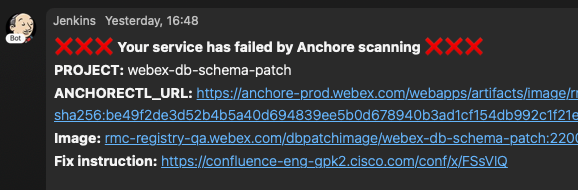
Image anchre scan fail always need to update the docker base image version as webex-db-schema repo version
File: webex-db-schema-patch/docker/Dockerfile
    2: FROM ${docker_registry}/pgda/pgda:1.0.0-505
Record the Image Tag 
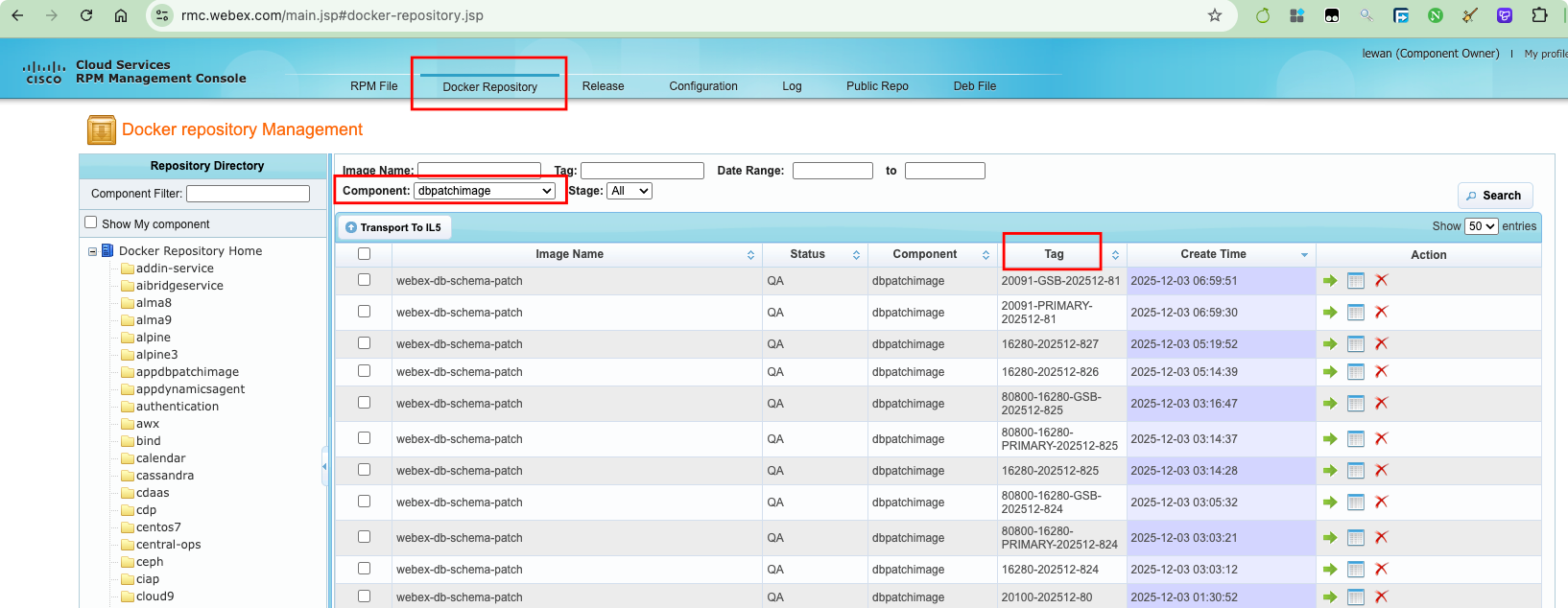
After the Jenkins job completes, you can find the image in RMC → “Docker Repository” → “dbpatchimage” component, with a tag that contains the release version, for example 21001-GSB-202511-22.
Test the DB Patch Image 
You can test the DB patch on a test DB before deploying to real PSF DB.
Test DB jump host:
IP: 10.194.248.110
username: wbxbuilds
password: <[[M9QrsYtFHpd11JE+XbJo/Nwmt+COkQREuE4oJRRb2POt8nWXR7D9I2Ff7FCdY2Xt]]> (use MCTBot to decrypt)
Test DB:
Side: PRI
IP: 192.168.190.191
DB name: pgsjmctpri
username: mct
password: <[[FBNunkYab4dEmoSq4cBIyHU33/BCEvwt2ZzMqZ0+j+nTkEJhohW5LiVdGlobKWwehnMOXJJl7fJLr/6b8gf2xg==]]> (use MCTBot to decrypt)

Side: GSB
IP: 192.168.190.191
DB name: pgsjmctgsb
username: mct
password: <[[GHxIp6RmwA+AEYZub/WWBoVn6ifPpMNQFj8FLnQ8v3K4Rx66+urYy8ZUstI3GFRX0n/Sq/KAMb4i0Co9kWEkYg==]]> (use MCTBot to decrypt)
You can directly ssh Test DB via jump host without password:
lewan@LEWAN-M-6FV6 private-proj % ssh wbxbuilds@10.194.248.110
wbxbuilds@10.194.248.110's password:
Last login: Wed Jan  7 14:27:00 2026 from 192.168.165.93
[wbxbuilds@labbuildvm ~]$
[wbxbuilds@labbuildvm ~]$ ssh wbxbuilds@192.168.190.191
[wbxbuilds@pgsj18mctdb191 ~]$
Deploy the DB Patch on the Test DB 
Create separate pull requests to the lab-configuration repo for PRI and GSB to update app.yaml and deploy.yaml for the MCT DB pgda Helm chart to use the new image tag. (Request approval from a DBA.)
- Deploy PRI first with argo command:
argo deploy pgda.yaml dbCluster=pgmctpocpri - Deploy GSB after PRI deploy success and verification pass with argo command:
argo deploy pgda.yaml dbCluster=pgmctpocgsb
There is no strict rule for
lastForceDeploy; using the current datetime is fine.
Message to DBA for approval case:
https://sqbu-github.cisco.com/meetings-web/lab-configuration/pull/198963
argo deploy pgda.yaml dbCluster=pgmctpocpri

https://sqbu-github.cisco.com/meetings-web/lab-configuration/pull/198986
argo deploy pgda.yaml dbCluster=pgmctpocgsb

Help approve
Troubleshooting 
If deployment fails, you can switch to debug mode by setting debug: true, then argo comment again and troubleshot with deployment kube pod.
In debug mode, the deployment does not start automatically. You must manually get into the pod, start the deployment, and troubleshoot.
Login to the deployment Kubernetes cluster:
export CLUSTER_DOMAIN=eng.infra.webex.com
export CNC_DOMAIN=eng.infra.webex.com
export CNC=mcceng
export VAULT_ADDR=https://east.keeper.cisco.com
export VAULT_NAMESPACE=meetpaas/mcceng
export VAULT_TOKEN=
kubectl wbx3 login e-wsj21mw-dc-1 --role k8s-admin
Ask the DBA for
VAULT_TOKEN.
Use k9s -n mw-pgda to enter the namespace and wait for the target pod, e.g. pgda-init-pgmctpocpri-7nhhq.
If you cannot find the pod or the Argo pipeline fails, try deleting the existing deployment with
helm uninstall pgda-pgmctpocgsb pgda-pgmctpocpri -n mw-pgdathen re-deploy with the Argo command.
Manually start the deployment and capture logs:
cd /opt/dbpatch_ansible/dbpatch_playbook && \
python3 deployment_entrypoint.py 2>&1 | tee deploy_$(date +%Y%m%d%H%M%S).log
You will see logs in the console and in the file deploy_YYYYMMDDHHMMSS.log.
- Troubleshoot based on this log.
- Ask the DBA for help if needed.
You can extract the deployment package to check the DB patch files:
cd /opt/dbpatch_ansible/dbpatch_playbook/roles/dbpatch/files && \
tar -xf 22001.tar.gz && \
cd /opt/dbpatch_ansible/dbpatch_playbook/roles/dbpatch/files/22001/database/postgresql/MCTDB/MCT/SEQUENCES
You can modify the files then compress back to tar.gz for manually re-deploy until success:
cd /opt/dbpatch_ansible/dbpatch_playbook/roles/dbpatch/files/ && \
rm -f 22001.tar.gz && \
tar -czf 22001.tar.gz 22001/
Deploy PSF DB 
Create a pull request to the configuration repo to update app.yaml and deploy.yaml for the MCT DB pgda Helm chart to use the new image tag (for example 22003). (Request approval from a DBA.)
Record the pull request latest commit id for BTP sync conf usage e.g., 7d7f5bcf036c6ccb9f432101d525b5a41bfc8832
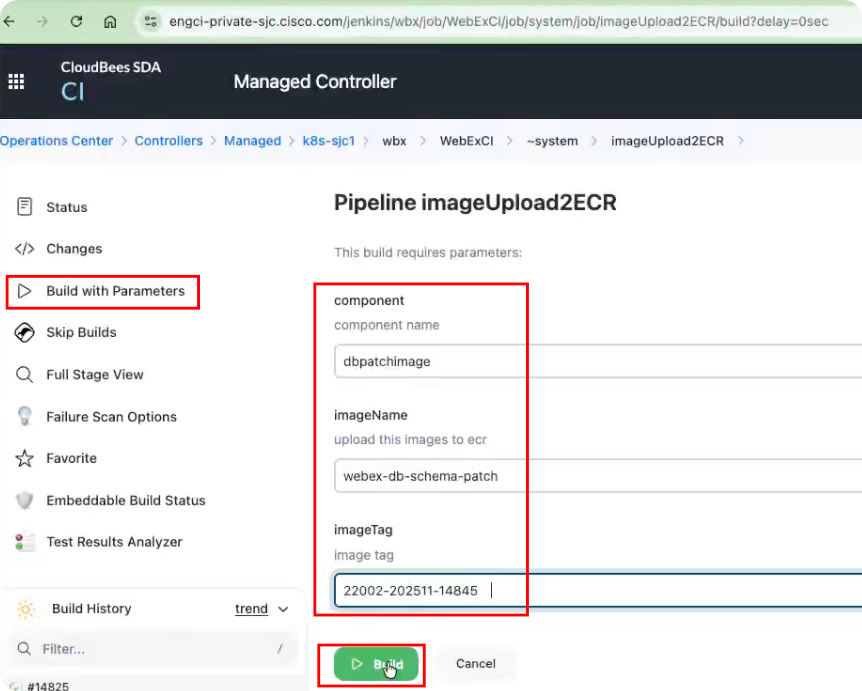
Push the image from RMC to ECR using the imageUpload2ECR Jenkins job:
- component:
dbpatchimage - imageName:
webex-db-schema-patch - imageTag: the image tag, e.g.
22002-202511-14845
Record ECR digest id for BTP sync after ECR job complete: search with DB patch image tag name in webex-db-schema-patch ecr portal e.g., 6e199eb56cd93fda7ec92ba7bb6f1b1eef27542e068ab459e2fb4e4b9f0e7c26
Create BTP PR to sync DB patch image to PSF environment e.g., 22002: (no need get approval)
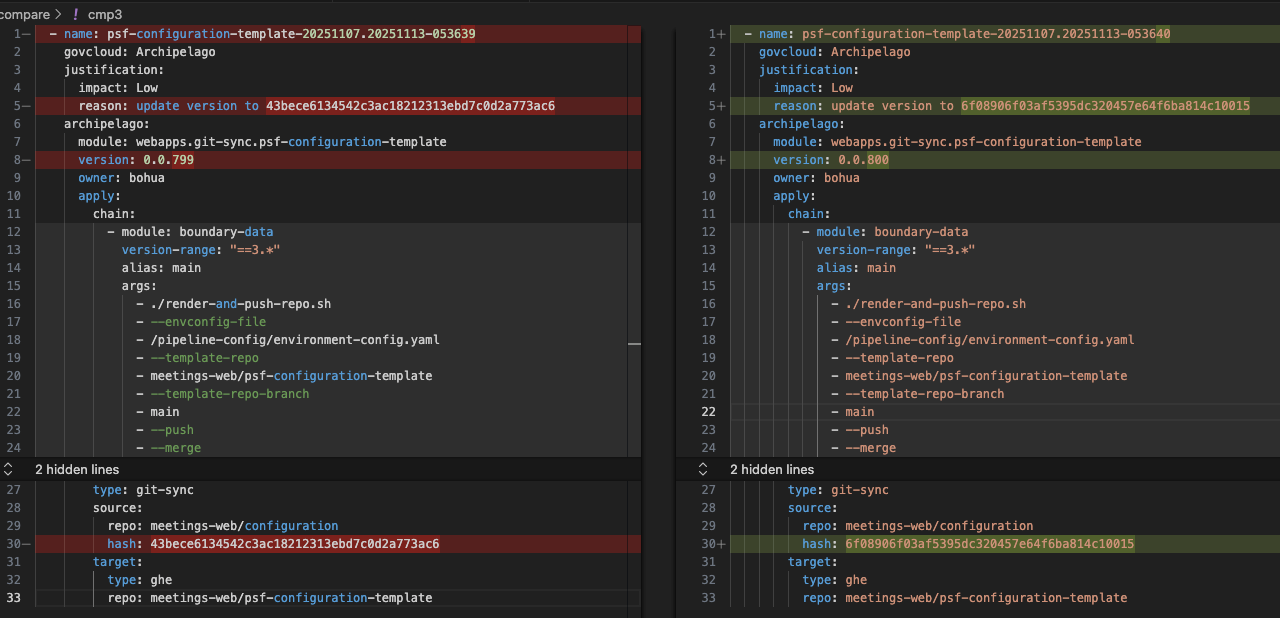
8f6a21441db081b848eb9772eb4a9d78f02ed6f5is commit id715db5ef1ef4d4619bfb1fc674df0f86b271f8884ade3ddaa744a4c586f98dacis digest id22002-202511-14845is image tag name- incrementally update number for
versionandreasonconfiguration - no need anyone to approve
- enable auto-merge
- record updated module name in BTP PR comments after automatically merged, e.g., 22022
webapps.helm-chart-and-image.pgda: 0.0.107webapps.git-sync.psf-configuration-template: 0.0.796
- when meet
Module 'webapps.git-sync.psf-configuration-template|0.0.799' referenced by root 'webex-full-bundle-staging|0.1.0' does not existlike issue- try copy existing lastest one and create new transfer to fix (cuz existing one is in using)
After BTP sync has been completed for about 30 minutes, request pulling and deployment by sending a message to the PSF: Ask Central OPs Webex space. Example for MCT PSF ITE DB:
Hi Team,

BTP SYNC done: https://sqbu-github.cisco.com/WebExSquared/archipelago-transfer/pull/27367/files
Could you please help pull local the below modules
- webapps.helm-chart-and-image.pgda: 0.0.107
- webapps.git-sync.psf-configuration-template: 0.0.796

then help deploy [the latest MAS Monitoring dbpatch MOP](https://sqbu-github.cisco.com/pages/webexplatform/operational-docs/docs/platform/mas/monitoring/dbpatch/) in ITE **one by one**? Thanks
1. argo deploy pgda.yaml dbCluster=mctpsfdc11
2. argo deploy pgda.yaml dbCluster=mctpsfdc12
Currently MCT only has ITE and MAP test environments in PSF. You should deploy them one by one. (Status as of 2025-12-04.)