EP Process
Overview 
- EP stands for exception release, EP means to release code to BTS or PROD out of a regular monthly release
- EP is basically a special small-scale release, so it's recommended to read monthly release for related knowledge, and this wiki focuses on the EP particular part
- Case for 16.9.0-EP
- Latest release branch: release/16.9.0
- Latest release CMC version-build: 16.9.0:9999
- working CMC version-build: 17.0.0:9999
- Created
EPbranch: release/16.9.0-EP - Created EP CMC version build: 16.9.0:99991
- Created EP CDP release: 16.9.1
QA EP release 
1. Create EP branch and merge release code to EP branch 
EPbranch should base on the latest release branch
2. Create EP CMC version-build 
- EP CMC version number should be the last release CMC version numbmer
- EP CMC build number should be the largest one in the last release CMC version
- Update CMC configuration if needed
3. Build MCT Component packages based on EP branch and refresh on QA 
- Remember to refresh with EP CMC version-build
4. QA Verification pass 
BTS and PROD EP release 
Do not forget to upgrade CMC EP version-build to BTS or PROD
1. CDP preparation 
-
Create CDP release for DevOps
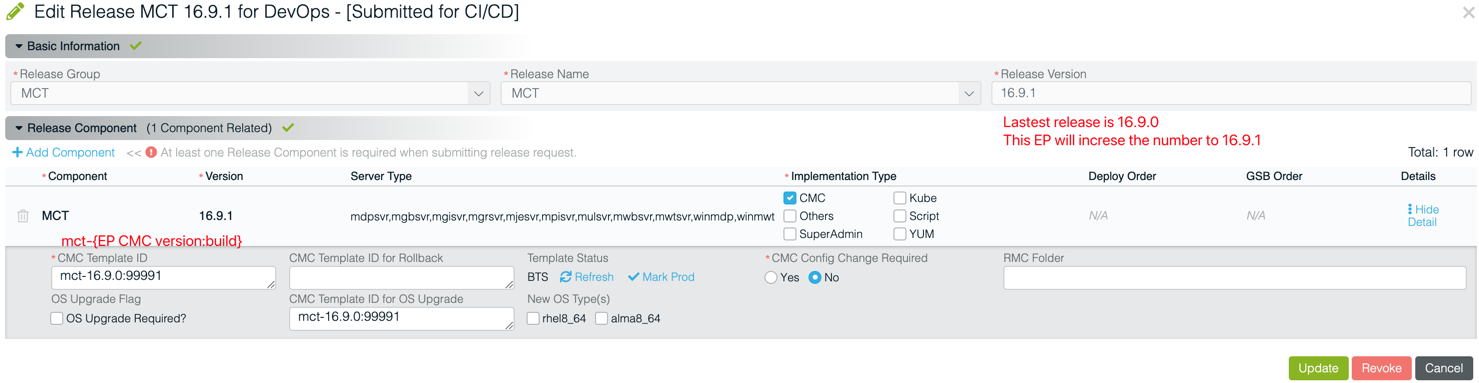
If choose the
Othersitem asImplementation Typeas the below screenshoot shown, CDP change and ticket can be opened, but CDP pipeline will not take effect (e.g. skip and complete in CDP pipeline) , then release owner can manual release with CMC
-
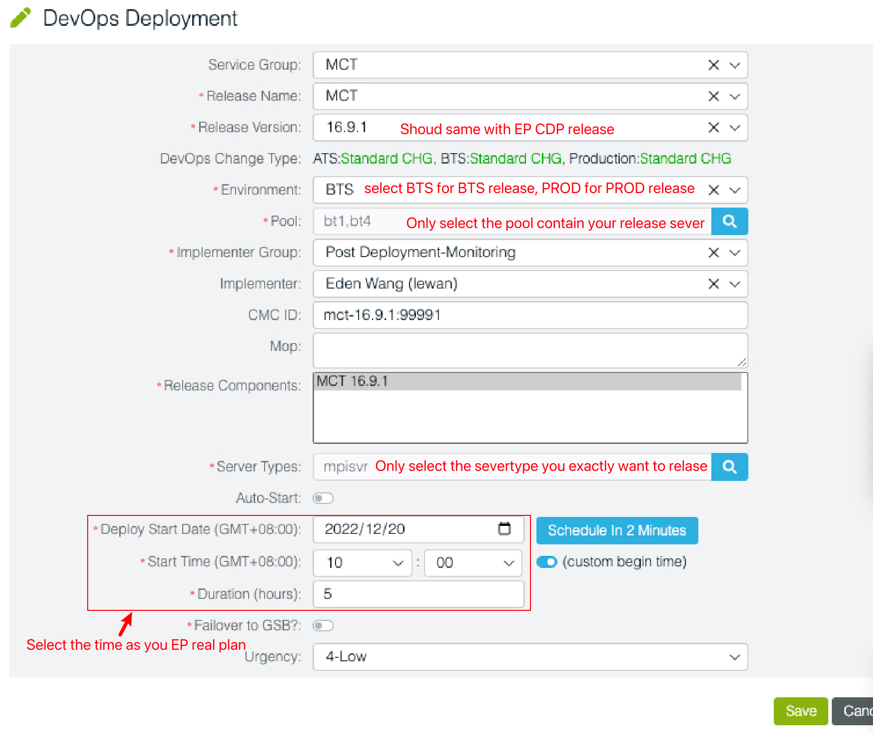
Create CDP DevOps ticket
-
release and change synchronization
- release BTS EP with CDP
- BTS verification pass
- release PROD EP with CDP
- PROD verification pass
- Synchronize EP change to the
mainbranch and working CMC version-build configuration. Otherwise, the next monthly release will clear the EP change