Development Tutorial
This is a step-by-step guide about how to develop UAS and debug locally and remotely.
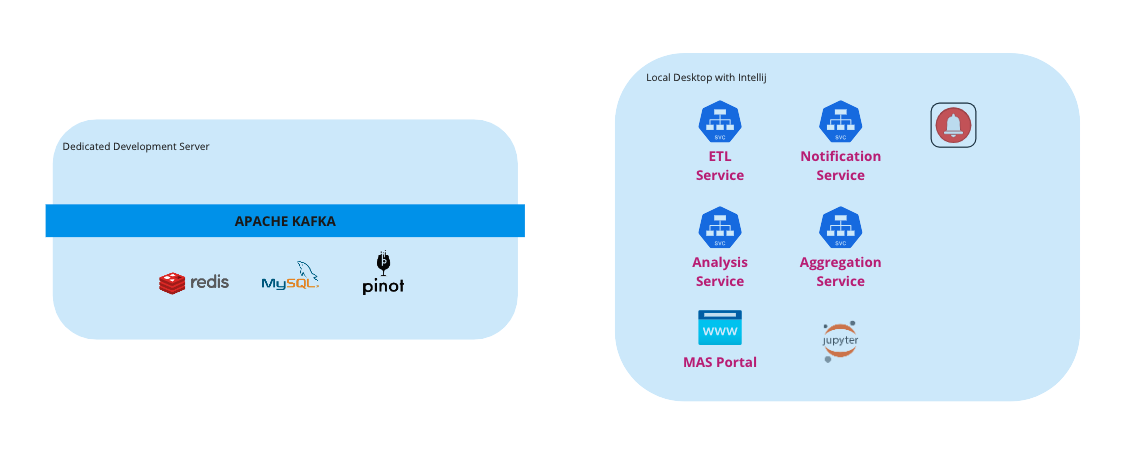
Pre-requisites 
Checkout following Git repositories on your local machine. 
Install JDK 8 
* Confirm with java -version in shell.
java version "1.8.0_291"
Java(TM) SE Runtime Environment (build 1.8.0_291-b10)
Java HotSpot(TM) 64-Bit Server VM (build 25.291-b10, mixed mode)
- Configure the environment variables
JAVA_HOMEto thePATH
Install Apache Maven 3.6.3 
* See Installing Apache Maven for different OS (Windows, Linux and Mac OS X)
* Confirm with mvn -v in shell.
Apache Maven 3.6.3 (cecedd343002696d0abb50b32b541b8a6ba2883f)
Maven home: /usr/local/maven/apache-maven-3.6.3
Java version: 1.8.0_291, vendor: Oracle Corporation, runtime: /Library/Java/JavaVirtualMachines/jdk1.8.0_291.jdk/Contents/Home/jre
Default locale: en_CN, platform encoding: UTF-8
OS name: "mac os x", version: "10.16", arch: "x86_64", family: "mac"
Install python3 
-
Use Homebrew install the latest Python, pip, and setuptools.
brew install python
-
Confirm with
python3 --versionin shell.Python 3.8.9
-
Confirm with
pip3 -Vin shell.pip 20.2.3 from /Library/Developer/CommandLineTools/Library/Frameworks/Python3.framework/Versions/3.8/lib/python3.8/site-packages/pip (python 3.8)
Development Steps 
Local Debug: 
Allocate one dedicated server provided by UAS Jenkins Job 
Zookeeper, kafka, pinot, redis, mysql on this server are started by default. Then teams message will be sent to notify your dedicated development node information via teams bot UAS-Pipeline.
Run script of local_config.bash 
- Pull configurations from kubed-app-configs
- Get dedicated server ip and replace it in the yaml file
- Set run arguments in intellij
Remote Debug: 
Currently only uas wfra environment(DEV) supports remote debug feature. 
Forward remote debug port to local: ETL:5001 AGG:5002 Notification:5003 Analysis:5004
kubectl port-forward mas-alert-aggregation-6db5569999-bv545 -n mas-alert-bts 5002:5002
Configure remote debug in IntelliJ 
Run -> Edit Configurations -> Add new configuration -> Remote JVM Debug