Release Process
Rollout Process (pipeline) 
-
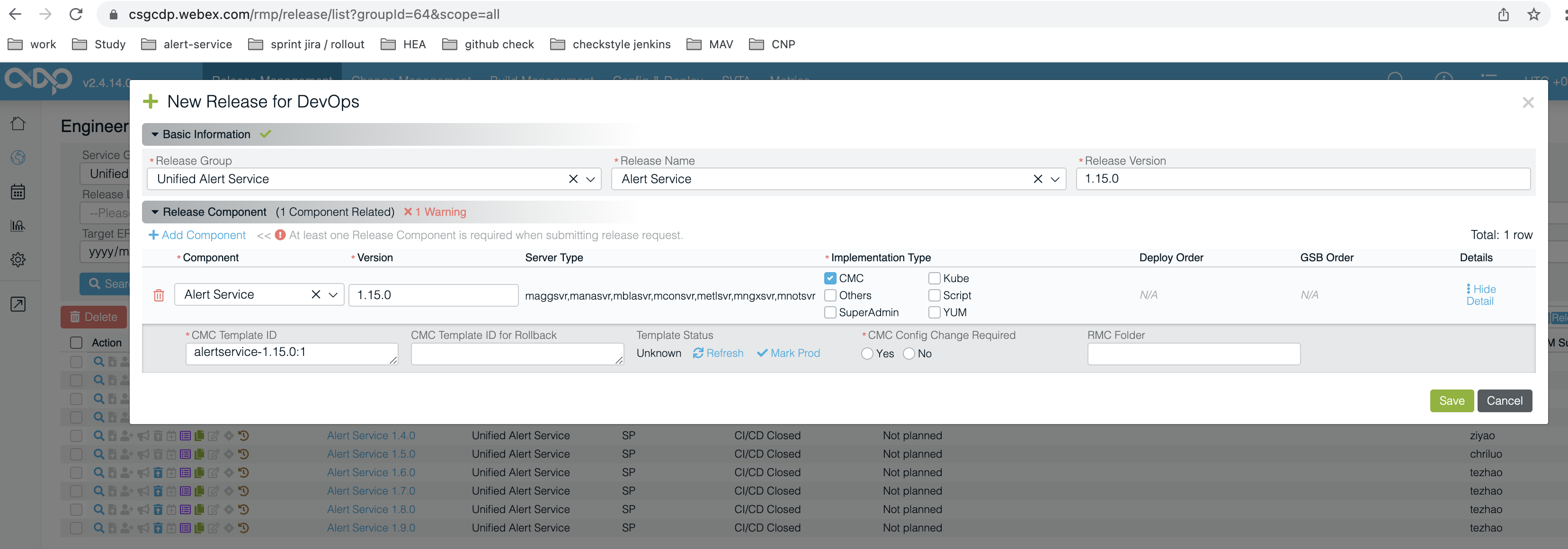
Create a New Release for DevOps on Engineering Release List Page by filling in the information as this.
-
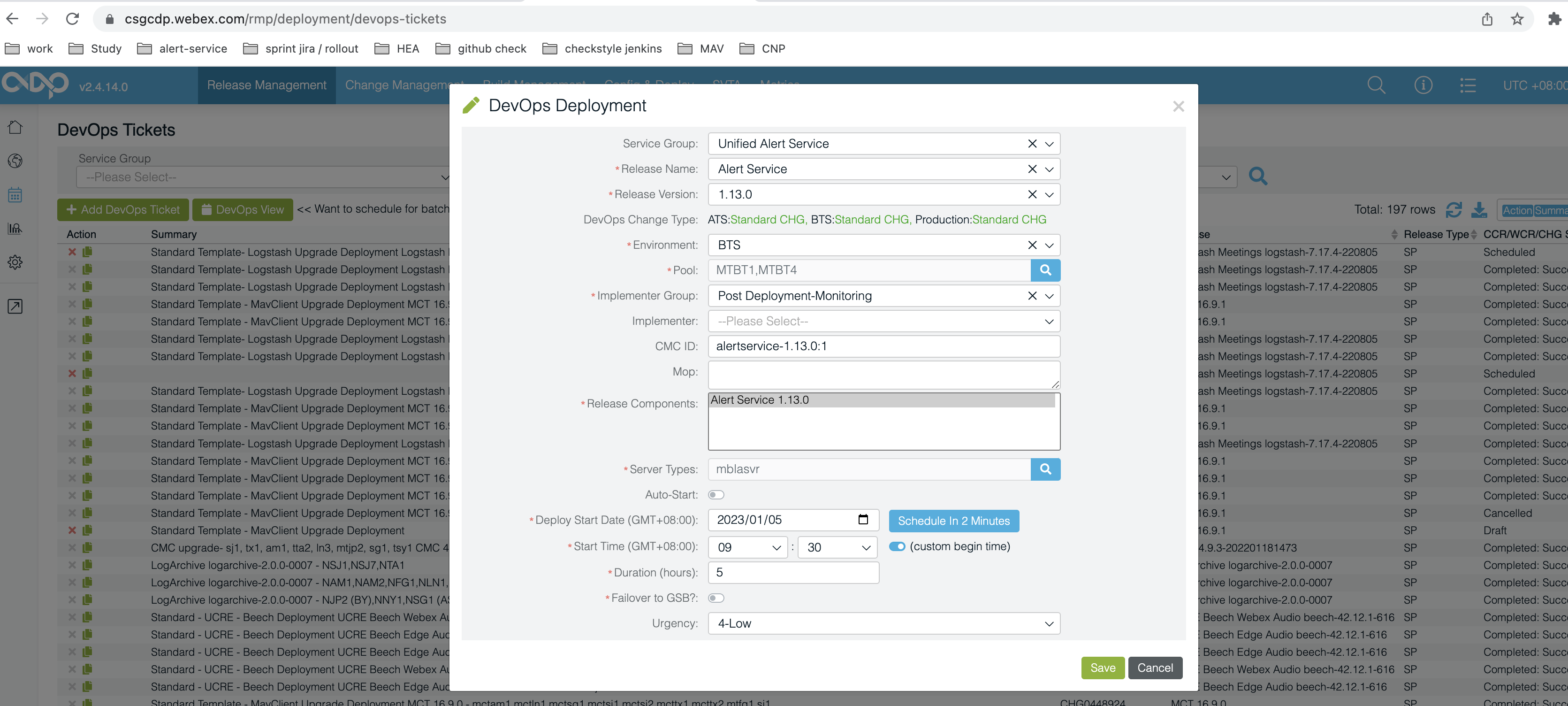
Add a DevOps Ticket on DevOps Tickets Page by filling the information as this.
-
Obtain the Change ticket number on Change Management - Implementation, which needed to be filled in Pre-Build text input field
Change ticket number. e.g. CHG0449347 -
Skip all steps before last block
Complete Changeon the rollout day because we use our custom pipeline rather than CDP release pipeline. -
Modify
<version>1.13.0</version>in eachpom.xmlin alert-service.
Modify"version": "1.13.0",inpackage.jsonin alert-service-webui.Then create Pull Requests from
staging->masterbranch in following repositories:PR
staging->masteralert-service for all backend services.
PRstaging->masteralert-service-webui for the frontend service (including nginx).
PRstaging->masteralert-service-config for all configuration files (including database schema SQL).
PRstaging->masteralert-service-test for the verification procedure tests. -
Merge the PRs of repositories in following orders after they are approved by peers.
1). alert-service-config, alert-service-test
2). alert-service, alert-service-webui (each will trigger a pipeline after merging) -
Wait for the rollout starting message sent by UAS-Pipeline bot in Self Monitoring / CICD PipeLine space. Validate the building parameters and fill in
Change ticket numberobtained from step 3. -
Trigger CI/CD pipeline by user input
Proceed or Abort?. -
Wait until our rollout pipeline is completed and after the release features are verified by feature owners, click the
completebutton to finish the CDP release pipeline. -
Create a new release tag on
masterbranch of each repository, as this.
Create a New Release for DevOps 
Add a DevOps Ticket 
CDP release pipeline 

Rollout starting message 
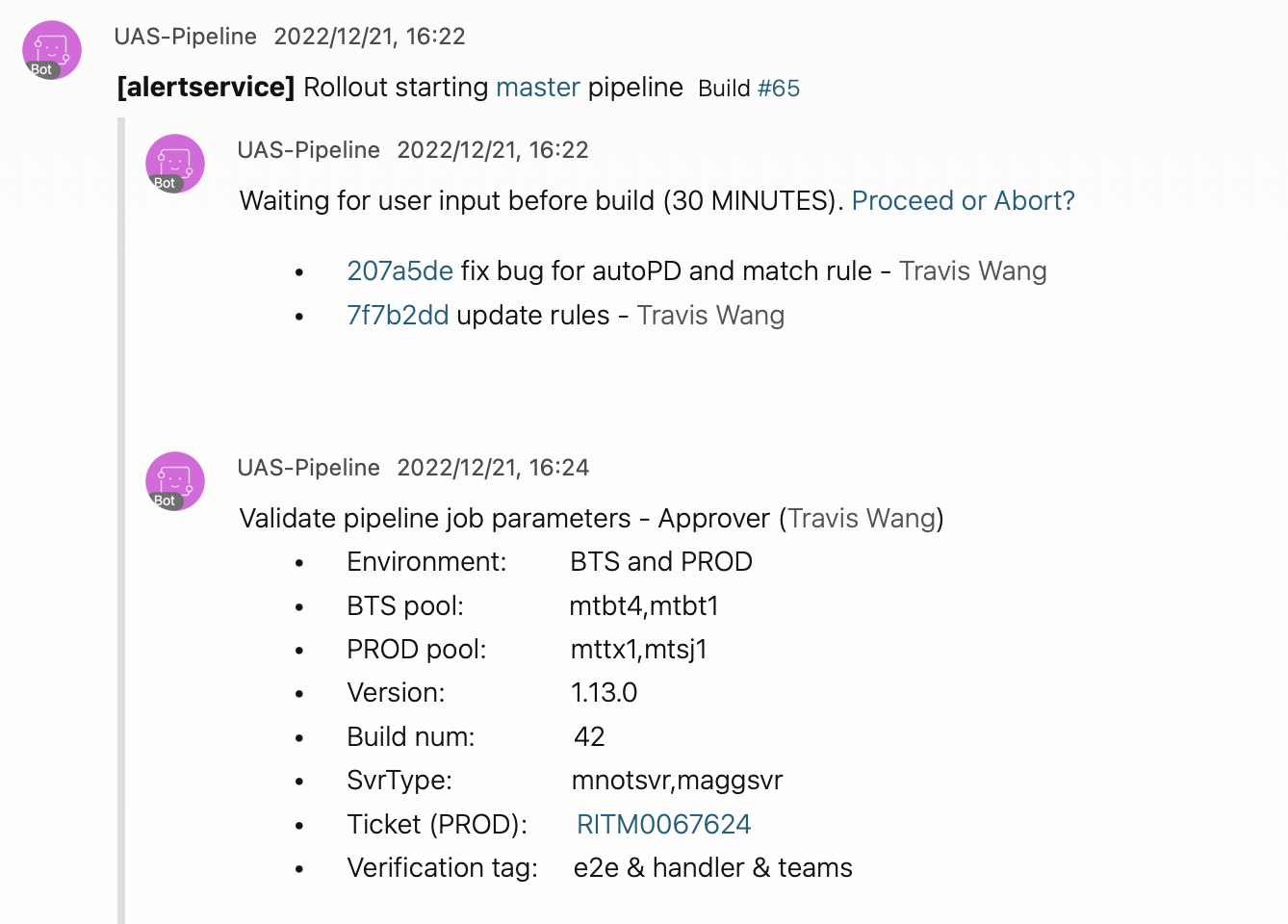
CI/CD Pipeline 
Automating the release process through CI/CD helps teams release high-quality code faster and more frequent than traditional ways. The CI/CD pipeline is setup on alert-service and alert-service-webui GitHub repository, leveraging Jenkins Multibranch Pipeline, helps teams eliminate manual errors, provides accurate, reliable and standardized feedback loops to developers, and automates product iterations. A general release workflow is shown as following.
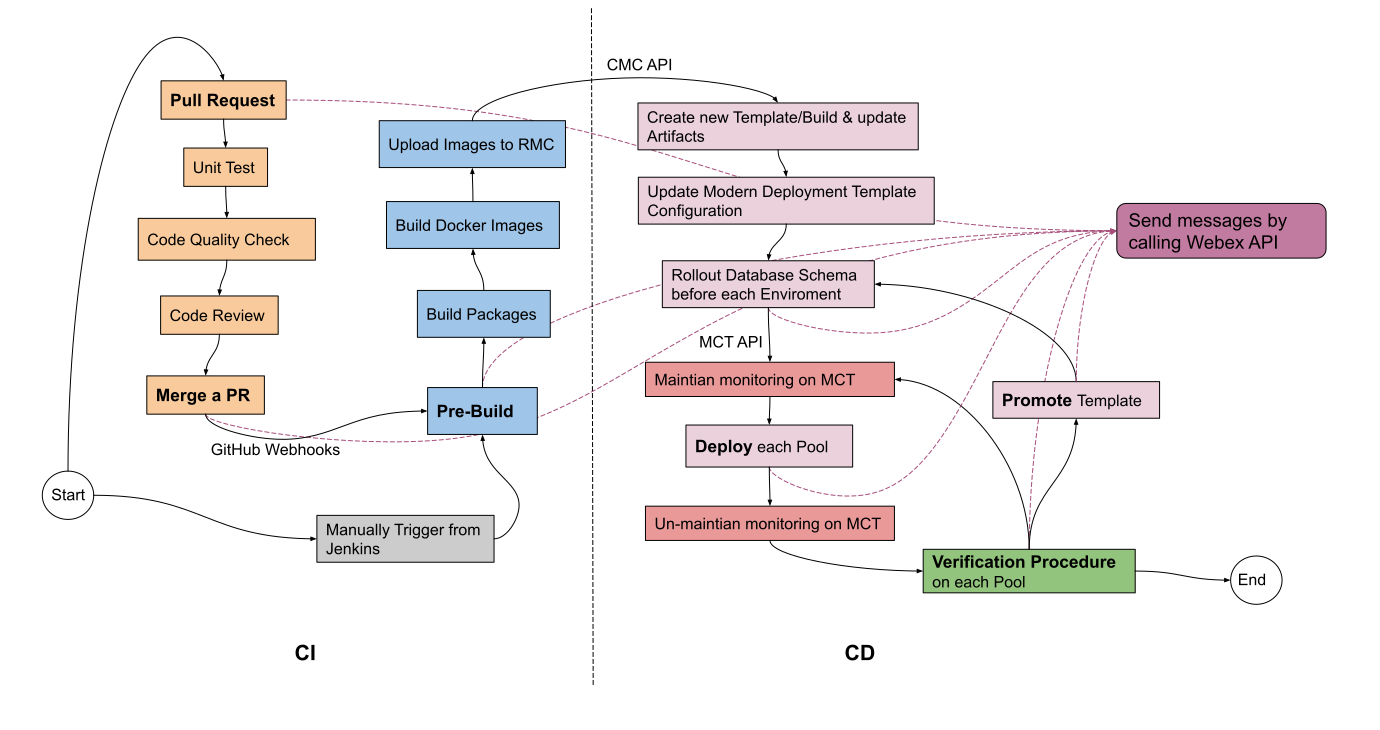
The pipeline can be either manually triggered through Jenkins Build Job on a specific branch or triggered by GitHub Webhook through a Pull Request.
Pull Request (PR) 
The pipeline is started with a trigger by a PR, from a developer's forked repository to the base (a.k.a. origin) repository, depends on its development workflow.
Unit test 
The PR-* folder job runs junit test including each project module, giving the Junit step the opportunity to capture and process the test reports.
Code quality check 
Code quality is important because it improves the level of program sustainability, transferability and also eliminates code potential code problems.
Code review 
No CI/CD pipeline can fully replace the need to review new code. Peer code review is a key element in building a robust and egoless engineering culture of collaborative problem-solving.
After all test cases are passed, the PR is waiting to be Merged into the target branch.
Merge a PR 
Merging a pull request will trigger the corresponding Jenkins build and deploy process depending on the Jenkinsfile in different branches. The staging and master branches are currently enabled the above CI/CD pipeline process.
In general, the staging branch is designed to trigger the build and deploy process for QA and BTS environment, whereas the master branch is for BTS and PROD environment.
Pre-Build 
The first stage of pipeline is to validate the building and deploying parameters: - svrType
svrType checkbox list is dynamic loaded based on hosts enabled in site.yml. - New template version
It shows the latest CMC template version, according to CMC QA. - Next build no.
It shows the latest CMC build number added by 1, according to CMC QA. - deployEnv
Select the environments to deploy. The hanging means there will be a pending after each promotion. - xxx Pool to deploy
Input which pool(s) to deploy as the CMC Deploy API is based on pool and box svrType. - enable_DB_schema_rollout
Enable database schema rollout by default. - skip_maintain_MCT_BTS
Skip to maintain MCT monitoring when BTS deploy by default. - Change ticket number xxx
Input a change ticket number to maintain MCT monitoring clusters before deploying any application used by BTS and PROD deploy stage. - maven test tags
Input maven test @tags for Verification Procedure - ansible option parameters
The ansible option parameters can be filled with eg.--skip-tags \"Docker\" if it is not neccesary to re-install Docker. - checkpoint context map
Input the context map to restore pipeline from checkpoint if the pipeline failed somewhere. It is empty by default.
Build 
- Build packages (with maven/npm) based on above input
svrTypecheckbox list. - Build docker images using designated
Dockerfilein alert-service-config repo and then push them to RMC. - Create new template by calling CMC Template API and create new build by calling CMC Build API.
- Update artifacts by calling CMC Artifcat Management API.
Deploy 
The maintain/un-maintain step calls External MCT API.
The deployment step calls CMC Deploy API and then it runs custom defined ansible playbooks in cmc-template or cmc-template-portal according to different CMC components (see details in alert-service-config).
Verification Procedure 
After the end of the deployment stage of each pool of each environment, the pipeline will trigger a downstream jenkins job according to different pool for verification test, within verification-procedure-QA, verification-procedure-BTS and verification-procedure-PROD. The downstream job accepts maven test parameters as a command and test onto the methods with corresponding @Tag in alert-service-test.
These downstream verification jobs are also hourly scheduled jobs for health checking and verification testing.
Promote 
This stage is to promote the CMC template from QA to BTS, and BTS to Prod. See the CMC Promote API.
Message 
The Jenkins pipeline leverages Webex API - Create a Message and sends teams message at each critical point, for instance, before and after each interactive stage and post deployment stage (success/failure/abort) with cecID to Self Monitoring / CICD PipeLine space room via Webex teams bot.